Is is possible through a layers Visualization Options to make a polygon have an outline and no fill?

I am wondering if I can customize a layer with polygons to show an outline, but not a fill color. When I go into the Visualization Options section (HTML Viewer 2.7) I can almost get there by adjusting the transparency, but it caps out at 90%, and there is no option for "none" in Fill Style that I can find.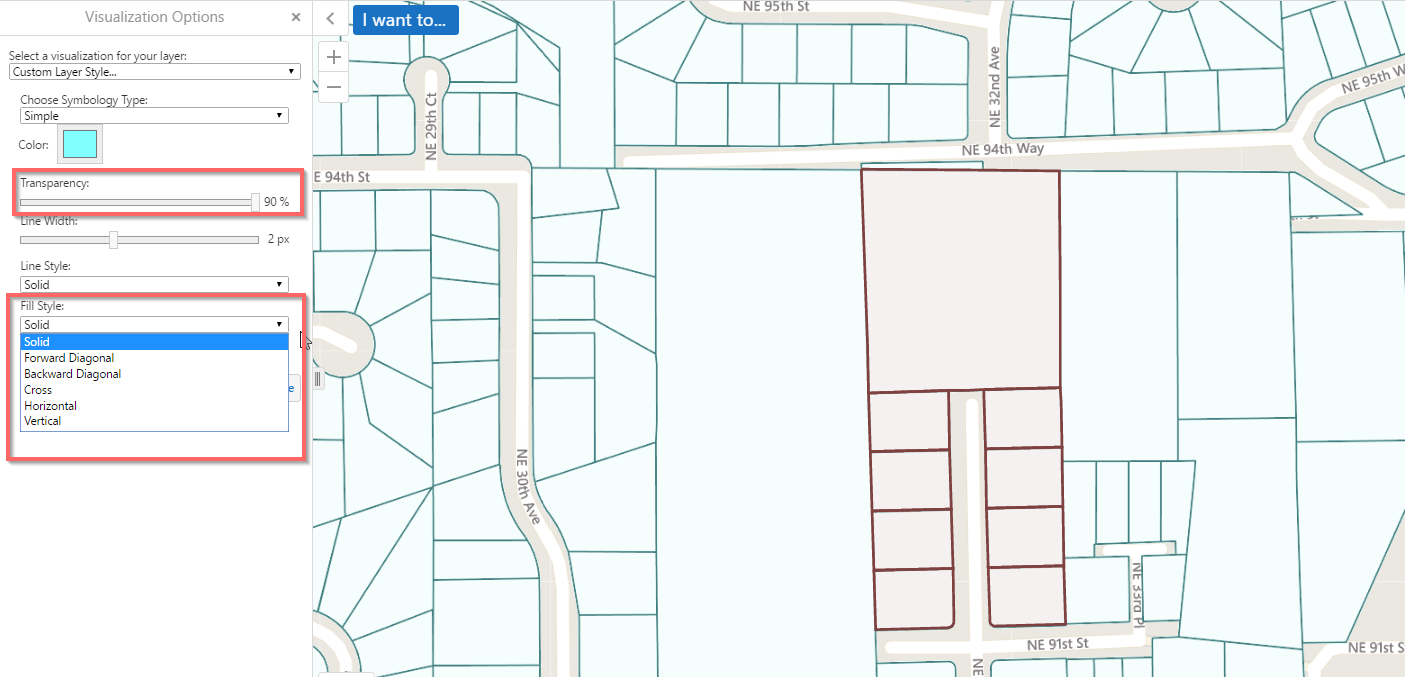
I realize I can publish the layer with this symbology, but users may need to customize things on the fly.
Thank you for your help.
-Aaron
0
-

Hi,
You can configure 100% transparency as an option here. Open the relevant configuration file (eg: desktop.json.js) and look for the "widgets" section (it's near the bottom).
Here you should see configuration for a widget called "SymbologySettings". In here is the configuration for the transparency control:"transparency": { "min": 0, "max": 100, "value": 10, "step": 5 },Just change the "max" value from 90 to 100 and you should be good to go.0 -
Jonathan,
Thank you for the prompt reply. That did the trick for me!
Aaron0 -

Hi Aaron
Under the same widget for "fillstyles" I added a "none" style as below. This seems to work well for me, and gives the user a No Fill style option.
"fillStyles": [
{
"style": "solid",
"label": "@language-symbology-settings-fill-style-solid"
},
{
"style": "forwarddiagonal",
"label": "@language-symbology-settings-fill-style-forward-diagonal"
},
{
"style": "backwarddiagonal",
"label": "@language-symbology-settings-fill-style-backward-diagonal"
},
{
"style": "cross",
"label": "@language-symbology-settings-fill-style-cross"
},
{
"style": "horizontal",
"label": "@language-symbology-settings-fill-style-horizontal"
},
{
"style": "vertical",
"label": "@language-symbology-settings-fill-style-vertical"
},
{
"style": "none",
"label": "None"
}
]
Cheers
Chris0
Du måste logga in om du vill lämna en kommentar.
Kommentarer
3 kommentarer