Pass variables to PrintMap in workflow

I have a workflow that ends with the PrintMap Activity and for the life of me I can't figure out how to get the variable already declared (and useable successfully in other activities) into the text field of the Print Template. I have done this using a report a few times but maybe the PrintMap activity is different than the TemplateReport activity?
I created a dictionary, datasets, datatables, named the table and column, Inserted the variable at row(0) and named everything in the workflow and map report the same name as the variable.... the "WellInfo" variable. I even tried making a subreport rather than a text field and tried using the TemplateReport activity to set that up but no luck! While it was a text field I even had it defined in the Rest Manager as the WellInfo text input.
What am I missing? All the other posts I found were super old and don't totally apply anymore in this latest version. I'm using Workflow designer 4.5.1.58 and HTML 5 2.6.1 and not sure about Essentials version but it's the same version that came out with this HTML version.
0
-
Hi Jacqueline,
In order to pass text into the Print Template from a workflow, there are a few things you need to configure.
First, you add the Text Fields in the Print Template in Essentials Manager (located at: Site > Print Templates > Edit > Text Fields Tab).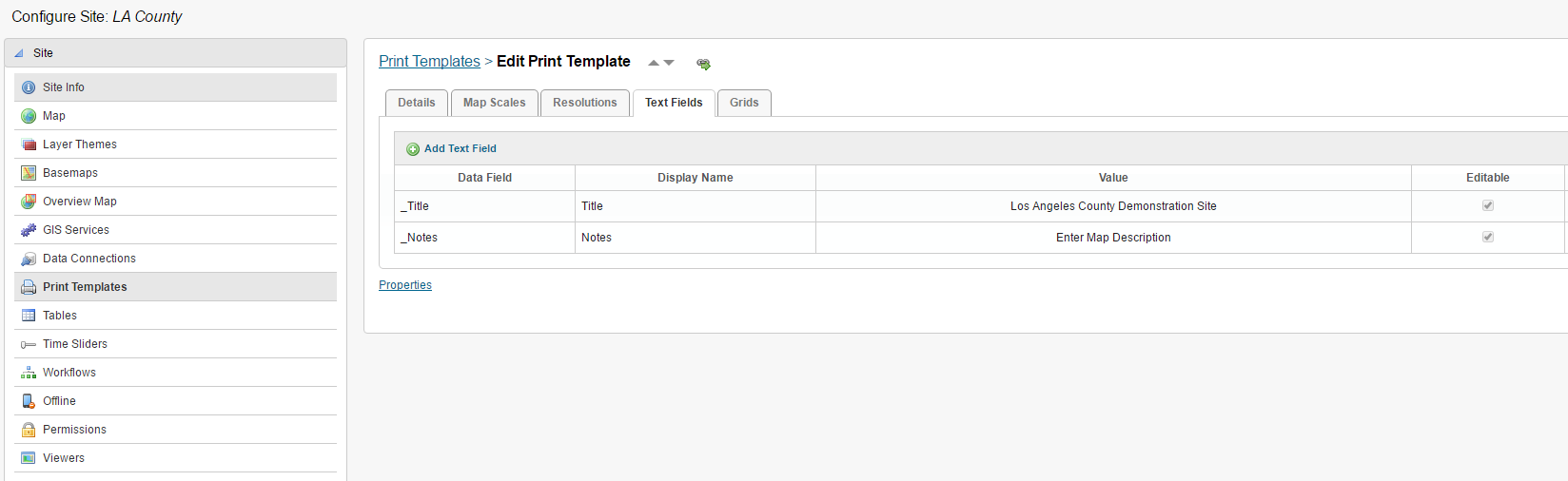
Once that is done, you go into Workflow Designer and create a Dictionary (of string, string). The Key values will be the DISPLAY NAME of the text fields you added to the Print Template in Essentials Manager. That is how the workflow associates the text fields with the values you want to add from the workflow.
Then all you need to do is assign that dictionary to the Print Map activity under the Text Fields parameter on the right properties panel. I have created a workflow example to show you how to create the dictionary, add values to the dictionary and then assign that to the Print Map activity. The code for that is here:<Activity mc:Ignorable="sap sap2010 sads" x:Class="ActivityBuilder" mva:VisualBasic.Settings="{x:Null}" xmlns="http://schemas.microsoft.com/netfx/2009/xaml/activities" xmlns:eac="clr-namespace:ESRI.ArcGIS.Client;assembly=ESRI.ArcGIS.Client" xmlns:eacg="clr-namespace:ESRI.ArcGIS.Client.Geometry;assembly=ESRI.ArcGIS.Client" xmlns:eact="clr-namespace:ESRI.ArcGIS.Client.Tasks;assembly=ESRI.ArcGIS.Client" xmlns:gce="clr-namespace:Geocortex.Core.Extensions;assembly=Geocortex.Core" xmlns:gfc="clr-namespace:Geocortex.Forms.Client;assembly=Geocortex.EssentialsWpfApi" xmlns:gfci="clr-namespace:Geocortex.Forms.Client.Items;assembly=Geocortex.EssentialsWpfApi" xmlns:gr="clr-namespace:Geocortex.Reporting;assembly=Geocortex.Reporting" xmlns:gwa="clr-namespace:Geocortex.Workflow.Activities;assembly=Geocortex.Workflow" xmlns:gwa1="clr-namespace:Geocortex.Workflow.Activities;assembly=Geocortex.Workflow.Activities" xmlns:mc="http://schemas.openxmlformats.org/markup-compatibility/2006" xmlns:mva="clr-namespace:Microsoft.VisualBasic.Activities;assembly=System.Activities" xmlns:s="clr-namespace:System;assembly=System.Core" xmlns:s1="clr-namespace:System;assembly=System" xmlns:s2="clr-namespace:System;assembly=mscorlib" xmlns:sa="clr-namespace:System.Activities;assembly=System.Activities" xmlns:sads="http://schemas.microsoft.com/netfx/2010/xaml/activities/debugger" xmlns:sap="http://schemas.microsoft.com/netfx/2009/xaml/activities/presentation" xmlns:sap2010="http://schemas.microsoft.com/netfx/2010/xaml/activities/presentation" xmlns:scg="clr-namespace:System.Collections.Generic;assembly=mscorlib" xmlns:sco="clr-namespace:System.Collections.ObjectModel;assembly=mscorlib" xmlns:sl="clr-namespace:System.Linq;assembly=System.Core" xmlns:x="http://schemas.microsoft.com/winfx/2006/xaml"> <TextExpression.NamespacesForImplementation> <sco:Collection x:TypeArguments="x:String"> <x:String>System.Activities</x:String> <x:String>System.Activities.Statements</x:String> <x:String>System.Activities.Expressions</x:String> <x:String>System.Activities.Validation</x:String> <x:String>System.Activities.XamlIntegration</x:String> <x:String>ESRI.ArcGIS.Client</x:String> <x:String>ESRI.ArcGIS.Client.Geometry</x:String> <x:String>ESRI.ArcGIS.Client.Tasks</x:String> <x:String>Geocortex.Core.Extensions</x:String> <x:String>Geocortex.Workflow.Activities</x:String> <x:String>Geocortex.Forms.Client</x:String> <x:String>Geocortex.Forms.Client.Items</x:String> <x:String>Geocortex.Reporting</x:String> <x:String>System</x:String> <x:String>Microsoft.VisualBasic.Activities</x:String> <x:String>System.Collections.Generic</x:String> <x:String>System.Linq</x:String> <x:String>System.Windows.Markup</x:String> </sco:Collection> </TextExpression.NamespacesForImplementation> <TextExpression.ReferencesForImplementation> <sco:Collection x:TypeArguments="AssemblyReference"> <AssemblyReference>System.Activities</AssemblyReference> <AssemblyReference>ESRI.ArcGIS.Client</AssemblyReference> <AssemblyReference>Geocortex.Core</AssemblyReference> <AssemblyReference>Geocortex.Workflow</AssemblyReference> <AssemblyReference>Geocortex.EssentialsWpfApi</AssemblyReference> <AssemblyReference>Geocortex.Reporting</AssemblyReference> <AssemblyReference>System.Core</AssemblyReference> <AssemblyReference>System</AssemblyReference> <AssemblyReference>mscorlib</AssemblyReference> <AssemblyReference>PresentationCore</AssemblyReference> <AssemblyReference>WindowsBase</AssemblyReference> <AssemblyReference>PresentationFramework</AssemblyReference> <AssemblyReference>System.Xaml</AssemblyReference> </sco:Collection> </TextExpression.ReferencesForImplementation> <Sequence mva:VisualBasic.Settings="Assembly references and imported namespaces serialized as XML namespaces"> <Sequence.Variables> <Variable x:TypeArguments="scg:Dictionary(x:String, x:String)" Name="dictionaryTextFields" /> </Sequence.Variables> <Assign> <Assign.To> <OutArgument x:TypeArguments="scg:Dictionary(x:String, x:String)">[dictionaryTextFields]</OutArgument> </Assign.To> <Assign.Value> <InArgument x:TypeArguments="scg:Dictionary(x:String, x:String)">[New Dictionary(of String, String)]</InArgument> </Assign.Value> <sap2010:WorkflowViewState.IdRef>Assign_1</sap2010:WorkflowViewState.IdRef> </Assign> <gwa1:AddToDictionary x:TypeArguments="x:String, x:String" Dictionary="[dictionaryTextFields]" Key="Title" Value="This is the map title" sap2010:WorkflowViewState.IdRef="AddToDictionary`2_1" /> <gwa1:AddToDictionary x:TypeArguments="x:String, x:String" Dictionary="[dictionaryTextFields]" Key="Notes" Value="This will go in the notes." sap2010:WorkflowViewState.IdRef="AddToDictionary`2_2" /> <gwa1:PrintMap TextFields="[dictionaryTextFields]" sap2010:WorkflowViewState.IdRef="PrintMap_1" /> <sap2010:WorkflowViewState.IdRef>Sequence_1</sap2010:WorkflowViewState.IdRef> <sads:DebugSymbol.Symbol>d0NDOlxVc2Vyc1xjdGFtXERvY3VtZW50c1xNeURvY3VtZW50c1xFeGFtcGxlc1xUZXh0RmllbGRQcmludE1hcC54YW1sDkADUg4CAQFEBUwOAgEPTQVNxgECAQpOBU7LAQIBBU8FT2cCAQJJSkltAgESRktGYQIBEE12TY0BAgEOTUtNYwIBDE1oTW8CAQtOdk6SAQIBCU5LTmMCAQdOaE5vAgEGTx9PNwIBAw==</sads:DebugSymbol.Symbol> </Sequence> <sap2010:WorkflowViewState.IdRef>ActivityBuilder_1</sap2010:WorkflowViewState.IdRef> <sap2010:WorkflowViewState.ViewStateManager> <sap2010:ViewStateManager> <sap2010:ViewStateData Id="Assign_1" sap:VirtualizedContainerService.HintSize="315,60" /> <sap2010:ViewStateData Id="AddToDictionary`2_1" sap:VirtualizedContainerService.HintSize="315,111" /> <sap2010:ViewStateData Id="AddToDictionary`2_2" sap:VirtualizedContainerService.HintSize="315,111" /> <sap2010:ViewStateData Id="PrintMap_1" sap:VirtualizedContainerService.HintSize="315,111" /> <sap2010:ViewStateData Id="Sequence_1" sap:VirtualizedContainerService.HintSize="337,637"> <sap:WorkflowViewStateService.ViewState> <scg:Dictionary x:TypeArguments="x:String, x:Object"> <x:Boolean x:Key="IsExpanded">True</x:Boolean> </scg:Dictionary> </sap:WorkflowViewStateService.ViewState> </sap2010:ViewStateData> <sap2010:ViewStateData Id="ActivityBuilder_1" sap:VirtualizedContainerService.HintSize="377,717" /> </sap2010:ViewStateManager> </sap2010:WorkflowViewState.ViewStateManager> </Activity>
I hope this helps.
Carmen0 -
I did exactly that and it still isn't working. See the pictures below of my setup.
_img_ alt="Creating the dictionary called "Dictionary" with WellInfo value" src="https://latitudegeo--c.na53.content.force.com/servlet/rtaImage?eid=90760000000PDkj&feoid=Body&refid=0EM60000000HTT5"_/_img_
Creating the dictionary and adding the contents of the string WellInfo variable to the dictionary
_img_ alt="PrintMap Activity" src="https://latitudegeo--c.na53.content.force.com/servlet/rtaImage?eid=90760000000PDkj&feoid=Body&refid=0EM60000000HTTA"_/_img_
PrintMap Activity putting the dictionary in the Text Field
_img_ alt="Adding the text field in the Print Template in the Manager." src="https://latitudegeo--c.na53.content.force.com/servlet/rtaImage?eid=90760000000PDkj&feoid=Body&refid=0EM60000000HTTF" _/_img_
Adding the text field in the Print Template in the Manager.
_img_ alt="report properties for the text box called WellInfo" src="https://latitudegeo--c.na53.content.force.com/servlet/rtaImage?eid=90760000000PDkj&feoid=Body&refid=0EM60000000HTTK"_/_img_
Report properties for the text box called WellInfo0 -
Nevermind!! I had variable issues! so dumb! I had so many failures and tries that my variable never got filled with a value! Well at one point it did and I thought I left that alone. I started filling it with a straight text string (no variable) and it worked, so then I assigned the variable a string and that worked too so I rebuilt the inputs to the variable and voila!
Also I noticed that the text field warning on another print template for testing this said not to fill the text with anything so Ileft the textBox in the report blank as well as the default value in the manager. That was probably one of my many issues.0
Du måste logga in om du vill lämna en kommentar.
Kommentarer
3 kommentarer