Move Feature Action

Would it be possible to move a feature action such as Attach a file or photo to "Map tip" or in the Feature - region?
0
-
Hi Steve -
You can add new items to any context menu by using the Context Menus page in Essentials Manager. First, navigate to the Context Menus > Feature Actions page. Then open the "Attach a file or photo" menu item for editing. You will be shown a modal called "Edit Menu Item" that includes all of the required information about this menu item.
The modal looks like this: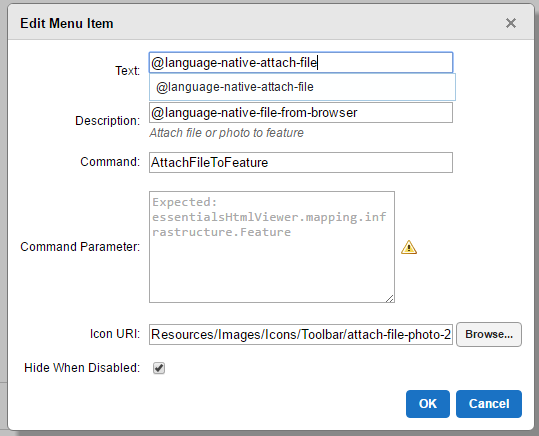
To add this item to the Map Tip context menu, you need to navigate to the Context Menus > Map Tip Actions page. Once there, press the "Add Menu Item" button and enter the information contained in the modal.
That should do it - let me know if you need any further assistance.
Regards,
Steve0
Du måste logga in om du vill lämna en kommentar.
Kommentarer
1 kommentar