selectfeatures "Description Format"

I have seen a couple of posts regarding this but no clear answers....
Does anyone have any examples of how to apply any kind of formatting to the "Description Format" (or Long Description Format) parameter that is on the SelectFeatures Workflow Activity?
Such as changing the color, making the text bold, or creating multiple lines?
I can get basic text to work. If all we can do is just basic text, then please let me know so I will quit trying.
I've tried copying and pasting the code from Manager for the descriptions without any luck.
Thanks,
Carmen
0
-

Hi Carmen,
You can use inline CSS in the Feature Description to format your text. The LA County Demo site in your Sample Sites folder has some examples. Otherwise, this is an example for the Census Tract layer to make the text italic and red:<span style="font-style: italic;">Population: </span>{TOTPOP}<div><span style="font-style: italic; color:red">Housing Units: </span>{TOTHOUSE}</div><div style="font-style: normal;"><span style="font-style: italic;">Density:</span> {DENSITY} people per sq km</div>You want to look for the STYLE parameter within the tags like this:
style="font-style: italic; color:red"
I hope this helps.
Regards,
Carmen0 -
Carmen,
Thanks for your reply. I tried a simplified version of your example in the SelectFeatures activity, but receive an error.
Here is the entry: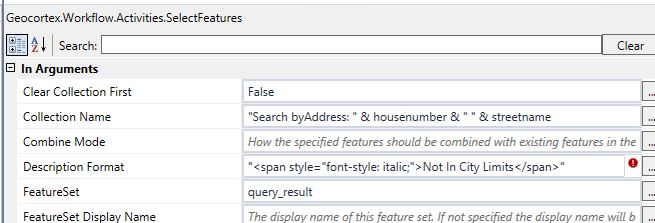
The error reads: Compiler error.... End of expression expected.
If I take off the leading and ending double quote - there is an error for "not allowing implicit conversions to string"
What am I missing? Workflow designer 4.5.0.1202
Thanks,
the other Carmen that can't answer all these questions!0 -
Hi Carmen,
If you are trying to reference strings within a string, then for every " you have inside the string, you need to change it to "". This way the application will know that you want to use quotations within the string, otherwise it just thinks that you want to end the string. For example, your Description Format needs to be like this:
"<span style=""font-style: italic;"">Not In City Limits</span>"
I hope this helps
Carmen0 -
Thank you. This worked. I think I tried everything but that for some reason.
Carmen0
Du måste logga in om du vill lämna en kommentar.
Kommentarer
4 kommentarer