Syntax for a using statement in C Sharp script activity

What is the syntax to bring in references to the C Sharp activity? I've imported the applicable assembly via "Imports" tab, but the statement "using System.Text" causes compilation errors for wanting a '(', ')' and ';' When I remove the using statement, it fails for not having the correct context for the types I'm using from the System.Text assembly. Is it possible to use other assemblies in the C Sharp activity???
0
-
Hi Eugene,
There is no need of adding references in the CSharp Activity, it should work after adding the references using Imports Tab.
Kindly check the the below workflow sample for your reference:
<Activity mc:Ignorable="sap sap2010 sads" x:Class="ActivityBuilder" mva:VisualBasic.Settings="{x:Null}" sap2010:WorkflowViewState.IdRef="ActivityBuilder_1"
xmlns="http://schemas.microsoft.com/netfx/2009/xaml/activities"
xmlns:eac="clr-namespace:ESRI.ArcGIS.Client;assembly=ESRI.ArcGIS.Client"
xmlns:eacg="clr-namespace:ESRI.ArcGIS.Client.Geometry;assembly=ESRI.ArcGIS.Client"
xmlns:eact="clr-namespace:ESRI.ArcGIS.Client.Tasks;assembly=ESRI.ArcGIS.Client"
xmlns:gce="clr-namespace:Geocortex.Core.Extensions;assembly=Geocortex.Core"
xmlns:gfc="clr-namespace:Geocortex.Forms.Client;assembly=Geocortex.EssentialsWpfApi"
xmlns:gfci="clr-namespace:Geocortex.Forms.Client.Items;assembly=Geocortex.EssentialsWpfApi"
xmlns:gr="clr-namespace:Geocortex.Reporting;assembly=Geocortex.Reporting"
xmlns:gwa="clr-namespace:Geocortex.Workflow.Activities;assembly=Geocortex.Workflow"
xmlns:gwa1="clr-namespace:Geocortex.Workflow.Activities;assembly=Geocortex.Workflow.Activities"
xmlns:mc="http://schemas.openxmlformats.org/markup-compatibility/2006"
xmlns:mva="clr-namespace:Microsoft.VisualBasic.Activities;assembly=System.Activities"
xmlns:s="clr-namespace:System;assembly=System.Core"
xmlns:s1="clr-namespace:System;assembly=System"
xmlns:s2="clr-namespace:System;assembly=mscorlib"
xmlns:sa="clr-namespace:System.Activities;assembly=System.Activities"
xmlns:sads="http://schemas.microsoft.com/netfx/2010/xaml/activities/debugger"
xmlns:sap="http://schemas.microsoft.com/netfx/2009/xaml/activities/presentation"
xmlns:sap2010="http://schemas.microsoft.com/netfx/2010/xaml/activities/presentation"
xmlns:scg="clr-namespace:System.Collections.Generic;assembly=mscorlib"
xmlns:sco="clr-namespace:System.Collections.ObjectModel;assembly=mscorlib"
xmlns:sl="clr-namespace:System.Linq;assembly=System.Core"
xmlns:x="http://schemas.microsoft.com/winfx/2006/xaml">
<TextExpression.NamespacesForImplementation>
<sco:Collection x:TypeArguments="x:String">
<x:String>System.Activities.XamlIntegration</x:String>
<x:String>System.Activities.Validation</x:String>
<x:String>System.Activities</x:String>
<x:String>System.Activities.Statements</x:String>
<x:String>System.Activities.Expressions</x:String>
<x:String>ESRI.ArcGIS.Client</x:String>
<x:String>ESRI.ArcGIS.Client.Geometry</x:String>
<x:String>ESRI.ArcGIS.Client.Tasks</x:String>
<x:String>Geocortex.Core.Extensions</x:String>
<x:String>Geocortex.Workflow.Activities</x:String>
<x:String>Geocortex.Forms.Client</x:String>
<x:String>Geocortex.Forms.Client.Items</x:String>
<x:String>Geocortex.Reporting</x:String>
<x:String>System</x:String>
<x:String>Microsoft.VisualBasic.Activities</x:String>
<x:String>System.Collections.Generic</x:String>
<x:String>System.Linq</x:String>
<x:String>System.Windows.Markup</x:String>
</sco:Collection>
</TextExpression.NamespacesForImplementation>
<TextExpression.ReferencesForImplementation>
<sco:Collection x:TypeArguments="AssemblyReference">
<AssemblyReference>System.Activities</AssemblyReference>
<AssemblyReference>ESRI.ArcGIS.Client</AssemblyReference>
<AssemblyReference>Geocortex.Core</AssemblyReference>
<AssemblyReference>Geocortex.Workflow</AssemblyReference>
<AssemblyReference>Geocortex.EssentialsWpfApi</AssemblyReference>
<AssemblyReference>Geocortex.Reporting</AssemblyReference>
<AssemblyReference>System.Core</AssemblyReference>
<AssemblyReference>System</AssemblyReference>
<AssemblyReference>mscorlib</AssemblyReference>
<AssemblyReference>PresentationFramework</AssemblyReference>
<AssemblyReference>WindowsBase</AssemblyReference>
<AssemblyReference>PresentationCore</AssemblyReference>
<AssemblyReference>System.Xaml</AssemblyReference>
</sco:Collection>
</TextExpression.ReferencesForImplementation>
<Sequence sap2010:WorkflowViewState.IdRef="Sequence_1" mva:VisualBasic.Settings="Assembly references and imported namespaces serialized as XML namespaces">
<Sequence.Variables>
<Variable x:TypeArguments="x:String" Name="string1" />
</Sequence.Variables>
<gwa1:CSharpScript sap2010:WorkflowViewState.IdRef="CSharpScript_1" Script="var byteArray = System.Text.UTF32Encoding.UTF8.GetBytes("jkl");
abc = System.Text.UTF32Encoding.UTF8.GetString(byteArray);">
<gwa1:CSharpScript.Parameters>
<InOutArgument x:TypeArguments="x:String" x:Key="abc">[string1]</InOutArgument>
</gwa1:CSharpScript.Parameters>
</gwa1:CSharpScript>
<gwa1:Alert sap2010:WorkflowViewState.IdRef="Alert_1" Text="[string1]" />
<sads:DebugSymbol.Symbol>dzVDOlxVc2Vyc1xkYXJcRGVza3RvcFxTeXN0ZW1fVGV4dF9FbmNvZGluZ19DU2hhcnAueGFtbAVAA0sOAgEBRAVIGQIBBUkFSU4CAQJGP0ZIAgEGSUBJSwIBAw==</sads:DebugSymbol.Symbol>
</Sequence>
<sap2010:WorkflowViewState.ViewStateManager>
<sap2010:ViewStateManager>
<sap2010:ViewStateData Id="CSharpScript_1" sap:VirtualizedContainerService.HintSize="212,86" />
<sap2010:ViewStateData Id="Alert_1" sap:VirtualizedContainerService.HintSize="212,86" />
<sap2010:ViewStateData Id="Sequence_1" sap:VirtualizedContainerService.HintSize="234,336">
<sap:WorkflowViewStateService.ViewState>
<scg:Dictionary x:TypeArguments="x:String, x:Object">
<x:Boolean x:Key="IsExpanded">True</x:Boolean>
</scg:Dictionary>
</sap:WorkflowViewStateService.ViewState>
</sap2010:ViewStateData>
<sap2010:ViewStateData Id="ActivityBuilder_1" sap:VirtualizedContainerService.HintSize="274,416" />
</sap2010:ViewStateManager>
</sap2010:WorkflowViewState.ViewStateManager>
</Activity>
Kindly let me know if you need any more assistance.
Regards,
Mohammad Ashraf0 -
Thank you for your help. What I've learned is that with the CSharp activity any reference to an assembly in the code must use the fully qualified name. With Visual Studio, it's easy to forget this because of the top level using statements, but in the CSharp activity it's a must or it won't know how to find the imported references. For example, in Visual Studio, I can write something like this:
using System.IO;
MemoryStream memoryStream = new MemoryStream();
but in the CSharp activity it has to be like this:
System.IO.MemoryStream memoryStream = new System.IO.MemoryStream();0 -
Hi Eugene,
Kindly refer the below given screenshot from the Designer Help documentation: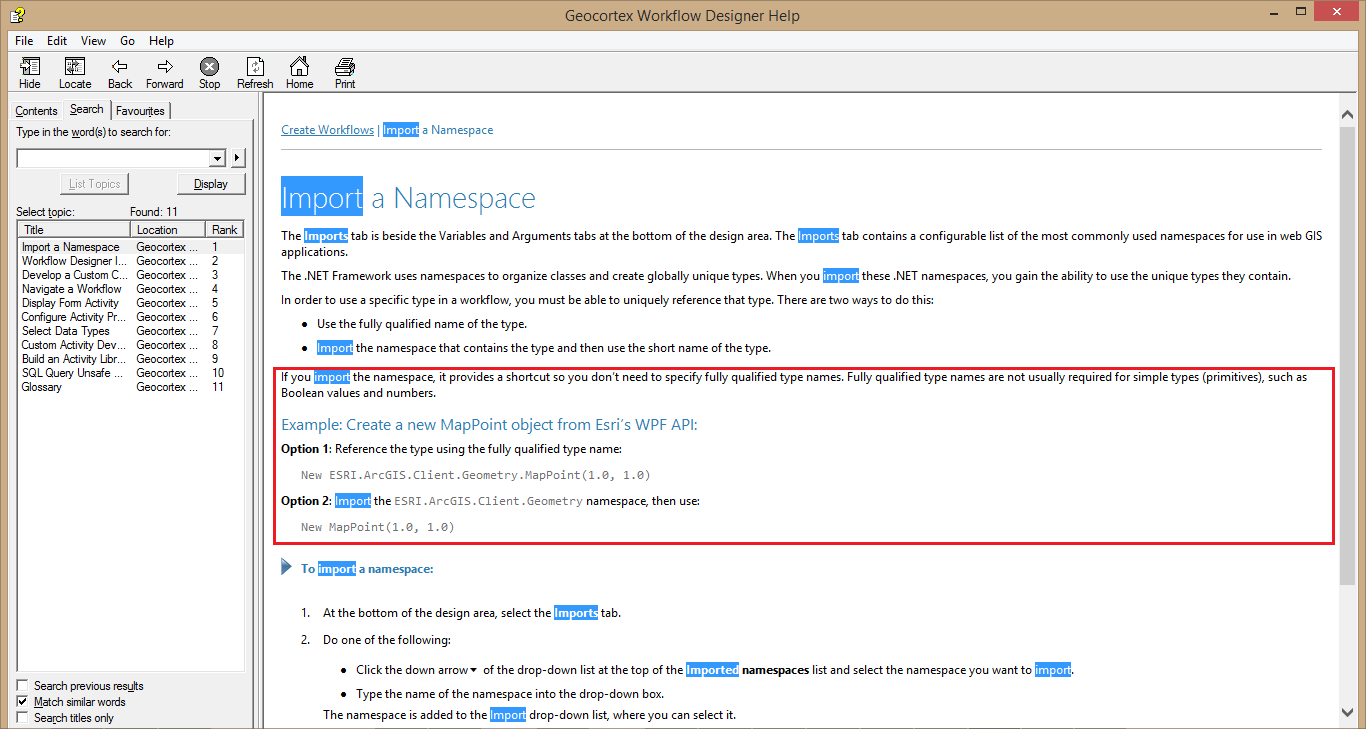
Hope this helps to understand the concept of Fully Qualified Type names.
Regards,
Mohammad Ashraf0
Du måste logga in om du vill lämna en kommentar.
Kommentarer
3 kommentarer