Automatically open legend

Looking for instruction on how to make the legend automatically open when the map initially loads
0
-
Depends on what you mean by automatically open legend - Have you set Data Frame to Open By Defautl? You can find this by editing your viewer and then the Look and Feel 0 -
Hi Mike, thanks for the input. I did set the data frame to open by default in the viewer with no success, however I'm not certain I'm at the correct line of code. I have a simple map that I would like the map legend to be initially open and displayed on load. Thanks 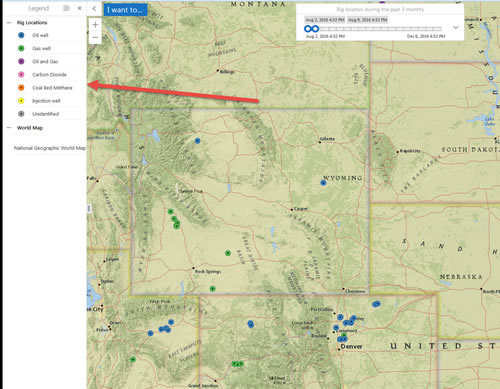 0
0 -
I'm confused - it looks like you have a legend... In GC, the Layer List displays in the data frame. If you just take the defaults, that is what will happen. Are you using Manager, or are you editing the Site.xml? 0 -
Hi Mike, let me see if I can clarify what I am after. I do have an existing legend, when the map initially loads in the browser the left pane is closed as default behavior. In order to open the pane to display the legend you must click on the > arrow icon. What I would like to try and do is have the legend (the left pane) open automatically when the map initially loads in the browser without having to click on the > arrow to open it. The image I included is how I would like it to look (opened) when anyone initally loads the map in their browser without having to click to open it. I am manually editing the HTML5 viewer file located in the site root at inetpub \wwwroot\Html5Viewer\Resources\Config\Default\Desktop.json.js. I am running Essentials 4.6.2.72 and the most current HTML5 viewer 2.7.1 0 -
Hi Roger,
Rather than messing with the json.js files, my suggestion would be to add a simple workflow to your site, and set it to run on startup. The workflow only needs to include a RunExternalCommand Activity with the following command name:
"SwitchToLegendView"
This will open the legend automatically whenever your site is launched.
I hope this helps!
Thanks,
Danny0 -
You're awesome Daniel. This worked great and was exactly what I needed. I appreciate your clear and concise answers.
Thank you for the help...again.0 -
No problem Roger, I'm glad it worked!
Thanks,
Danny0
Du måste logga in om du vill lämna en kommentar.
Kommentarer
7 kommentarer