Time Slider Question

I have a time slider set up on a service, and I've added the Time Slider widget to the tool bar. It seems to work fairly well, but when I go to close the Timeline, it still keeps the existing time selection - seems like there should be a way to close it and have it remove the time selection automatically instead of having to reset the min/max controls before closing...
0
-
Also, is there no way to close the Time Slider widget once it has been opened, without first expanding (Display Options...) it? The tool itself should be a toggle... How does the user know to hit the arrow to find the close button? I'm using 4.6.1 and 2.7. Here is a link to the site:
https://maps.srcity.org/Html5Viewer/Index.html?viewer=OpenDataViewer0 -
Also, is there a way to put the widget in the top right, instead of the top middle? 0 -

Hi Mike,
Sorry for the confusion. The close button actually does hide the time slider. We changed the "Close Timeline" button text to "Hide Timeline" in the GVH 2.7.1. Also, we have created an improvement report (GVH-11020) for displaying time slider at other region in the viewer.
Cheers
Long0 -

Hi Mike,
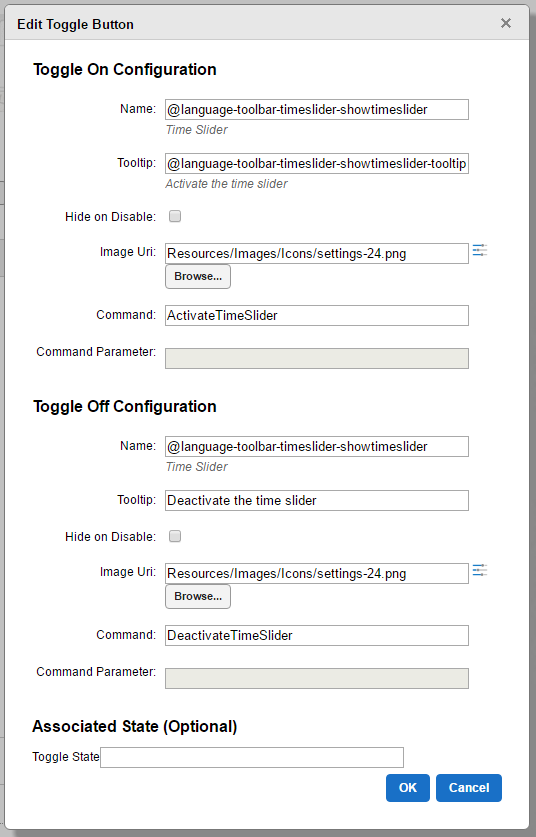
It is possible to configure the tool as a toggle. The LA County sample site that ships with Essentials does so as an example. There is also a command available, "DeactivateTimeSlider" which will remove the time selection like you've described rather than only hiding the time slider. Here's the configuration you would use to combine those two features: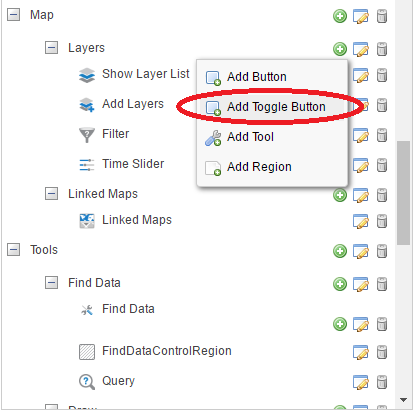
Finally, we may be able to use custom css as a 'quick and dirty' way to move the time slider to the top-right corner of the viewer while we're not able to properly change its region. I've found using the following works on my test site, but you'll want to test that out on your end to make sure it works and doesn't impact anything else on your site..timeslider-container { left:auto; right: 5%; }(the default location of custom css file for the desktop viewer shell is: "C:\Program Files (x86)\Latitude Geographics\Geocortex Essentials\Default\REST Elements\Sites\SiteName\Viewers\ViewerName\VirtualDirectory\Resources\Styles\Custom\Desktop.css")
Hope that helps!
Amanda0 -
I'll give it a try, thanks Amanda! 0 -

Amanda, do you know whether I am able to set the time extents automatically from a map service? I have data that updates regularly, and I'd prefer to have the updates reflected in the slider without needing to reconfigure it each time. 0 -

+1 on Zack's suggestion! 0 -
same request here for "Set the time extents automatically from a map service". Thanks. 0 -
Hi,
Is it poosibel to hide the playback button in TimeSlider through Essential Manager. Where hsould the property be set ?0 -
Re: Zack Robinsons
I completely agree Zack - we had this exact requirement where had has a 'History' viewer which constantly needed to be showing the last 30 days of data (e.g. a dynamic extent). The only way we could meet this was by setting up an FME job which at midnight eacjh night programatically alters the Time Slider parameters in the Site.XML file.0
Du måste logga in om du vill lämna en kommentar.
Kommentarer
10 kommentarer