switch SDE GDB version on-the-fly for GVH

For GVH 2.6.1, is there a way to switch SDE GDB version of a layer, dynamically, via workflow? The client wants a tool where he has the option to choose which GDB version to display.
0
-

Hi Jie,
Yes, you can do this. There are really two parts to it.
One, you need to add a property to your feature service, in the GC Rest Manager like so: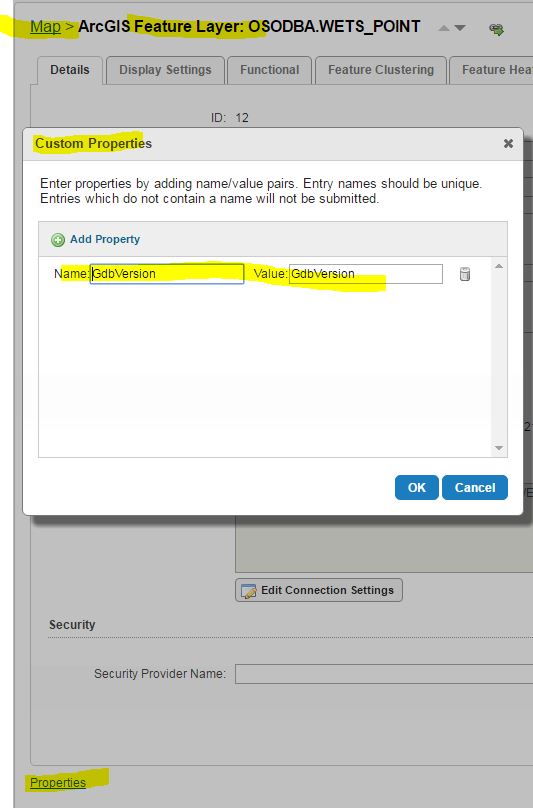
Second, in the workflow, use the SetMapServiceProperty activity to call the map service ID, property name, and the name of the version as a string... like so: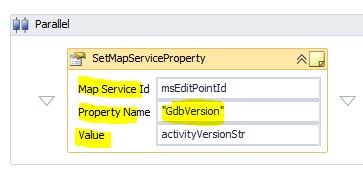
You may need to use a RefreshMap activity afterwards to see the change of version on the screen.0 -
awesome! Thank you, Ryan! 0 -
Ryan,
Your instruction on how to switch the GDB version works great. I have another question and wonder if you can help. Is there a way to check from the workflow that the user-inputted version name is valid? Namely, the user may input a version name that is not defined for the GDB, and I would like to be able to catch such instances, what should I do?0 -
Hi Jie,
We actually have a process that delivers all user-associated versions in a picklist. You could accomplish this with a simple geoprocessing script, that you can pub to ArcGIS Server, and cann that from the Geoprocessor actvity. There should be an 'arcpy.ListVersion()' function you can use in said script.
But yeah, I wouldn't let the user free-text in the version string to determine the version to draw.0
Du måste logga in om du vill lämna en kommentar.
Kommentarer
4 kommentarer