Error: Unable to connect to the data source for layer with mapLayerId: 1

Hi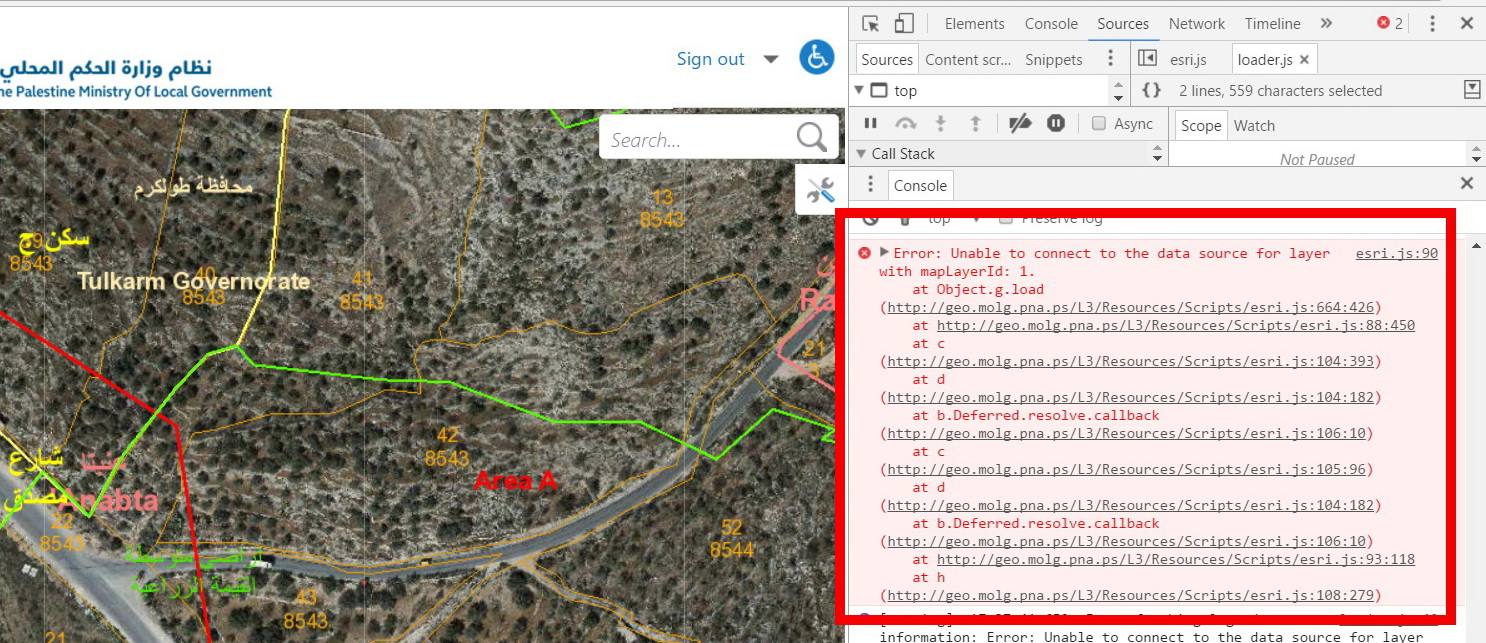
It seems that we are experiencing a viewer startup performance issue, One of the errors that I can see in browser developer tools is “Unable to connect to the data source for layer with mapLayerId: 1”
esri.js:90 Error: Unable to connect to the data source for layer with mapLayerId: 1.
at Object.g.load (http://geo.molg.pna.ps/L3/Resources/Scripts/esri.js:664:426)
at http://geo.molg.pna.ps/L3/Resources/Scripts/esri.js:88:450
at c (http://geo.molg.pna.ps/L3/Resources/Scripts/esri.js:104:393)
at d (http://geo.molg.pna.ps/L3/Resources/Scripts/esri.js:104:182)
at b.Deferred.resolve.callback (http://geo.molg.pna.ps/L3/Resources/Scripts/esri.js:106:10)
at c (http://geo.molg.pna.ps/L3/Resources/Scripts/esri.js:105:96)
at d (http://geo.molg.pna.ps/L3/Resources/Scripts/esri.js:104:182)
at b.Deferred.resolve.callback (http://geo.molg.pna.ps/L3/Resources/Scripts/esri.js:106:10)
at http://geo.molg.pna.ps/L3/Resources/Scripts/esri.js:93:118
at h (http://geo.molg.pna.ps/L3/Resources/Scripts/esri.js:108:279)
I don’t know what is the source of this error, it seems that there is something wrong with the java scripts in the resources folder! Has anyone experienced this before. I am using G.E 4.6.2 and GVH 2.7.1
I had a chance to look at the article “Best practices to optimize viewer startup performance”
https://support.geocortex.com/essentialsGSCkba?criteria=BESTANSWERS&dc=All_Essentials_kba&feedtype=SINGLE_ARTICLE_DETAIL&id=kA360000000L142&main-nav=essentials&sub-nav=kba
this articles is pretty good and gives recommendations for configuring the Geocortex Essentials viewer and information on optimizing map service performance, but doesn’t say anything about errors like that.
Thanks a lot,
Ahmad
0
-
Hi Ahmad,
It looks like you've got a data link that the viewer is unable to access. If you take a look at the web requests made by the client in Fiddler, you should be able to see the request that is failing; the server may provide a response that indicates what the problem is. You could also try loading the site's REST endpoint and browsing to that layer to see if you can access its data outside of the viewer.
Is the site publicly accessible?0 -
Hi Jordan,
Thank you for your reply, I think that the issue was related to a corrupted service, I discovered this in the hard way after removing the template folder form the wwroot and deployed it again.
But I am still struggling with the startup performance issue. And yes the site is publicly accessible:
Geo.molg.pna.ps
User:training
Password:123456
Any help is highly appreciated
Thanks,
Ahmad0 -
Hi Ahmad,
I took a quick look at your viewer yesterday and this morning (my time; I'm 10 hours behind you). Yesterday, several of the map services were giving intermittent server errors (500 errors) which were delaying things considerably -- some of the layers took a minute or more to load after repeated requests. I'm not seeing those errors today, so someone may have fixed that already, or it may be an issue that comes and goes. I'm hoping that it's the former, as the latter can be trickier to troubleshoot.
Aside from the errors, the one thing that is slowing this site down is that there are nearly 150 layers. There's no hard upper bound on the number of layers you can put in a site, as their performance will also be tied to things like the complexity of the layers' data, the speed of the servers hosting them, the latency between those servers and your Essentials server(s), etc., but as a general rule, fewer is faster.
This is the sort of scenario where using a layer catalog can be quite beneficial, as your users can opt to include only the layers they need. Obviously, whether it's feasible for you to go that route in this site will depend on how the application is used and whether performance considerations outweigh other user needs, but it may be something you want to consider.
Hope that helps!0 -
Hi Jordan,
Thanks for following up with this issue, your totally right the server errors (500) seems to be an issue that comes and goes, beside I don’t know the source of this issue, and why it happens?
I am aware that the fewer layers means better performance, but the core business of this site is to see all layers related to ( Land use plans, Parcles, communities boundaries, Aerial photo…) on top of each other, which are relatively heavy but necessary for the business.
There shouldn’t be a delay in the layers since the ArcGIS server and its source data and the Essentials are on the same server, so the delay due to connections is neglected.
About the using a layer catalog , do you mean to do this at the ArcGIS level? Or there is a feature included in the G.Essentials that can be used for this purpose?
Unable to connect to the data source for layer with mapLayerId: 1 issue disappeared after deleting the HTML template (L3 in my case) form the wwroot and deploying it again, but I looking forward enhancing the performance of my site.
Thanks for you continues support,
Ahmad0 -
Add to this Ahmad, that startup performance of Cityworks application that consumes almost same services in is much better. Here you go generic access to the cityworks application
Link: (http://geo2.molg.pna.ps/c1/Login.aspx) http://geo2.molg.pna.ps/c1/Login.aspx
user name: wesam_cs
password: 1230 -
The layer catalog site was a feature we added in Essentials 4.6. There's a feature video for it (https://support.geocortex.com/essentialsGSCVideo?sub-nav=videos&main-nav=essentials&feedtype=SINGLE_ARTICLE_SEARCH_RESULT&id=kA560000000PBbZ) here . The documentation for layer catalogs can be found in the Essentials Administator Guide in section 5.3.2. As I said, it may not be what you need for your particular site, but it's probably worth taking a look. 0 -
Hi Jordan,
I will explore the layer Catalog, and I will post here if it provides a solution in my case.
Thanks,
Ahmad0
Du måste logga in om du vill lämna en kommentar.
Kommentarer
7 kommentarer