Printing using MapBox as a basemap

Has anyone had any luck printing using a MapBox service as a basemap. Whenever I print with a Mapbox service it comes back with all the tiles in the wrong spots. 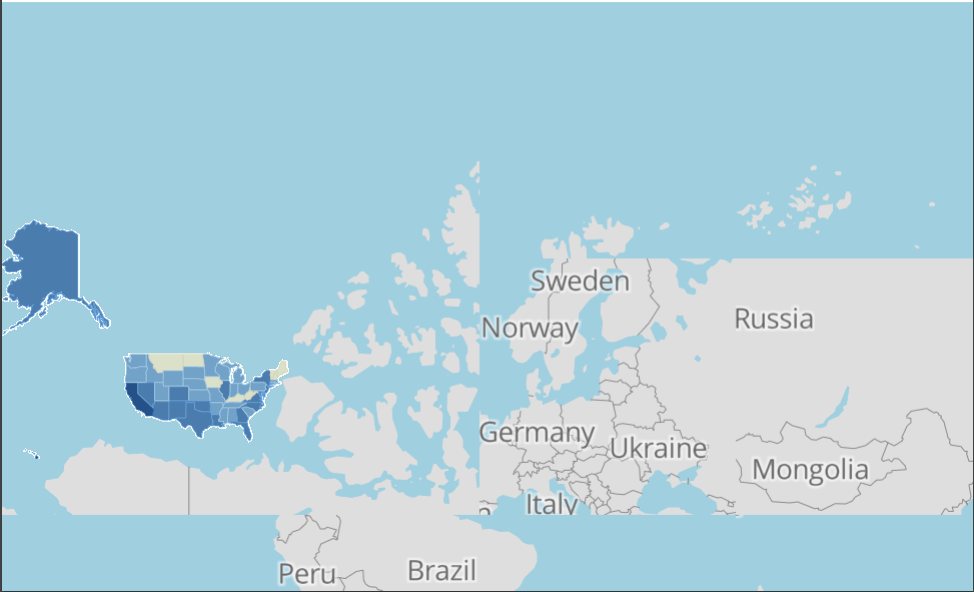
0
-
Hi Tyler,
I just tested this, and it seems to work OK for me.
The first thing I would check is that the WKID for your map services match. MapBox seems to be using WKID 102100. If your map services aren't using this projection as well, that could account for the anomaly you are seeing. In my test, both my map services were using WKID 102100.
If they do match, could you please post the URL for the MapBox Map service that you configured in Essentials (without your token of course).
Thanks!
Danny0 -
Everything seeems to be using 102100.
Export a Map Image works with this service:
https://services.arcgisonline.com/arcgis/rest/services/Canvas/World_Dark_Gray_Base/MapServer
Does Not work with these two:
https://api.mapbox.com/styles/v1/jllglobal/cir5j17ov0001bymdyjs6mft8/tiles/256/{level}/{col}/{row}@2x?access_token
https://api.mapbox.com/styles/v1/mapbox/satellite-streets-v9/tiles/256/{level}/{col}/{row}@2x?access_token%0 -
Hey Tyler,
I'm not a MapBox expert, but it looks to me like when you load a service from the styles API, MapBox may not be presenting a standard WMTS, which in turn may be confusing Essentials when the print/export operation gets called. My guess is that it's a WMTS with some custom styling applied. I did a few tests, and I'm able to print properly from your second URL if I change it to point directly at the tileset:
https://api.mapbox.com/v4/mapbox.satellite/{level}/{col}/{row}.png?access_token
This may or may not be what you're looking for, but I hope it helps! If not, I would suggest that you open a support case so we can assist you :)
Cheers!
Danny0 -
I know this is an old thread, but I ran into this issue today and wanted to share my results so that it's searchable in the future. The issue is that the @2x in the Tyler's url makes Mapbox return 512x512 tiles instead of 256x256. When printing, the tiles don't get resized to fit in the 256x256 spots that printing has allocated for them, so you can only see about 1/4 of each tile and the map ends up looking scrambled.
If you take the @2x out of the url when you add the service connection to your site, it'll print as expected. Alternatively, 5-series printing can handle the @2x tiles without issues.0 -
Wow just found this thread. Might remove the whole need for ESRI ArcServer for Image which is an extra Server Costs and License cost given the changes at 10.6 0

Du måste logga in om du vill lämna en kommentar.
Kommentarer
5 kommentarer