Has anyone been able to run a workflow by Id from the feature description in a Select Features task?

I have the following feature description in a Select Feature Task (formated for ease of reading):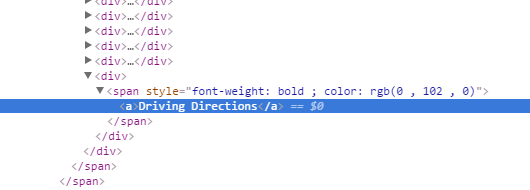
"<div><span style='font-weight: bold; color: rgb(4, 71, 138);'>{BUILDING}</span></div>
<div><span style='font-weight: bold; color: rgb(255, 0, 0);'>{OFFICE_NAME}</span></div>
<div><span style='font-weight: bold;'>{ADDRESS} {LOCATION}</span></div>
<div><span style='font-weight: bold; color: rgb(0, 102, 0);'>{CITY}</span></div>
<div><span style='font-weight: bold; color: rgb(0, 102, 0);'><a href='http://www.wilco.org/CountyDepartments/GIS/tabid/454/language/en-US/Default.aspx'>More Information</a></span></div>
<div><img src='http://orbtest.wilco.org/Images/InnerLoop_Summer.jpg'/></div>

<div><span style='font-weight: bold; color: rgb(0, 102, 0);'><a href='command:RunWorkflowWithArguments?workflowId=DestinationDirection&officeName={OFFICE_NAME}&officeBuilding={BUILDING}'>Driving Directions</a></span></div>"
On inspecting the code, the "href" in bold seems to be ignored, leaving on the the text "Driving Directions" in the feature description, so the "command" isn't executable.
This same code works when used in the feature description in the Layer Details.
Any thoughts as to why the difference?
Thanks for you help!
Frank
Essential: 4.6.2
GHV 2.7.1
0
-
Oops... I meant running a workflow with arguments, but the problem is the same. 0 -

Hi Frank,
Thanks for letting us know! I did some looking into this, and it looks like a known issue unfortunately. I'll add you as a stakeholder on the issue.
Right now there is no workaround I'm afraid. You cannot currently run a workflow from a URL in a map tip.
The tracking number is GVH-12544.
Thanks,
Danny0
Du måste logga in om du vill lämna en kommentar.
Kommentarer
2 kommentarer