Geocortex Essentials 4.6.3 upgrade error

I am trying to run the upgrade but I keep receiving an error. I am able to get past the setup wizard but once the post install configuration launches it times out. The screen says Connecting to Geocortex Core when I get the timeout error. The progress bar makes it about half way every time.
Fortunately this is only my test server so it’s not super critical I get the fixed immediately.
System.TimeoutException: The operation has timed out.
at Geocortex.Platform.Role.Documents.DocumentStoreClient.<PerformPeekDocument>d__117.MoveNext()
--- End of stack trace from previous location where exception was thrown ---
at System.Runtime.CompilerServices.TaskAwaiter.ThrowForNonSuccess(Task task)
at System.Runtime.CompilerServices.TaskAwaiter.HandleNonSuccessAndDebuggerNotification(Task task)
at Geocortex.Platform.Role.Documents.Sentry.Block[TResult](Task`1 task)
at Geocortex.Platform.Role.Documents.DocumentStoreClient.Marshal[TResult](Task`1 task)
at Geocortex.Platform.Role.Documents.DocumentStoreClient.PeekDocument(String id, Boolean throwIfMissing)
at Geocortex.Essentials.PostInstall.EssentialsPostInstall.TestConnectionToCore(InitWindow window)
at Geocortex.Essentials.PostInstall.EssentialsPostInstall.StartupAsync(InitWindow window)
0
-
Hi Daniel,
Can you please chack your running services, and make sure the Geocortex Core service is started and running? If it is, can you please take a look at the running processes, and let me know which running Geocortex processes there are?
Cheers!
Danny0 -
hi I'm having the same problem here on GE4.6.1. though I was try to back up GE by following the sugget that stop Geocortex Core service first before make copy of the Data folder. After retart the Gecortex Core service i noticed i couldn't get into the Geocortex site manager page. Then tried to do a post-installation config but received the same timeout error with the following error details. I could confirm the Geocortex Service is running, and tried restart it and the server couple of times didn't fix the probelm .Please help.
System.TimeoutException: The operation has timed out.
at Geocortex.Platform.Role.Documents.DocumentStoreClient.<PerformPeekDocument>d__117.MoveNext()
--- End of stack trace from previous location where exception was thrown ---
at System.Runtime.CompilerServices.TaskAwaiter.ThrowForNonSuccess(Task task)
at System.Runtime.CompilerServices.TaskAwaiter.HandleNonSuccessAndDebuggerNotification(Task task)
at System.Runtime.CompilerServices.ConfiguredTaskAwaitable`1.ConfiguredTaskAwaiter.GetResult()
at Geocortex.Platform.Role.Documents.Sentry.Block[TResult](Task`1 task)
at Geocortex.Platform.Role.Documents.DocumentStoreClient.Marshal[TResult](Task`1 task)
at Geocortex.Platform.Role.Documents.DocumentStoreClient.PeekDocument(String id, Boolean throwIfMissing)
at Geocortex.Essentials.PostInstall.EssentialsPostInstall.TestConnectionToCore(InitWindow window)
at Geocortex.Essentials.PostInstall.EssentialsPostInstall.StartupAsync(InitWindow window)0 -
Hi Jack,
Per the question I asked Daniel, when you start the Geocortex Core service, which roles do you see running in the task manager?
Thanks!
Danny0 -
hi Danny,
thanks for the reply. Just an update. I continued to upgrade GE from 4.6.1 to 4.6.3 and seems Geocortex Core fixed itself. The upgrade finished and post-installation went through OK. So all good now for me. I didn't pay attention to which user the Geocortex Core was running when I had the connecting porblem. but now it is running under System. Out of courious, what the correct way to store geocortex core service? I just went to services stoped it and restarted it. is that right?0 -
I'm glad that did the trick Jack!
Yes, that is the correct way to restart the Geocortex Core service.
Cheers!
Danny0 -
Hey Jack,
One of the developers was asking about this thread, and was wondering if we could get your log files to investigate the root cause of this issue. If you don't mind running GCXInfo (Per the KBA here: https://support.geocortex.com/essentialsGSCkba?id=kA360000000Xb6h), that would be really helpful!
If you run into any issues with it, or if you have any questions, you can drop me a line: (dbriggs@latitudegeo.com)
Thanks so much!
Danny0 -

I'm having the same problem as Jack, except it's when I'm upgrading to 4.6.3
Here's what's running...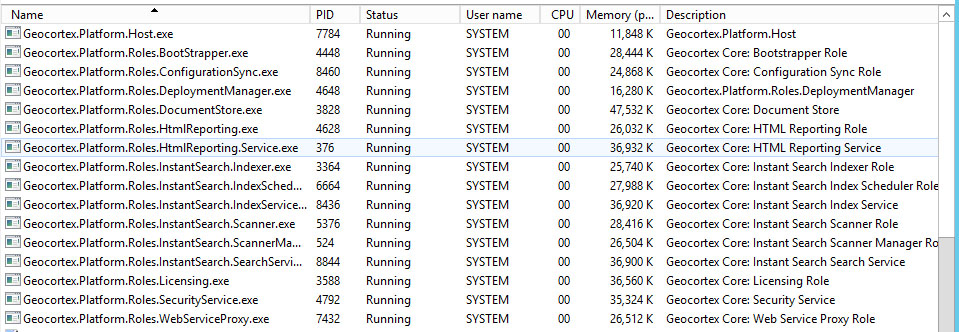 0
0 -
Hi Eric,
Can you please run GCXInfo per the previous post, and let me know when it is complete?
If this is urgent, you may also want to open a support case so we can help you investigate!
Thanks,
Danny0 -
Danny, I have ran GCXInfo and the file that upladed is named 000-TUNDRA@2017-02-14T13-55-51-UTC
Thanks.0 -
Danny,
It seems that there was an issue relating to the fact that we have encrypted data connection strings.
Once we undid that, we could get to the manager app.
Maybe something in my GCXInfo package will bear that out?
Seems like that's not something that should cause a problem.0 -
Hi Eric,
I agree that is something that should be OK when upgrading. The only time your encrypted strings should cause issues is when the .config files are moved to a new server.
If you follow the KBA and re-enable encrypted strings, does this issue return? If so, I would suggest opening a case so we can help you investigate this issue.
Thanks!
Danny0 -

Hi,
I'm having the same problem upgrading to 4.7.1 (from 4.6.3). The screen says Connecting to Geocortex Core when I get the timeout error.
System.TimeoutException: The operation has timed out.
at Geocortex.Platform.Role.Documents.DocumentStoreClient.<PerformPeekDocument>d__117.MoveNext()
--- End of stack trace from previous location where exception was thrown ---
at System.Runtime.CompilerServices.TaskAwaiter.ThrowForNonSuccess(Task task)
at System.Runtime.CompilerServices.TaskAwaiter.HandleNonSuccessAndDebuggerNotification(Task task)
at Geocortex.Platform.Role.Documents.Sentry.Block[TResult](Task`1 task)
at Geocortex.Platform.Role.Documents.DocumentStoreClient.Marshal[TResult](Task`1 task)
at Geocortex.Platform.Role.Documents.DocumentStoreClient.PeekDocument(String id, Boolean throwIfMissing)
at Geocortex.Essentials.PostInstall.EssentialsPostInstall.TestConnectionToCore(InitWindow window)
at Geocortex.Essentials.PostInstall.EssentialsPostInstall.StartupAsync(InitWindow window)
I unistalled the geocortex core and reinstalled it using post Installation, but still the same.
The Geocortex Core service is running.
Unfortunatly, this is a production machine ....
Regards,
Tom0 -
Hello Tom,
As these issues can be difficult to troubleshoot via the forums, are you able to contact your reseller in your area to see if they can assist you?
I will DM you your reseller contact information.
Best wishes,
Pandora0 -
Hello Pandora,
As it was a production site, I had to or rollback or try another alternative.
We decided to completly remove 4.6.3 and do a clean install of 4.7.1. (after making backup of the sites)
Then we recopied the sites and upgraded the viewers one by one.
As our security was windows based, we had no problem with that.
Kind regards,
Tom0
Du måste logga in om du vill lämna en kommentar.
Kommentarer
14 kommentarer