Is GVH 70% slower than GVS in starting up?

Is GVH 70% slower than GVS in starting up?

My findings say that GVH is 70% slower than GVS. The test is simple:
- Create a site that consumes some heavy services
- Create gvs and gvh viewers for the site.
- Access the two applications
What does Fiddler say?
- GVH goes to many folders before starting up
- HVG consumes time in reading turned off services\layers (the thing that seems not to occur in case of GVS)
Is there any settings that can be applied to enhance the performance of GVH to be similar to GVS?
Thank you
Best
Jamal
0
-

Wayne, I'm trying to optimize our start time (usually in the 20-30 second range), and have a question about the export calls that the viewer makes to get images of the map services. For our site, this is a substantial part (~50%) of the load time. It appears to make export calls even for services that are not turned on. Why do this? It just returns a transparent image. Couldn't these services just be bypassed? 0 -
Wayne, I'm also still a bit confused. It seemed like in early versions of HTML5, only one image was sent. Now, each service is sending multiple images, regardless of whether they have any layers turned on?
Also, my Network/Server guy was asking about IIS - does it help to change any of these settings?0 -
Thank you Mike.
We managed to take care of all our services and make sure that they are fine. However, the startup performance and navigation is not enhanced significantly in GVH.
I think that the more we highlight our issues the chance to resolve them by geocortex developers increases and then to get magnificent GVH at the end.0 -
Wayne and Daniel,
We checked the latency to our network SAN, and it was only 10 milliseconds, yet as you can see with developer tools (F12) that a tiny 57.2 kb export PNG takes 7.5 secs to download and processed. Can you tell me whether this is mostly the time it takes to download, or is it taking a good percentage of the time being processed by GE?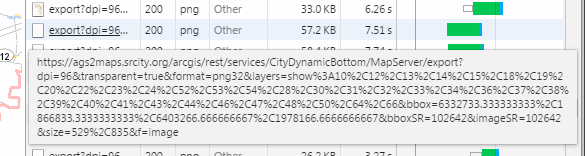 0
0 -
Also, can you tell me why switching my very large parcel layer from a file GDB to SDE should effect the time, when the layer is turned off at open? SDE is slower, though it loads faster in Desktop... 0 -
Some more feedback for Latitude:
Just moved two of our customers to HTML5 maps and within 11 days we had two tickets in our queue which read "There is a problem with the application after the last release. It suddenly became very slow and is now hard to use.".
To put this in simple terms --> this is really bad guys.
The HTML5 viewer is so slow at loading that users are impacted from the get go. It's very hard to figure out how this could be so different from the SLV. Isn't there anything which can be done by Latitude?
We're going to try all the suggestions but I don't see why the HTML5 migration should cause us to do an optimization project as well. It's like a piece of work which had a hidden punch in the gut and it would have been nice if Latitude was upfront about this issue.0 -
thank you all.
I think that reporting users experience in GVH will definitely encourage geocortex developers to take our issues into consideration and then try to fix them in the coming releases.
Compared to GVS, GVH still has performance and functionalities issues0 -
The two main factors we see in site/viewer performance are these:
1. The nature and volume of services they consume
2. The amount of code and assets loaded
Ultimately, we only directly control #2. However, we can help people make smart choices about #1.
We invested heavily in R&D for factor #2 throughout 2016 in order to address the growing footprint of the features and capabilities users expect. To do so, we overhauled viewer internals to use the new, asynchronous, standard module system defined by the recent "ES2015" (JavaScript) spec. This helps us address certain load time issues around code volume, and offers future compatibility with new Esri technology.
As of GVH 2.8, viewer modules are individually compiled and bundled into the "AMD" module format. Viewer modules are now downloaded in parallel, rather than in a single file. This helps offset the impact of the volume of code required to provide the out-of-the-box capabilities users expect.
While many vendors and teams faced with migration to the new standard are opting for complete rewrites due to the scope and complexity involved, we did not see this as something we wanted to subject customers to. This is the exactly the type of technological churn and complexity we strive to shield you from on a daily basis.
I'm proud to say that we've pulled this off without a rewrite, and without breaking existing viewers, workflows and other investments. On our end, this required tens of thousands of individual edits to the GVH codebase and some thinking outside the box to accomplish.
So, R&D done in the 2.8 cycle will reduce initial load times by packaging code in more efficient, modern ways and with minimized impact to customers. We will continue to be pragmatic and aggressive around performance topics where we can provide value or share knowledge. Of specific utility to us is constructive feedback and useful information around specific performance issues.
I'll share some thoughts around factor #1 and some thoughts around Jamal's site and viewer in a post to follow.0 -
So I've discovered something. Even if a service has no layers turned on at load, it can still take a long time to load. My users want more control than a cached service would provide, but I was getting very slow load times, I decided to make a cached service for zoomed out. I just copied and pasted into a new mxd and cached for scales over 1:9600, which is where I normally turn on parcels. I then edited the old dynamic service to override the minimum scale. So now, when a user comes to the site, they look first at a cached service, and then when they have searched for a parcel and zoomed to it, they then start using the dynamic service. I did the same for another heavy service that is not needed until you zoom in - I set the override for a scale just a bit zoomed in from the normal openning scale. You then don't pay the service load cost until you've zoomed in, and you are not looking at the full extent.
This seems to work, but now I'm being frustrated by another long load, but this time something to do with the site - anyone able to tell me what this is?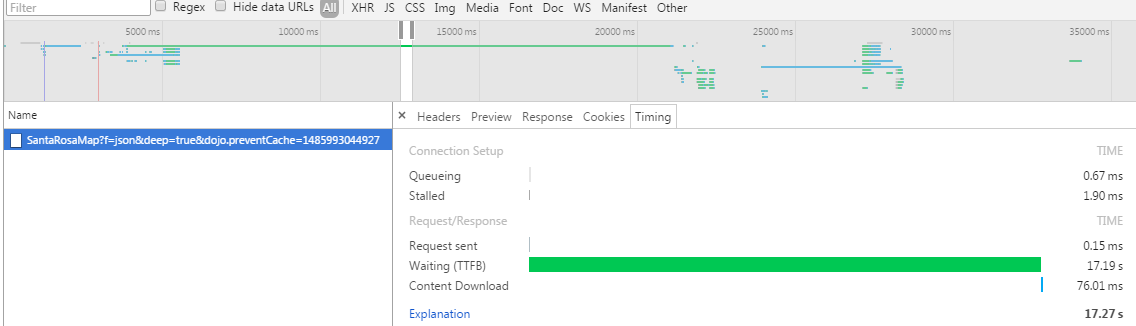 0
0 -
Thank you Jason for the input.
I don’t really need to repeat what I have already highlighted early in this thread, but I can tell that, with same working environment, GVS is still doing better than GVH. At least, you can compare them taking our application (geomolg) as case study. However, I’m happy to hear that GVH 2.8 will overcome several performance issues (startup + navigation). We, as geomolg, are online spatial data provider and all what we need is to make our users happy as much as we can.0 -
I've made somewhat of a breakthrough in optimizing Site Open. I've been able to increase light server load by about 25%. The sites also still seem to be behaving today as load increases. So, on top of everything else that folks have said, try to keep this in mind - any dynamic service takes time to load, even if none of the layers are turned on. The more layers it has, the longer it takes. Cached services take minimal time to load. So, based on this:
1. Do not ever have a dynamic service be called for at Load. For services that do not need to be on at load, go to the Display Tab of the Service properties in Manager and set an Override Minnimum Scale to something less than the opening scale. If you do not need the service until you are way zoomed in, then set it to a value just zoomed out from where you need it.
2. If you need to view a service at load, and then want to be able to do modifications once Zoomed In, then build a very simple cached service for the scales where you don't need to make modifications (I'm doing 19200, 38400, 76800, 153600, 307200, 614,400) and then modify the Override Minimum Scale of the services you are replacing to come on when zoomed in (I set to 9601, so it would be there at my next aerial cache scale of 9600).
Here is my everything public site, which is loading for me on my network at about 15 seconds:
https://maps.srcity.org/Html5Viewer/Index.html?viewer=publiccity
And here are a couple of directed sites which now load for me in about 7 seconds:
https://maps.srcity.org/Html5Viewer/Index.html?viewer=parcel
https://maps.srcity.org/Html5Viewer/Index.html?viewer=AerialViewer
The following is a CPU intensive site for looking at Homeless Data (and soon other Crime data) with Heat Maps, Time Sliders and Charts:
https://maps.srcity.org/Html5Viewer/Index.html?viewer=OpenDataViewer0 -
Jamal, I looked at some traces of your viewer and saw rougly 27 MB of response data, which seems quite high. Ortho imagery services appear extremely problematic.
Response times vary wildly for the exact same requests, including for static resources. To me this looks like a server under heavy and/or spiking workloads.
When I looked at a sample of your ortho services, I noticed they had no discrete min and max scale values. Also, they appear to be re-rendered on every request and at extremely high cost to your server. This looks to be what's stressing your machine(s).
Unless you need to see these services from space, or you need to print at extremely high resolutions, you will likely see easy wins by choosing discrete scale values and fine tuning them for your needs, similar to what Mike mentioned.
That's probably the quickest, most significant win and seems like a reasonable starting point. As others have mentioned, caching is quite effective as well. This will free up even more previous server capacity.
After constraining the scale ranges, I suggest taking a systematic approach and start removing other bottlenecks shown in the traces by applying AGS tile caching, as well as tweaking HTTP caching if we need to go even further.
Please keep us posted.0 -
My last change made a BIG difference - my AGS Server went from being at or above 90% CPU for a total of 25.85 minutes the day before to only 3.23 minutes yesterday. Load was similar, and yesterday I never hit 100%, whereas I had been prior to this. I'm really hoping to not have to up my number of cores... Jason, are there any recommendations out there for where CPU should be? 0 -
Hi Mike,
Thanks for sharing your knowledge and optimization tips in this thread. Very useful. I can't really give you a specific answer on where CPU should be. Obviously lower is better in general, but there's really no single answer I can give you, as it depends on your average baselines of load, and what kind of spikes you expect to see during times of high traffic - ideally, they aren't hitting 100% when a single user hits your services.
There does seem to be an issue with the services being requested unnecessarily. This may be due to an issue with the map control or the viewer itself. We're looking into it, and thanks again for sharing your expertise.0 -
Hi Jason and Mike,
We are still taken by the GVS in all terms: performance, functionalities, friendliness, etc. We have encountered in massive issues as we moved to the GVH. The main reason behind moving to GVH was that the GVS is no longer accessible by the google chrome and the fact that the GVH doesn’t require installing Silverlight or other similar application. I need to confirm that I’m myself not a user for our application. I’m the admin and I just receive the feedback from the users who have been working for few years on GVS and now they do on GVH. We are reporting our issues so that geocortex developer can consider it in the next releases and thus make our application users happy again.
However, I have already posted the following on other thread”
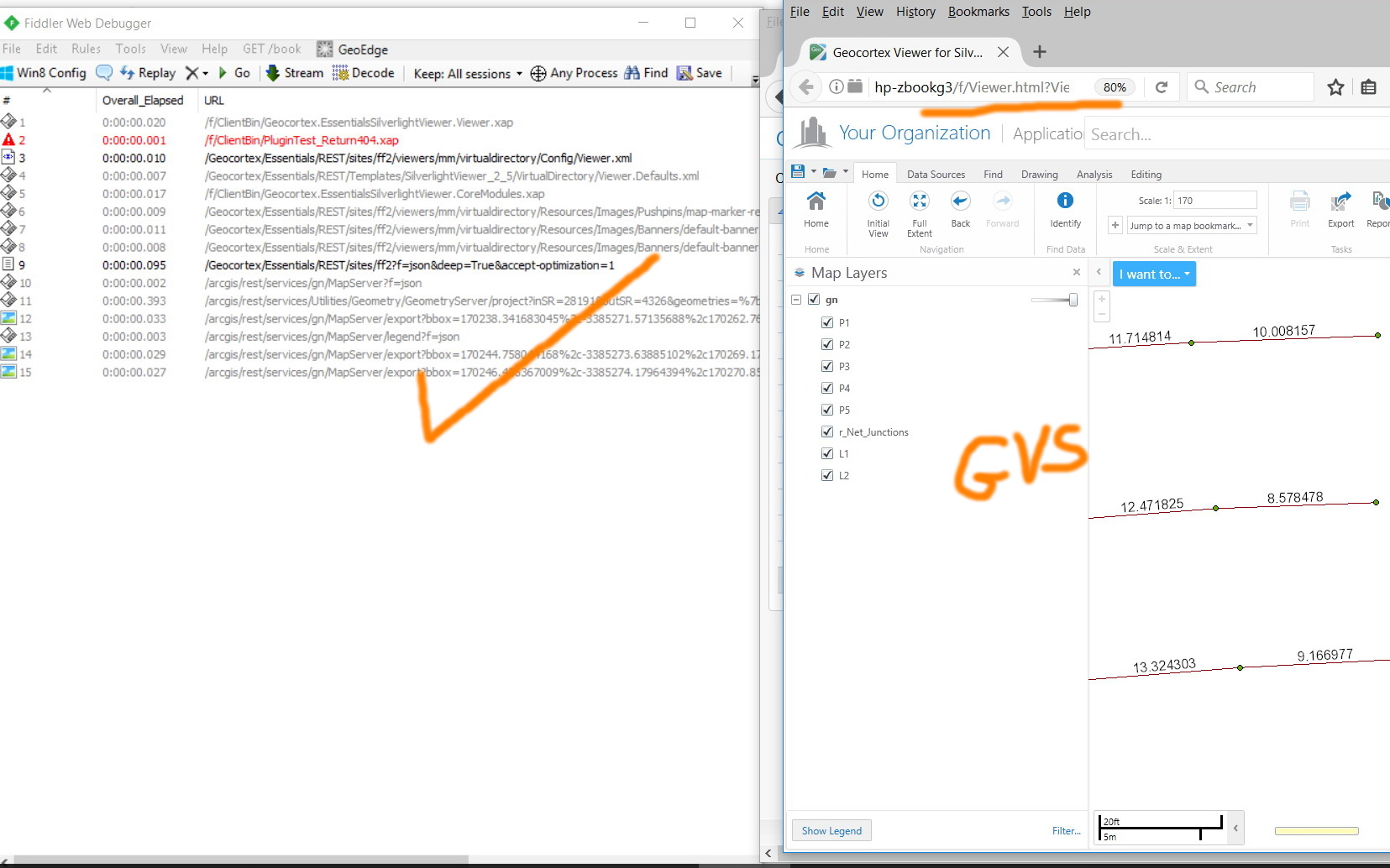
“To avoid inclusion of multiple factors in analyzing the GVH performance, I just have created simple GVH and GVS site with one service consumed. Both the Geocortex and the ArcGIS Server are in the same local machine. In case of GVH, the startup still takes few seconds considering that the ArcGIS Server and Geocortex are installed in the same machine. It calls so many item as it appears in the screenshots below. Meanwhile, the GVS starts faster! It calls few item”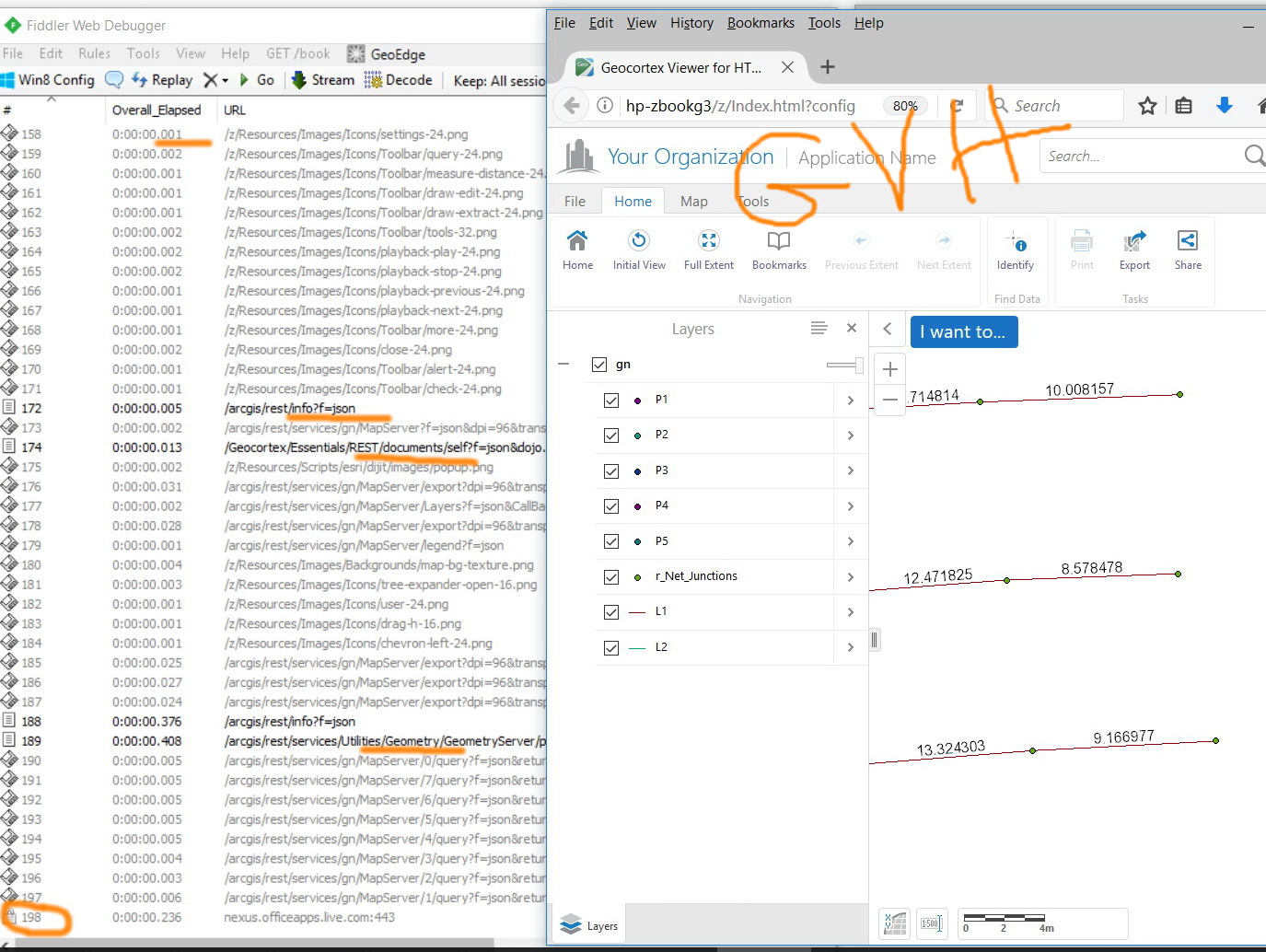
 0
0 -
Jason, I wouldn't call it expertise - more just trial and error. While I've had more success than Jamal, I do share some of his frustration. Similar to Obamacare down here - too much was promised up front, and then when reality is diferent, folks don't recognize the upside. I appreciate the new features in HTML5, but if my users are with customers and the site is slow, it really doesn't matter what the new bells and whistles are. When it was said that all you will have to do is add a new viewer to your existing site, you guys really didn't do your homework with real-world complex sites. I've had to re-engineer all of my sites to adjust to the new Server-centric environment. I'm also creating smaller, more directed sites to try (mostly unsuccessfully) to get folks off of my heaviest sites. While I understand that you guys were taken somewhat by surprise by Silverlights' demise, and it is more difficult to program for HTML5, I believe that the work that I and others are doing to speed up our sites should have been done long ago by you guys. We should have been warned about the differences between Silverlight and HTML5, not how they will be the same. 0
Du måste logga in om du vill lämna en kommentar.
Kommentarer
46 kommentarer