Export Datalinks to excel/csv

We don't seem to be able to export datalink results to csv/xlsx in html5 viewer. It's a huge headache for us not being able to export these tables. the command is available in the expanded view results but is greyed out. Is this still a limitation in html or am I missing a setting somewhere that will allow it?
We're on GXE4.6.2 and HTML5 Viewer 2.6
0
-

Hi Lauren,
You aren't missing anything. The export functionailty doesn't currently include data in datalinks.
The good news is that this feature will be available soon in the Geocortex Viewer for HTML5, open beta expected mid-February.
Here is an image from one of our update meetings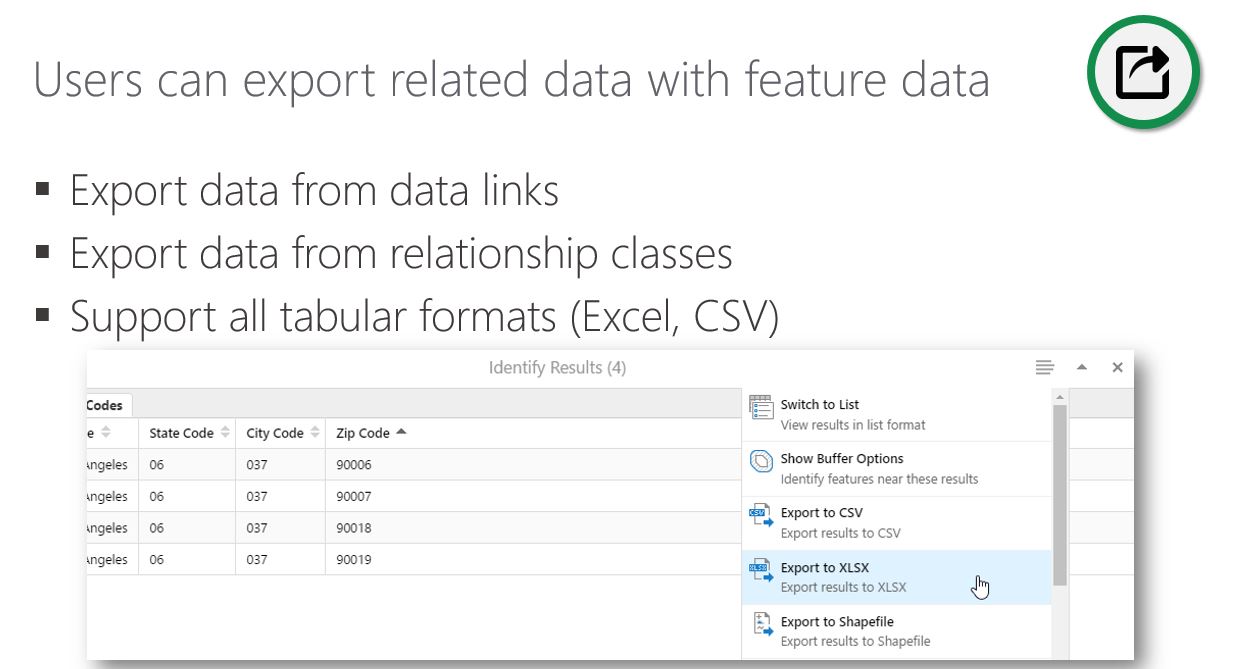 0
0 -
That is absolutely fantastic news Cam. Thank you for the update, if we can tell users that 'it is coming very soon' they'll be a bit less resistant to the change from Dekho. 0 -

Awesome, I've been waiting over a year for this! 0 -

Hi
Is there an update to this with respect to exporting Datalinks? I have users who would like to export a TAB at will - much like how the results export works. We are on 4.6.3 with HTML5 2.7.1
Thanks
Doug0 -
I don't have a lot to add to what Cam's already provided, but the 2.8 HTML5 viewer just finished its beta and should be generally available in the next few weeks. 0 -
Hello, I just installed 4.8 and html 2.9 and i still don't get this feature to show up for data link tabs and such. I was able to manually add "export to csv" under the feature action context menu but it is greyed out. How do i get this feature enabled or working since it was part of the enhancement in this upgrade package? 0 -
Hi Raoul,
If you use export to xlsx in the results menu, all datalink tabs are exported for all the selected features. However you're right - it is greyed out for individual records. (I would think it has to be xlsx, as csv does not support multiple tabs).
Not sure why it's inaccessible for single records?. Hopefully Latitude can enlighten us?0 -
Hi,
We have HTML5 2.10 and we have the same result, it is greyed out. Is anyone as it working ?0 -
Hi Lauren and Émilie,
That is the default behaviour, export is meant for 2 or more records. If you are still seeing the option to export to xlsx with more than one feature selected, I would open a support ticket so we can do a screenshare and look into it further.
Regards,
Wayne Richard
Latitude Geographics Group Ltd.
Head Office: 300 – 1117 Wharf Street Victoria, BC Canada V8W 1T7
Tel: (250) 381-8130 | Fax: (250) 381-8132 | wrichard@latitudegeo.com
Developers of Geocortex web-based mapping software | www.geocortex.com
An Esri Platinum Business Partner0 -
Wayne, that doesn't really make much sense. If you are using datalinks, there's the potential for a one-to-many relationship. So a single selected feature could easily have four datalinks each with 20+ results for that single feature. That's the whole point of the datalinks in our organisation.
And anyway, what if my single feature has 30 columns of information and I want to pull that into an external report or excel? I don't understand the logic behind making it impossible to export one record.0
Du måste logga in om du vill lämna en kommentar.
Kommentarer
10 kommentarer