how to set the toggle on button as default

I would like to know how to set the 'toggle on' button as default when the site is loaded. I tried setting the Associated State to "Default". It does work, but I am not able to toggle off the button.
Html5 viewer version : 2.7.1
Cheers,
Mahender
0
-
"Toggle on" what!? Tools (Toolbar tab)? Data Frame (Look and Feel tab)? 0 -
It is for the toggle button configured in the toolbar. 0 -
You need to edit your viewer in Manager and then go to the Toolbar tab. There is a check box to open by default. 0 -
Ok, I did not mean to toggle the toolbar itself. Maybe a screenshot might help :-) 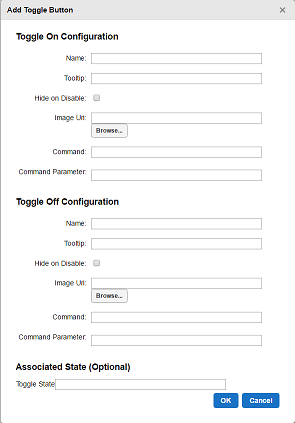 0
0 -
Okay, hadn't seen this before. From reading the GE Admin, this is used to run "a command when a user clicks it to turn it on, and a different command when the user clicks it to turn it off." Are you trying to get the site to run a command when the site opens? If so, then I believe it would make more sense to run a workflow at open. 0 -
No, It is not about running the command when the site loads, the 'toggle on' button should be active by default when the site loads. 0 -
I have the same question. Following... 0 -
Hi Folks,
It doesn't look like there's any out-of-the box way to configure this yet. Toggle buttons are either associated with preset application states (https://docs.geocortex.com/essentials/gvh/2.10/dev-help/Default.htm#gvh/dev/state-reference.htm) , or they aren't and are off by default. I would recommend posting the suggestion to the Ideas section (https://support.geocortex.com/GSCIdeas?c=09a6000000008RsAAI&filter=1&categ=all&sub-nav=ideas&main-nav=essentials&page=1) .0
Du måste logga in om du vill lämna en kommentar.
Kommentarer
8 kommentarer