Basemap printing outside of minimum scale

I have my aerial imagery set not to turn on until the user zooms in at least to 1:5,000. However, when printing, the imagery is being printed even though the printed map's scale is greater than 1:5,000.
Is there a setting I'm missing to stop the basemap from printing outside of the minimum scale I set, or is this a bug?
0
-

Yes, for printing, it is using the Min and Max scale at the bottom of the REST endpoint. This value can be set in ArcGIS Server Manager on the Caching tab. 0 -
I tried changing the minimum scale on my map service to 1:5,000, and it's still showing up in my maps when it shouldn't. Furthermore, this isn't an issue in an older instance of Geocortex I'm running (4.4) and using the same image service. 0 -
Where did you try to change it? In Manager, those settings are for the viewer only. For printing, it is using an ESRI function. The print scale range is set using ArcGIS Servier Manager on the Cache tab (top image below), and you can see how it is set in your REST end point, near the bottom (bottom image). This is a setting that Silverlight did not use, but HTML5 does. Not sure what to say about the different instance of GC... 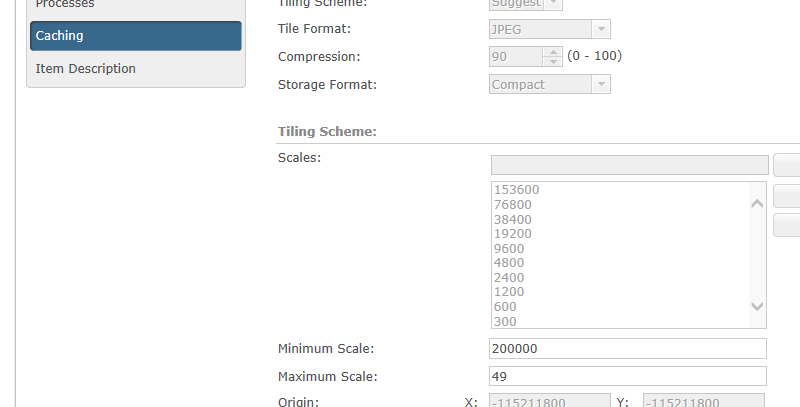
 0
0 -
Yes, I made the change on the minimum cache scale of my image service, and that didn't fix it.
Even if it had, I wouldn't want to use that as my solution because:
1) I use the image service for other things besides my one GVH
2) It seems like something I shouldn't have to do since it wasn't an issue in a past version of GE (and the GVH 2.5)0 -
I'm stumped. Can you share your site and/or REST endpoint? 0 -
Here's a public sample site with the image service in question:
https://gis.brooklynpark.org/Html5Viewer/index.html?viewer=Test_Imagery.Test_Imagery
Unfortunately the REST endpoint is secured, so I can't share it.
I also made a sample site using Esri services, and the same thing happens. Even though I set World Imagery not to show at scales above 1:5,000, it still shows up on the printout.
https://gis.brooklynpark.org/Html5Viewer/index.html?viewer=Test_World_Imagery.Test_World_Imagery
And here's a sample using the GE 4.4 and GVH 2.5 instance, which does work:
https://gis.brooklynpark.org/Html5Viewer_25/index.html?configBase=https://gis.brooklynpark.org/Geocortex/Essentials/GE1508/REST/sites/Test_World_Imagery/viewers/Test_World_Imagery/virtualdirectory/Resources/Config/Default0 -
Sorry, but can't seem to connect to any of them this morning...
In the second site you say that you set the ESRI World Imagery not to show at scales above 1:5,000 - and I'm wondering how you would manage to do that to the Service itself, which is where you would need to do it to stop it from printing... Can you show me a sceen shot of the bottom portion of your REST endpoint that is printing when it shouldn't be?
You talk about it being an "Image Service" - are you using the Image Server Extension to Server? I'm not using that. Wondering if the issue could lie there...0 -
I'm not making any changes to REST or the AGS services - I'm only making changes to the minimum scale settings within GE Manager. In the third site (the older version of GE), that's enough to stop the imagery from printing.
I'm not using the Image Server Extension, just the ol' AGS 10.3.1.0 -
And if you look at my earlier post, HTML5 seems to use a setting in the service itself that Silverlight did not use. This is just what I've found to be the case, and I cannot talk about your case where it seemed to work in an earlier version of GE (HTML5?)...
Try going into the Caching tab of your service and set the min/max there and republish - easy enough to do. It will either work or not.0 -
I tried setting the minimum scale on my service, and it didn't fix anything in the GVH 2.7 and caused some wonky behavior in the GVH 2.5. 0
Du måste logga in om du vill lämna en kommentar.
Kommentarer
10 kommentarer