Add Attachment via MapTip

Hi team.
I'm rolling out a HTML5 viewer across my organisation, and I have a featurelayer with attachments enabled within my site.
Currently, to edit a feature we are simply using the maptip functionality (selecting the location on the screen, then the feature in the maptip, then 'Edit Feature').
To add an attachment the user must select the Identify tool, then the location, then the feature then 'Attach a File or Photo'.
Can I add a tool to add an attachment through the using the maptip functionality (selecting the location on the screen, then the feature in the maptip, then 'Attach a File or Photo')?
?Thanks in advance, Matthew
0
-

Hi Matthew,
This is actually quite easy to set up. Navigate to
Essentials Manager > Viewers > Edit Viewer > Context Menus > Map Tip Actions > Add Menu Item
Then configure the new menu item using the following settings (you can customize the other fields however you would like)
Command: AttachFileToFeature
Command Parameter: {{context}}
Hide When Disabled: (check the box)
Apply changes, save site, and now you should have an option to add attachments through map tips for any layer that has attachments enabled.
Hope that helps!
Amanda0 -
Amanda, which version of Essentials and HTML5 Viewer are you using? I do not see a 'Map Tip Acstions' option in any of the viewer configuration options. Thanks! 0 -
Hi Andrew,
If I remember correctly the Context Menus section in the Manager was added in 2.7, so 2.6.x or earlier won't have it. If you're using an earlier version it might still be possible to just write this into the viewer's configuration file, so let me know if that's the case.
Here's a screenshot for where to find the menu in 2.8: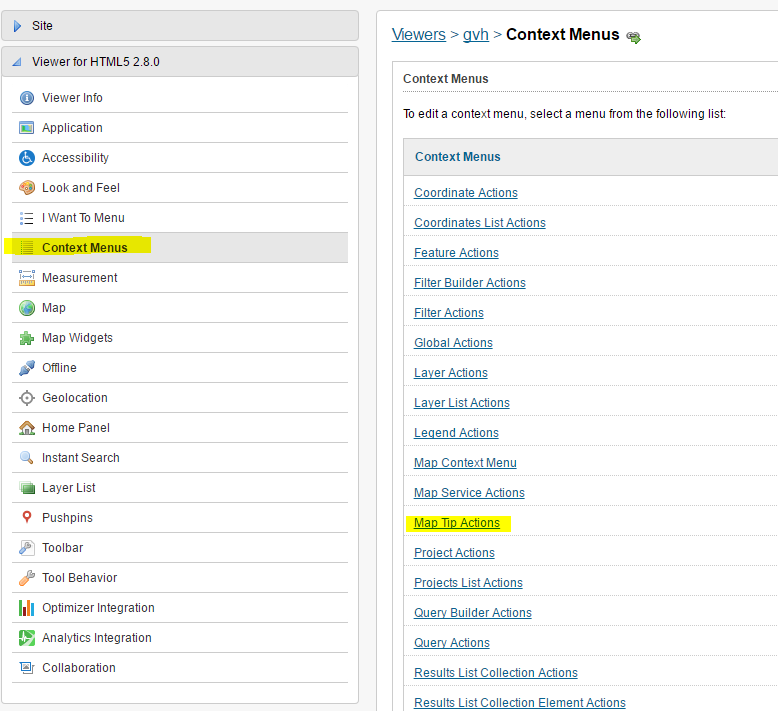
Hope that helps!
-Amanda0
Du måste logga in om du vill lämna en kommentar.
Kommentarer
3 kommentarer