Coordinate Display Types - Positive/Negative Lat/Lon in addition to N/S/E/W

My users typically get lat/lon coordinate pairs in positive/negative (as opposed to N/S/E/W). Is the a way they can (using the Plot Coordinates tool) input this positive/negative coordinate pair - rather than having to specifiy N/S/E/W?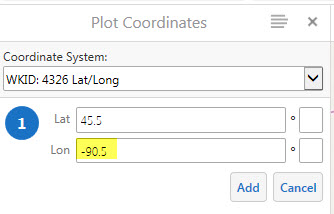
0
-

Hello Paul,
We have an improvement request already filed for this capability, GVH-13968. I've added you as a stakeholder there, but I would also recommend posting it in the (https://support.geocortex.com/GSCIdeas?c=09a6000000008RsAAI&filter=1&categ=all&sub-nav=ideas&main-nav=essentials&page=1) Ideas section so that other users can easily vote for it as well.
In the meantime, it should be possible to use a workflow to emulate the Plot Coordiantes tool and accomplish this. It would involve:- using a DisplayForm activity to let users enter their coordinates
- using the values they entered to create a MapPoint object
- using the RunExternalCommand activity to run the "PlotCoordinates" command, with the MapPoint as the command parameter
Amanda0 -
We also need to use negative numbers instead of N/S/E/W. 0 -

Yes!
Also, I've found that if you're in the process of adding in coordinate values to plot on the map and the user moves the mouse over the map, the coordinate values are overwritten by the mouse hovering. This is an annoyance if you've entered your coordinates and navigate to click the button and mistakenly move the cursor over the map. You'll need to re-enter the values.
It was a good effort, but I'm not sure that the aggregation of functions in the case, works as eloquently as intended.0 -
Thanks, Eric. That's good feedback. I'll include your comments in the issue. 0 -
I second Erik's issue with typing in coordinates and losing them when the mouse hovers over the map area. I steer people away from the Plot Coordinates tool when trying to type in coordinates because of this but also because of the need for the N/S/E/W entry. If they only want to click a spot on the map to get coordinates then the tool works fine.
For typing in coordinates, I try to direct people to the global search bar but users never quite know if they need a negative sign in front of something, does the Latitude or Longitude come first, is there a space between the Lat/Long numbers or a comma then a space, etc.
I also agree with Paul's original question...could there be a way to type in the coordinates without entering a N/S/E/W letter but just using a negative in front? Typical formats for coordinates we receive are:
40.1250, 80.1253 (decimal degrees)
40 7 29.8607, 80 7 30.9033 (degrees minutes seconds)
I would envision this tool having a look and feel similar to the 'Go to XY' tool in ArcGIS. Ability to type Lat coordinates into a Lat box, Long coordinates into a Long box but without the need for N/S/E/W and of course no degree/minute/second symbols.
Please add me as a stakeholder.
Thanks!0 -
Just to add one more issue...when typing in Degrees Minutes Seconds (DMS) coordinates into the Global Search bar, I never get a returned location ("No Results to Display"). For example I tried the following in different formats:
40 7 29.8607, 80 7 30.9033
40 7 29.8607 N, 80 7 30.9033 W
40° 7' 29.8607" N, 80° 7' 30.9033" W
I also tried them with just a space between the coordinates and no comma and still I never get a return in the global search bar for a DMS coordinate.
John0 -
Hah, thanks John,
I came searching for a way to incorporate the ability to type coordinates into a global search test field to return a location... Much like Google where if you type a coordinate, it will place a marker and zoom you to the location. I'm surprised this isn't functional in Essentials/HTML5 Viewers.0 -
Apologies if this has already been asked...
In my part of the world the plotting of coordinates for Lat is always with an 'N' bearing and the Lon is always with a 'W' bearing. Is there a way to edit the code where 'N' and 'W' are placed by default in the appropriate Bearing Field?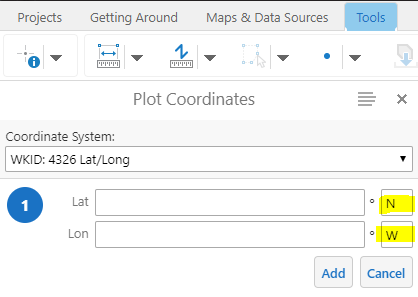
-SJE0 -
Did this ever get resolved. Either the ability to default the bearing to N and W or allow an option to enter negative coordinates and avoid the bearing altogether ?
Rob0 -
Hi Rob,
Entering negative values is still an Improvement Request and it has not been implemented. You may want to look into using a workflow, as Amanda mentions above, to have a more custom solution specific to your needs.
I could not see any requests for defaulting the value, the "Ideas" section of this Support Center would be the best place for it.
Regards,
Wayne Richard
Latitude Geographics Group Ltd.
Head Office: 300 – 1117 Wharf Street Victoria, BC Canada V8W 1T7
Tel: (250) 381-8130 | Fax: (250) 381-8132 | wrichard@latitudegeo.com
Developers of Geocortex web-based mapping software | www.geocortex.com
An Esri Platinum Business Partner0
Du måste logga in om du vill lämna en kommentar.
Kommentarer
10 kommentarer