How do I render diagonal hashes in the Update Graphic Layer activity?

I want to use diagonal hashes in my polygon fill for a graphics layer. What is the syntax for the Renderer in the Update Graphic Layer activity?
0
-

If you haven't figured something out yet, I'll copypaste from another answer that I just wrote. Disclaimer: I haven't used this actual activity but have used the ArcGis for Server renderers in other applications involving Geocortex so hopefully this answer can prove helpful. If you have found another solution, I'm interested to know what it is because my way seems like too much work! Here's what I would do:
1) I publish the symbology that I want in a service
2) I navigate to the REST endpoint for that layer in the published service
3) I view the JSON definition for that layer, which the uninitiated may not know can be accessed from the "JSON" link towards the top of the page.
4) I copy the definition for that renderer right on out of this page, verbatim but linearized. The parts that ESRI (typically) wants are what's contained on the "renderer" line, up to but not including the "transparency" definition.
5) You can probably turn this JSON into the object that Geocortex needs using ESRI.ArcGIS.Client.Renderer.FromJson()0 -

Did this suggestion end up working for you? I am trying to make a graphic buffer a simple outline with no fill and I tried their examples as well as this JSON example. With the JSON, I get compiling and syntax errors and with their examples I get an error when I run it that "The calling thread cannot access this object because a different thread owns it." 0 -
Use update graphics layer with the following renderer:
ESRI.ArcGIS.Client.Renderer.FromJson("{""type"": ""simple"",""label"": """",""description"": """",""symbol"": {""color"": [0,0,0,0],""type"": ""esriSFS"",""style"": ""esriSFSForwardDiagonal"",""outline"": {""color"": [0,0,0,255],""width"": 2,""type"": ""esriSLS"",""style"": ""esriSLSSolid""}}}")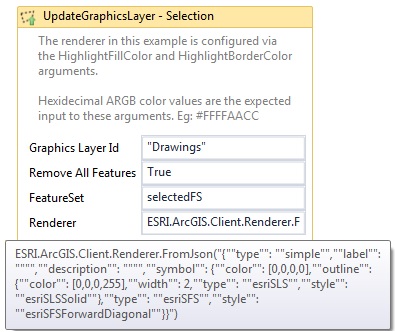 0
0
Du måste logga in om du vill lämna en kommentar.
Kommentarer
3 kommentarer