Add a Map Service to the Map programmatically using "AddMapService" command

I'm developing/extending a custom HTML5 viewer and I'm stuck trying to add a Map Service to the Map using "AddMapService" command programmatically using typescript.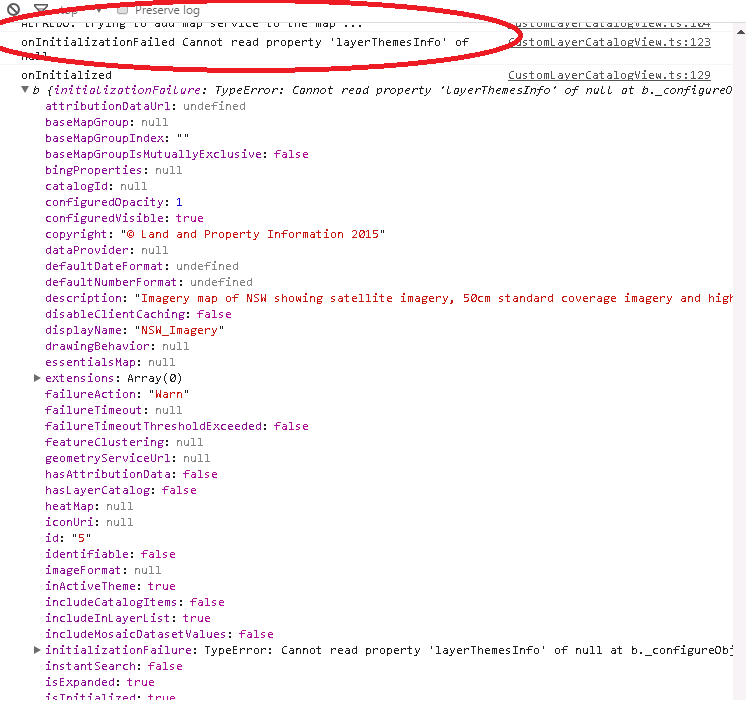
When geocortex.essentials.MapService object is initialized, it throws the error:
onInitializationFailed Cannot read property 'layerThemesInfo' of null
This is the code:
//creates a new instance of map service using REST url endpoint of a layer catalog site
this.mapService = new geocortex.essentials.MapService('http://hs2-p6gis/Geocortex/Essentials/REST/sites/test_catalog_site/map/mapservices/5');
//initialize map service (here it fails)
this.mapService.initialize();
//map service initialization event
this.mapService.onInitialized = function (mService) {
alert('onInitialized');
console.log('onInitialized', mService);
//add map service using command
this.app.command("AddMapService").execute(mService);
console.log('AddMapService command executed');
}
//map service initialization error event
this.mapService.onInitializationFailed = function (e) {
alert('onInitializationFailed');
console.log('onInitializationFailed', e.message);
}
I've tried with other map services REST uris, but they all throw the same error onInitializationFailed Cannot read property 'layerThemesInfo' of null
That.s the error captured on the browsers debugger. Apparently, the mapService object when initialized, it can find some properties but not layerThemesInfo property?
Any ideas why this error is happening?
Thanks,
Alfredo
0
-
Any luck with that one? 0 -
Hi folks,
It's not easy to determine exactly what's going on here without halting your custom viewer ina debugger and inspecting the object state, but I suspect that the Javascript API is assuming that the Mapservice that we've just created is associated with an Essentials site, which would have some layer theme information.
If you set the newly created Mapservice objects' isUserCreated attribute to true then the API should skip over all of that and proceed with the command.
Let me know if this works!
-Malcolm0 -

If anyone is still looking for a solution here is a method that worked. Also tried setting up the MapService first and using initialize, but that doesn't appear to be how it works. You need to load in a dynamic layer, listen for the layer to finish loading, assign it to the MapService, and then use the AddMapService command.
let url: string = "https://YOURADDRESSHERE/arcgis/rest/services/SOMEPATH/MapServer";
let workingService: MapService = new MapService(url);
let layerOptions = { "id": "dynamicLayerTestShouldBeAGUID", "opacity":1, "showAttribution": false };
let dLayer = new esri.layers.ArcGISDynamicMapServiceLayer(url, layerOptions);
dLayer.setVisibleLayers([7]);
The fix here is to use setVisibleLayers. You can use a layer ID or a layer name as a string.dLayer.setVisibleLayers([7]);
dLayer.setVisibleLayers(["Some Layer Name"]);
Setup the MapService.workingService.serviceLayer = dLayer;
workingService.mapServiceType = MapServiceType.DYNAMIC;
workingService.isUserCreated = true;
workingService.userLayerType = "LayerAddition";
workingService.includeInLayerList = true;
//workingService.essentialsMap = this.app.site.essentialsMap;
workingService.displayName = "Custom Layer";
//newMapService.disableClientCaching = true;
workingService.mapServiceFunction = MapServiceFunction.OPERATIONAL;
workingService.opacity = 1;Finally, list for the layer to finish loading. Make any final map service changes based on the loaded layer and then use the AddMapService command.
dLayer.on("load", (args) => {
workingService.id = dLayer.id;
thisViewModel.app.commandRegistry.commands.AddMapService.execute(workingService);
});0
Du måste logga in om du vill lämna en kommentar.
Kommentarer
3 kommentarer