Firefox pushes layer in TOC far down

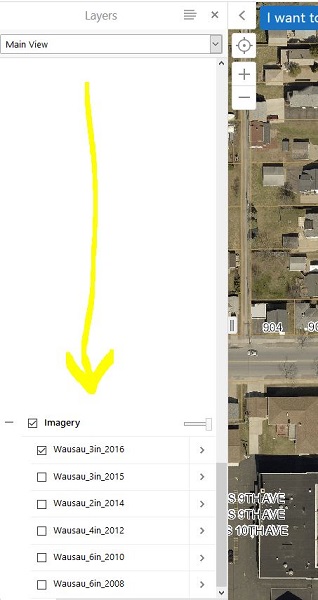
It appears to happen only in Firefox, however, my bottom layer get pushed way down in the TOC and users have to scroll thru blank space to view it. Anyone else have this issue?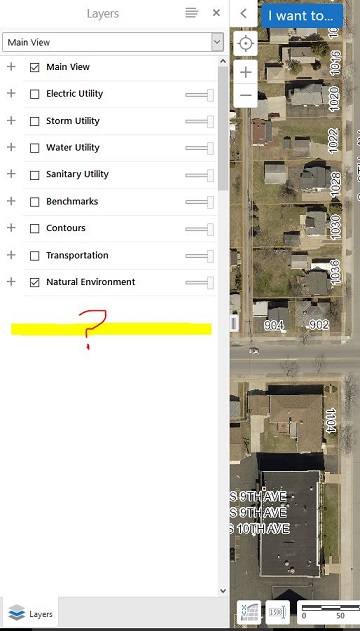
0
-

Hi Dan,
Could you please share layer list of your manager screenshot? Have you hidden some layers in manager?
Cheers
Long0 -
I do have several layers that are 'hidden' from the table of contents. This must be the culprit? 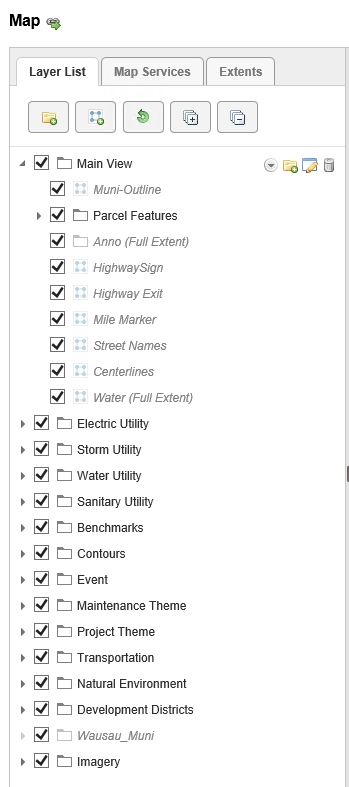 0
0 -
Hi Dan,
Thank you for the screenshot. Yes, I think the hidden layers cause the issue. The issue has been reported (Bug ID is GVH-12916). So far, we don't have a timeline for a fix yet, but it's been validated.
Cheers
Long0 -

We have hidden layers and don't have this issue. Our hidden layers are only in other folders (like under your Main View).
Have you tried just removing the Wausau_Muni from the Layer List instead of hiding it? As long as it's turned on under Map Services it should always be visible within the viewer.0 -
I had this same sort of problem, where I had deleted specific services and/or layers from services from my site (that was referencing another site). When I deleted the empty folders in the layer list that were place holders for the layers that I had deleted, the mysterious gaps in the layer list in the viewer disappeared. Looks like consistency between the layer list and the map services list is key. 0
Du måste logga in om du vill lämna en kommentar.
Kommentarer
5 kommentarer