How to assign a view to a variable in Workflow

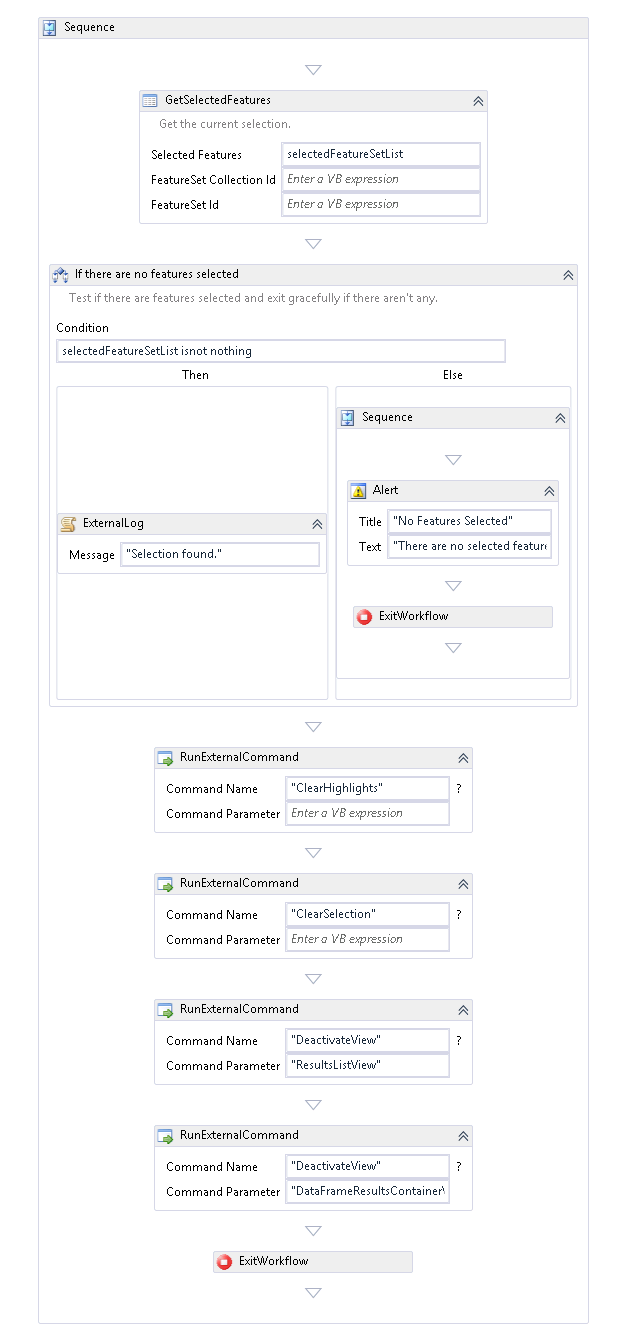
I have been trying to create a simple Clear Selection workflow that would clear the user's selection and close all the results views at once. I thought I had figured it out by using "DeactivateView" to close "ResultsViewList" and "DataFrameResultsContainer". However, this causes the Query tool to no longer work properly. If Clear Selection is used to clear the query results, the user is unable to perform a new query because the results views remain inactivated.
Therefore, I decided to try using "ToggleView", but I need to assign the views to variables in order to run an IF statement on them. Can anyone tell me if that is possible, and how to do so?
I would also be interested in other methods for clearing the selection, if there is an easier way.
0
-
HI Pennie,
I don't think it will be possible to save a view like you mentioned; theResultsListView is just the part of the viewer that holds the results. Deactivating a view is more like hiding it than removing it (see "DestroyView " command), so tools that need the ResultsListVie should re-activate it if it's been closed. If you're looking to hide the dataframe too, I would recommend the "CloseDataFrame" command.
What kind of selection(s) would your users have open before running this? And how is the next query performed?
Thanks,
Amanda0
Du måste logga in om du vill lämna en kommentar.
Kommentarer
1 kommentar