bitly link redirect through IIS 7 - How can I make it work?

I have a Bitly link that points to a GVH 2.7 viewer that I want to redirect to the 2.8.1 viewer. I am having no luck with URL Rewrite in IIS 7. The pattern test succeeds in the Edit Inbound Rule page of URL Rewrite, and the rule is enabled, yet no redirect takes place when the Bitly link is entered into the browser, nor when the address it points to is entered. http://bit.ly/bruceCi should redirect to an address different only in the substitution of /GVH/ for /GVH5/. I don't know what to do because the current target of the link fails to load due to some customizations that are incompatible with 2.8.1, and I don't want to create yet another Bitly link.
Has anyone else succeeded in redirecting a GVH link? Please help me with this.
Thanks,
Justin
0
-

There is something wrong with your rule if even using the full URL is not working.
Could you post your rule? You can screenshot the edit screen or copy it form webconfig.0 -
here's a screen shot of the test pattern showing it works with the full URL, followed by the rule 
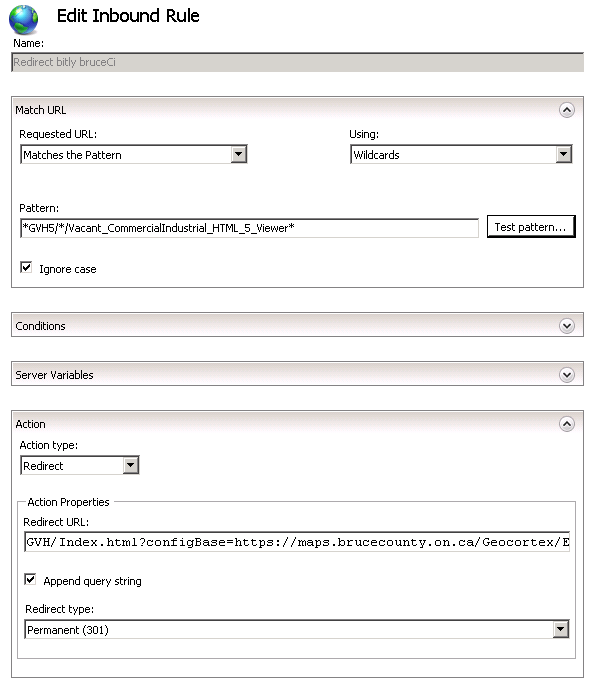 0
0 -
I realize I could write a more concise Redirect URL, but thought this would do for the time being. So I still do, please, need help sorting out why no redirect actually happens. 0 -
For context I was following the directions at https://docs.microsoft.com/en-us/iis/extensions/url-rewrite-module/creating-rewrite-rules-for-the-url-rewrite-module#creating-a-rewrite-rule where of course the example URL is so much simpler than the Bitly destination URL I am struggling to redirect. 0 -
Yeah, took me a while to get my rules working, too. Does your redirect URL use the references?
I would try making the match URL *.* and then add the GVH5 and viewer name as separate conditions, using {QUERY_STRING} Matches The Pattern.
I would also uncheck the 'Append query string', that may trip up Geocortex.0 -
Thanks Dan, I'll give this a go on Monday. Thanks again, and have a great weekend! 0 -
The redirect URL was not using references until I tried that today. But regardless of checking or unchecking Append query string, it's still not redirecting
https://maps.brucecounty.on.ca/GVH5/Index.html?configBase=https://maps.brucecounty.on.ca/Geocortex/Essentials/REST/sites/Vacant_CommIndustrial/viewers/Vacant_CommercialIndustrial_HTML_5_Viewer/virtualdirectory/Resources/Config/Default
to
https://maps.brucecounty.on.ca/GVH/Index.html?configBase=https://maps.brucecounty.on.ca/Geocortex/Essentials/REST/sites/Vacant_CommIndustrial/viewers/Vacant_CommercialIndustrial_HTML_5_Viewer/virtualdirectory/Resources/Config/Default
the difference being only in the GVH5 becoming GVH in the second URL, which is what I want the redirect to go to.
The redirect URL today with references was
{R:1}.{R:2}GVH/{R:3}/Vacant_CommercialIndustrial_HTML_5_Viewer{R:4}
but this still didn't redirect when the browser loads the initial URL. So I decided maybe better to try the short URL instead for Redirect URL and not use any references i.e.:
https://maps.brucecounty.on.ca/GVH/Index.html?viewer=Vacant_CommIndustrial.Vacant_CommercialIndustrial_HTML_5_Viewer#
but this did not work either regardless of checking or unchecking Append query string.
I don't understand why the Test Pattern succeeds on the Bitly target URL (the first one in this reply), yet no redirect action takes place. Yes, it is an Enabled Inbound Rule. This is how the URL Rewrite screen looks in case you see anything out of place here:
I'm greatly puzzled by this problem, and will appreciate any further guidance.
Thanks,Justin
0 -
the pattern I am using in the previous post is
*.*GVH5/*/Vacant_CommercialIndustrial_HTML_5_Viewer*
This makes me wonder if the fact the Input in URL Rewrite (shown in the image) states "URL path after '/'" might be tripping things up because the pattern picks up the https://maps.brucecounty.... portion of the URL. I wonder if that is inappropriate.0 -
I know the Test pattern works, but it is not picking up that URL. I would make the match URL only *.* and then add conditions for the GVH5 and the viewer name.
Is this rule at the server level or site level? If you put the rule in the GVH5 site, then you shouldn't even need to check for the GVH5 anymore. Or if it is already at the site level, it's probably not going to work because I think the "URL path after the /" is referring to the "/" after GVH5.0 -
After putting in *.* and seeing it match every request to the server, I noticed Conditions in the context menu. Click through to that is where I found the {QUERY_STRING} you had mentioned earlier. I put my successful test pattern from earlier into this condition, and from that point, only the relevant URL requests redirected. Objective accomplished! Thanks so much Dan! 0
Du måste logga in om du vill lämna en kommentar.
Kommentarer
10 kommentarer