Auto zoom to Instant Search Results in HTML 2.8

Hi,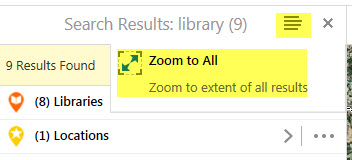
Has anyone been able to modify instant search in Essentials 4.7.1 HTML 2.8 to make use of the new Zoom To All option (ZoomToFeatureSetCollection)? I want the results to automatically be zoomed to (ie same action as manually clicking on the Zoom To All button).
I've got it working when you click on the results list set, but not the results list collection.
{
"name": "FeatureSetClickedEventBehavior",
"event": "FeatureSetClickedEvent",
"commands": [
"ZoomToFeatures",
"ShowFeatureSetResultsView"
]
},
Any ideas on how to go about it?
Thank you!
Belinda
0
-

Hi Belinda,
We don't generally try to do automatic zooming on search results, since there can be a delay in getting all the results, and we don't want to move the map too early or too late.
However, you should still be able to configure a click event to zoom to all results. I'll take a look at the viewer config and see what I can find.
Regards,
-Malcolm0 -
Hi Belinda/Malcolm,
Did you ever figure out if this is possible? We would like this same behviour when users run an instant search.
thanks
Ben0 -
Hi Ben,
We ended up paying AAM (our Australian distributor) to write the missing functionality. It's a shame it doesnt work automatically or at least have the option to enable it. If you want to check out what we ended up getting to work, our external site called Shire Maps has it. https://maps.ssc.nsw.gov.au/ShireMaps/
Belinda0 -
Thanks Belinda,
That is a shame, I was hoping it was just a syntax issue :(. It seems like it should be default map viewer behaviour to me.
Thanks for sharing and I will contact AAM as well to see how we can also do this.
cheers
Ben0
Du måste logga in om du vill lämna en kommentar.
Kommentarer
4 kommentarer