Change Access Denied Language

We are piloting a new site and only have a few users with access to it. Some people outside our pilot have gotten access to the link and are getting the Access Denied. This is expected but I want that page to have different language so they can be excited about what's coming instead of feeling excluded.
I can't seem to find the html file where this is coming from, anyone know?
0
-
Hi Stephanie,
Are you referring to the viewer error that looks like this: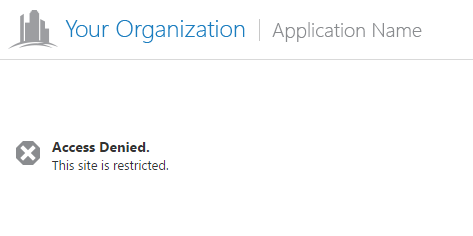
If so, the "Access Denied" and "This site is restricted" strings are found in the Mapping.en-US.json.js locale file. You could edit this file in ..\inetpub\wwwroot\Html5Viewer\Resources\Locales to change these messages, though this change will apply for all of your viewer applications. The keys in question are language-map-site-authorization-failed and language-map-site-authorization-failed-message, respectively.0 -
Thank you, this is exactly what I was looking for! 0 -
just to add to Jordan's reply, if you want the change to only apply to a specific site, edit the same strings in the same files under your sites/[sitename]/viewers/[viewername]/virtualdirectory/Resources/Locales folder. 0
Du måste logga in om du vill lämna en kommentar.
Kommentarer
3 kommentarer