Issues with Initial Extent in Site vs. Viewer

So, when I "Set Initial Extent" in the Site, and then load the Viewer, the Viewer is zoomed in one step too far. If I zoom out my "Set Initial Extent" one step in the Site and then load the Viewer, the Viewer is zoomed to the correct level (i.e. it matches the zoom level of the Site).
While that is an issue, we can work around it. However, if I have the done the steps outlined above, and I click "Return to Initial Extent" in the Viewer, my Viewer goes to the Site zoom level, which is one step too far.
So, if I want the Viewer to look correct upon load, I have to screw with the initial extent in the Site and have it zoomed out too far. But doing so makes the "Return to Initial Extent" button function incorrectly. If I want the "Return to Initial Extent" button to work correctly, I have to screw with the initial extent in the Site and have it zoomed in too far. Can anyone help?
0
-
Hi Matt,
I had a similar issue. I swapped out the "Return to Initial Extent" button for the "Full Extent" button, then:- Set the initial extent values in Manager to the coordinate extents required for the viewer to look correct upon load
- Set the full extent values in Manager to the coordinate extents required for the viewer to look correct when the toolbar "Full Extent" button is clicked.
Dave0 -
For the "Return to initial map extent" option in the "I wanto to..." menu, go to the I want to menu option in Manager and make the highlighted change: 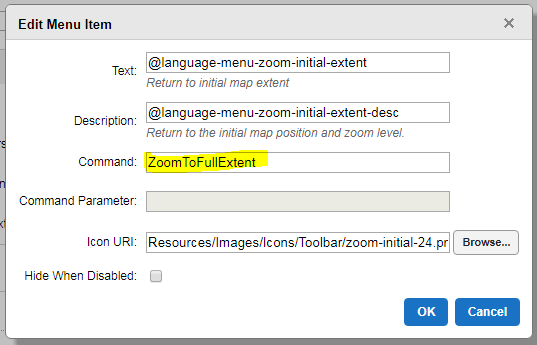 0
0
Du måste logga in om du vill lämna en kommentar.
Kommentarer
2 kommentarer