Sorting in Datatable without C# Script

Hello,
I have a C# Script that would sort a datatable for me. However in the past week, the C# scripts have prevented my workflows from executing (it times out). I have been converting all the C# scripts to using workflow activities. Now I am a bit stuck on sorting.
This is the original C# script:
String filter = "";
String sort = "Property_Type ASC, Property_Sub_Type ASC, LOCALITY ASC, STNAME ASC, HOUSENO ASC";
DataRow[] dataRows = DataTable.Select(filter, sort);
DataTable dt = DataTable.Clone();
foreach (DataRow row in dataRows)
dt.ImportRow(row);
DataTable = dt;
Can someone provide some advice? I can do most of it using assign activities however I was unable to get the 'for each' activity to work.
Thanks!
0
-
Hi,
Did you try to use AddDataTableRow activity from activities toolbox list?
I think you could use that activity instead of the foreach ... something like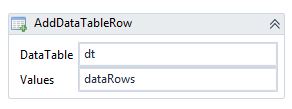
I hope this helps0 -
This is the way that I do it. Keeps me from having to loop through the datatable: 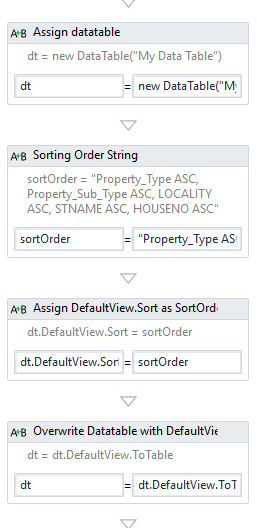
See https://msdn.microsoft.com/en-us/library/system.data.dataview.sort%28v=vs.110%29.aspx for extra documentation.
Marshall0 -
Thanks so much Marshall! That worked for me. I had not thought to sort on the DefaultView. 0
Du måste logga in om du vill lämna en kommentar.
Kommentarer
3 kommentarer