Bing Maps AJAX Control Version 7 deprecated; 3rd-party maps integrated with Bing Maps affected

As of June 30th, 2017, Microsoft is deprecating its V7 AJAX control in favor of the Bing Maps V8 web control. More information about this deprecation can be found (https://www.microsoft.com/maps/discon-control-migrat-guide.aspx) here and (https://social.technet.microsoft.com/wiki/contents/articles/34563.bing-maps-v7-to-v8-migration-guide.aspx) here . This will affect viewers which use the 3rd-party map control with Bing Maps. For version 2.9, the HTML5 viewer will contain an updated version of the HTML page that hosts the 3rd-party map via V8. For existing HTML5 viewers, this page is also available (http://data.latitudegeo.com/support/GSC/BingMapsV8Control.zip) here .
For Silverlight viewers, an updated version of the Bing Maps 3rd-party integration page is available (http://data.latitudegeo.com/support/GSC/BingMapsV8Control_GVS.zip) here .
Note that this deprecation does not affect Bing Map services added to Essentials sites, as these are rendered via the Esri API rather than the Bing AJAX control.
0
-
"Note this deprecation does not affect Bing Map services added to Essentials sites..."
Coincidentally, following this deprecation a valid key is now seen as invalid(?) and therefore in at least our case Bing Map services appear to have been affected. Any thoughts? 0
0 -

With Essentials Version 4.7, HTML5 Viewer 2.8
It shows as offline in our Manager.
It won't display in feature maps.
However it seems to work in our map viewer.
On our DEV site running 4.8.1, HTML5 Viewer 2.9, we do not see this behavior and it works as intended.0 -
Yes, there are two issues with Bing Maps: one is described here and affects the HTML5 and Silverlight viewers' 3rd-party map integration with Bing Maps. This is addressed in GVH 2.9 and for GVS using the updated page linked above.
The second issue impacts Geocortex Essentials sites using Bing Maps (e.g., as base maps), and is resolved in Essentials 4.8.1. (https://support.geocortex.com/essentialsGSCForum?sub-nav=forum&main-nav=essentials&dc=Announcements&id=906f20000000CJQAA2) There's more info on that here .0 -
Paul, the error you're seeing is very likely due to the Bing Maps SOAP services deprecation -- that is what you'll see if you attempt to add a Bing Maps layer in Essentials pre-4.8.1. 0 -
Hi Jordan, we have incorporated the Bing Linked map into our web map but would like the Bing map to automatically open to streetside, not birdseye. In the BingMaps.html, I have edited the Microsoft.Maps.MapTypeId.streetside, but am now just seeing a white screen when the map loads. Is streetside not supported?
* Initializes the Bing map.
*/
function initializeMap() {
var bingApiKey = "AtV9AsvwPTO_qa3SHgSyFo-mqXeKMgqp7p9eBFudcq_xWxYXnoyTo3_iaoB94LOFHRE";
var location = new Microsoft.Maps.Location(0, 0);
var mapOptions = {
credentials: bingApiKey,
center: location,
mapTypeId: Microsoft.Maps.MapTypeId.streetside,
zoom: currentZoom
}; 0
0 -
Hi Lisa,
Jordan is no longer at Latitude. I see an issue filed in our system for the use of streetside but it is reporting the tools don't work when streetside is selected. Your issue looks much more serious! If you click F12 to show the developer tools, are there any errors listed?
Regards,
Wayne Richard
Latitude Geographics Group Ltd.
Head Office: 300 – 1117 Wharf Street Victoria, BC Canada V8W 1T7
Tel: (250) 381-8130 | Fax: (250) 381-8132 | wrichard@latitudegeo.com
Developers of Geocortex web-based mapping software | www.geocortex.com
An Esri Platinum Business Partner0 -
Hi Wayne, Update: I changed streetside to canvasDark to see if another basemap would work, to confirm that it is in fact an issue with streetside. canvasDark worked, so I changed it back to streetside, and now it is no longer showing white, but defaulting to road. Ideas? 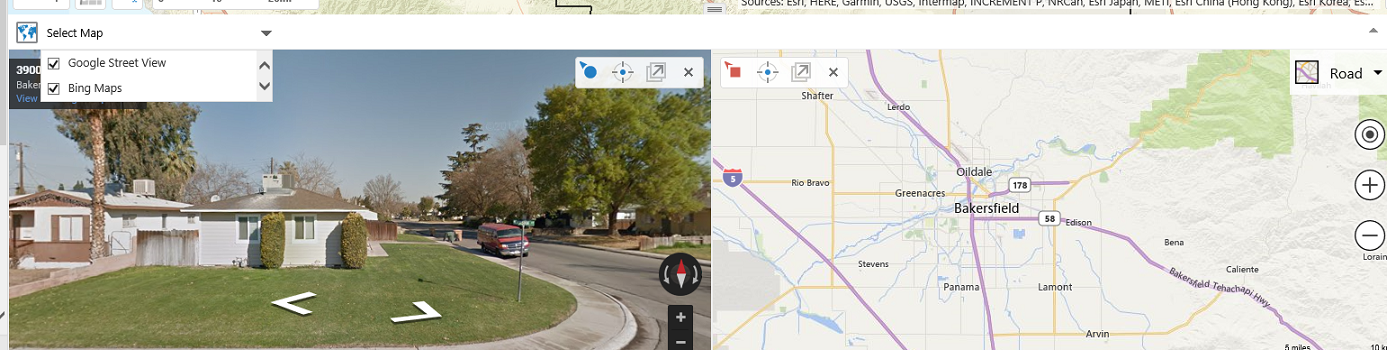 0
0
Du måste logga in om du vill lämna en kommentar.
Kommentarer
7 kommentarer