overlay issue when zooming

This is hard to describe...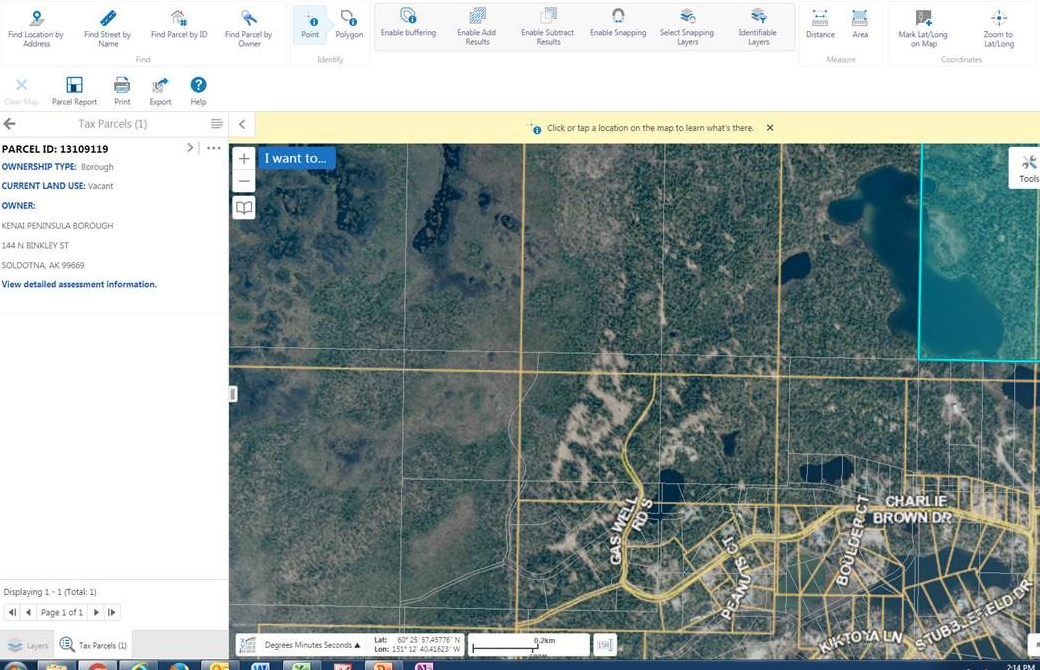
Have you ever noticed that basemaps and layers don't zoom together?
We have a basemap that includes parcel lines and then a parcel layer over top. I know that seems redundant but it's a long story. Usually you can't tell that there are two layers, but lately users are seeing the layer and the basemap zoom at different rates. It looks like the basemap zooms and then the layer (after a lag) 'jumps' to where it should be. Usually this isn't terribly probelmatic, just weird. Some users however, see the error persist and the layer never lines back up to the basemap. It does seem related to the home panel flying in and out.
Any ideas how to fix this?
0
-
The simplest answer - speed up the dynamic layer. How long does it take to draw using the developer tools in Chrome (F12)? 0 -
The entire viewer? 6.6 seconds.
The parcels are scale depedent though and I'm afraid it is beyond my chrome developer abilities to parse out how quickly they are loading.
How would one go about speeding up the dynamic layer?
https://maps.kpb.us/gc/Html5Viewer/Index.html?viewer=P_BasicParcelViewer0 -
You are refering to the Lot Lines that can be turned on at 1:15,600? There are different ways to make a service faster, but I want to make sure I'm looking at the correct layer. What is the Service URL? I'm not seeing a huge difference from where I am, but it is likely that for me the cached layer is taking longer over the internet than you are over your network.
You don't need "Developer abilities" for this. Open your site in Chrome, then hit the F12 function key. This lets you view traffic coming to your browser. You can then see how long different parts/services to load.
I would be currious about your "long story" - I also use a cache at first to speed things up, but I then change to a dynamic service at 1:9,600, which is where I turn on my parcels. Parcels are never cached.0 -
Yes, I have the developer window open - that was a bit of a joke - I wasn't able to identify the parcels layer as it drew, that's all.
No, it is not the lot lines. It is a layer that is always on and not shown in the layer list.
http://maps.kpb.us/gis/rest/services/txparcel/MapServer
The long story isn't that long, just one of those legacy things. The basemaps predate geocortex (although they are updated). There was no need to have a seperate dynamic layer in the old flex viewers and speeds being as they were, it was fine to have the parcels, streets etc. as part of the tiled layers. When we switched to Geocortex, we wanted to leverage some relationships etc. using its funtionality but hadn't changed the basemaps. This is now on my list.
Regardless of this, I've seen this lag - snap thing happen with other layers. The recent issue was brought to my attention by another agency and although I am guessing it's because their internet isn't the greatest, this is Alaksa and many folks have crappy speeds.0 -
So it looks like that service is taking about a half second to load for me, which is not horrible... It is making a number of calls to your geometry service right after, so I'm wondering if this service is in a different coordinate system from the others? You can also look at your services using ArcGIS Server Manager - click on Logs at the top right, and then Statistics in the ribbon right below that. Once there, you should be able to click on individual services and pull various reports. I find Average Response Time to be a good place to start. Any service that is used a lot, you want to make faster. Below is an image for my main dynamic services: 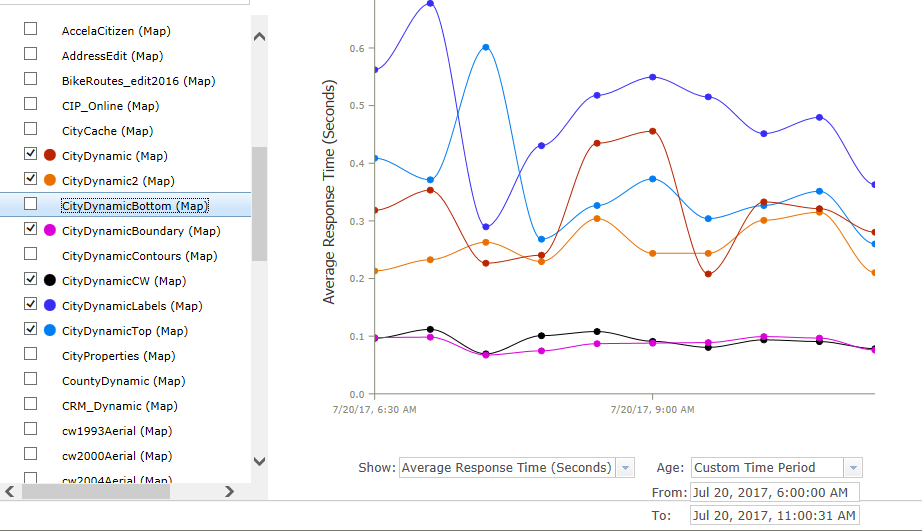 0
0 -
Great! Thanks so much for your help. I'll take a look. 0 -
Once you have found out which services are the slowest, you can try to make them faster. For parcels, does your data reside in SDE or in a File Geodatabase located on the AGS machine? I keep most of my layers in a FGDB on the same server as AGS, and this is faster usually. If you are doing searching/joining, etc. on a layer with many features (100,000+) then keeping the data in an industrial strength database (SDE) makes more sense. I also don't do any joins with my parcels. Instead, we run a routine once a month when we get parcels from the County to add things like Zoning and such from other layers into the parcel layer to speed things up. You can see whether the service needs more resources - is it worth changing min/max instances? 0 -
And what about total system resources - what does total CPU and memory look like on your server(s)? You are creating a parcel service with just one layer - is that common? Each service uses RAM, so you will use a lot of RAM with many services - do you have enough extra when a service needs more resources? 0 -
You also need to balance site open speed with redraw speed once you are using the site. I tried to increase site open, but ended up degrading response to panning and zooming. The number of instances can be set on the Pooling tab in AGS. Setting the minimum higher means getting to the service quicker, but also uses more RAM. Think of this as having your horse already saddled. You can also increase your Max Instances, which can also lead to faster access times. This is like having more horses, so you don't have to wait for one to come back from a ride. RAM is much cheaper than CPU (ESRI licensing), but you need to balance things out. If you set the Max too high, then one service could start to hog all of your resources. This is what I did, and my site just hummed...until the load went up, and then it froze. If you look at the Statistics reports for Max number of instances, that will show you what your service has been doing in this regards. Look at where it normally sits during work hours, and then set the Min value to this, or just under. Likewise, you don't want to be hitting your Max values very often. If you do, look at the average response time during that time to see if it caused issues, and if so, raise it a bit. I look at these every few weeks to see how things are going. 0 -
And more on this - those dynamic services that are always on - give them more instances. These are the ones that can freeze/slow your site for the most folks, so they are the ones to worry about the most. Cached services are generally fast, and you don't need to worry, unless you see times slow. Also simplify those common services to make them faster. Those layers that are just used by only a subset of users, or are off at open, give less resources to. 0 -

The site is kind of slow to display map updates, especially the imagery. This is probably due to network limitations, but tuning your services should also help. We have also experienced the overlay issue when zooming and it is typically due to services being slow to load or crashing. You'll want to check the AGS logs to see if services are crashing. I was advised by ESRI to set all services to high isolation, which takes a bit more memory but increases stability.
All the geometry services call are from your coordinates tool. You may want to hide that by default to save on the processing and bandwidth usage.0 -
Dan, out of curiosity, do you track how long your server(s) are above a certain CPU level? My server guy likes to measure minutes above 95%, above 80%, etc. Do you guys do that? Currently, we tend to get above 95% around 5-10 minutes a day, and above 80% around 30 minutes a day. At 95%, we are certainly seeing slowdowns, but 80% for brief times seems okay. Are you aware of and best practices in this regard? We are looking to add a new GIS based Asset Management system, and that will likely add to our load. I'm trying to figure when best to go from 4 to maybe 6 cores... 0 -
I don't, but our network engineers might. Our production servers are way overpowered right now, so it's not really a concern. I've never seen the CPU or RAM higher than about 25%.
I do push our test box to the limits though and i think you're spot on with the 80% mark. It's a 4 core VM with 24GB RAM. I used to run 3 or 4 instances when tiling, but that maxes CPU and RAM and kills overall performance. It currently has the RAM maxed and the CPU about 60-70% (I'm importing 40Gb of tiles) and it's a little slow but acceptable. Since it's just a test box, we do keep most services with minimum instance of 0, however, so not much else is going on.0 -

Hi,
Bobbi, what version of the HTML5 Viewer do you have installed? There might be an issue in 2.8/2.9 related to how we changed the way modules are loaded during the viewer initialization. I have a site where this behavior is present in an upgraded 2.9 viewer but it goes away if I create a secondary 2.9 viewer with default settings.
Thanks,
Mike Ketler0 -
Hi Mike,
This issue has persisted even with a whole new rebuild and throughout versions. I'm up to 2.12.1 now and it is still doing it.
https://gis.kpb.us/map/index.html?viewer=basic0
Du måste logga in om du vill lämna en kommentar.
Kommentarer
15 kommentarer