Custom markup styles in the HTML 5 Viewer 2.9.0?

It seems the addition of the style selector has changed the format of the Desktop.json.js file and thus any custom styles and symbols from previous viewer versions don't seem to work after the upgrade to 2.9.0. Does anyone have any insight on how to change the default styles and/or add custom ones?
0
-

Phil,
They can be found here:
\\<servername>\c:\Program Files (x86)\Latitude Geographics\Geocortex Essentials\Default\REST Elements\Sites\Resources\Symbols
They are split out into JSON files. Make sure you use a JSON Validator or the symbols won't load when you open the viewer.0 -
This is great, thank you.
It appears that the colours are in rgba format with the a/alpha controlling the transparency, but the alpha value must be converted to a percentage out of 255 rather than just 0-1.0.
Examples:
100% (solid/opaque) = 255
50% = 127.5
5% (almost fully transparent) = 12.75
phil.0 -

Hey Phil, does the new style selector let users create their own custom style on the fly (ie they choose the color, they choose the thickness and trasparency) or is it still just predefined options?
Thanks!
Don0 -
Yes, users can select their own custom style:
- Fill and outline colour (both with transparency)
- Line width
- Line Style (dashes, dots etc)
- Fill Style (horizontal, vertical, diagonal etc)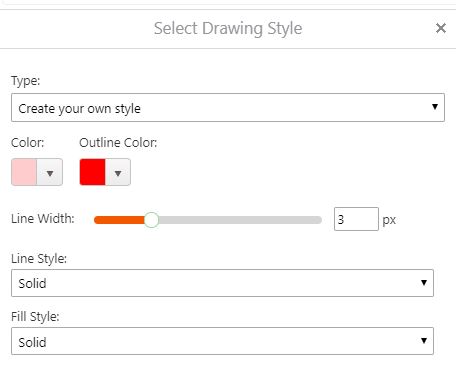 0
0 -

Ive been trying to nut this out for months!
Thanks for the post Phil.0 -
This might help: https://developers.arcgis.com/javascript/3/samples/playground/index.html
You can graphically create the symbol, then bottom right hand panel there is a button to show the json.
Looks like you just need to add a name tag.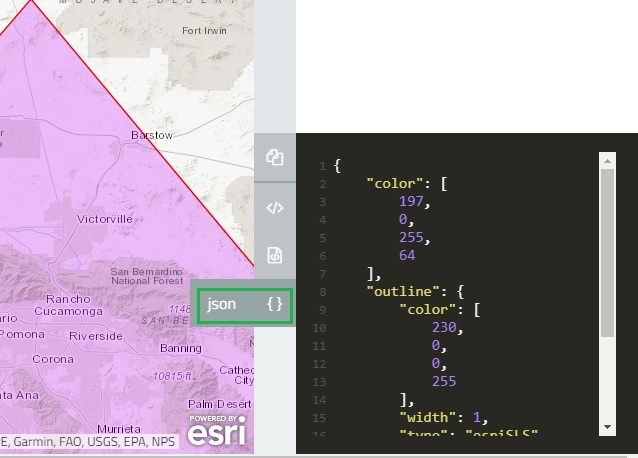 0
0 -
I have managed to create a new point image symbol library for our emergency managemet point symbols, by exporting an mxd to a map service, open the REST endpoint and reading the json file. The copying out and reformating to the appropriate format. That worked a treat ... so .. Yay. 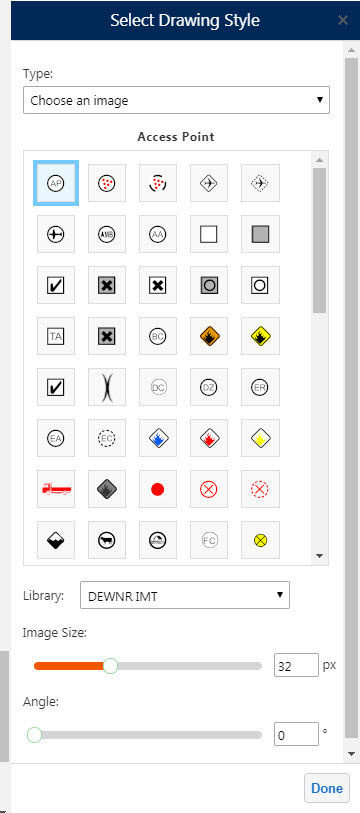
What I am wondering though .. is it possible to create Cartographic Line Symbols? I can make new simpe ones with no problems, but I cant seem to find the right syntax for somehting more complex.0 -
Chris, Great tip and the symbol library looks good. 0 -
Phil, thank you very much for taking the time to answer. It is great to see that functionality will be available upon upgrade. Phil, Mark, Chris great tips! 0
Du måste logga in om du vill lämna en kommentar.
Kommentarer
9 kommentarer