Change order of Related records and field attributes in identify results

Hi,
Is there a way to configure or modify the site/viewers configuration/code so that identify results show related table links first, and then fields/attribtues?
I dont want users to have to scroll past the identify long description, and then scroll past all of the fields (which need to be visible for the query and filter tool) in order to get down to the related records.
In case there is a completley different solution that still gets me where I want to be.... my problem is that I have turned off visibility for all fields in certain layers so that they do not show in the identify results, but the side effect is that they are not available for the query and filter tools. If I turn field visibility on in order to have them available in the tools, then users get extra clutter in the identify results.
Thanks
Don
0
-

Don,
I have not done what you are asking specifically in the first paragraph, but I have done something that may result in what you are asking for.
My use is a specific purpose for FIRE when they respond to calls. They enter and address and it will return their commercial building inspection (1-1) and pre plan data (1-many) information that is stored in SQL tables (from Firehouse). It looks like this: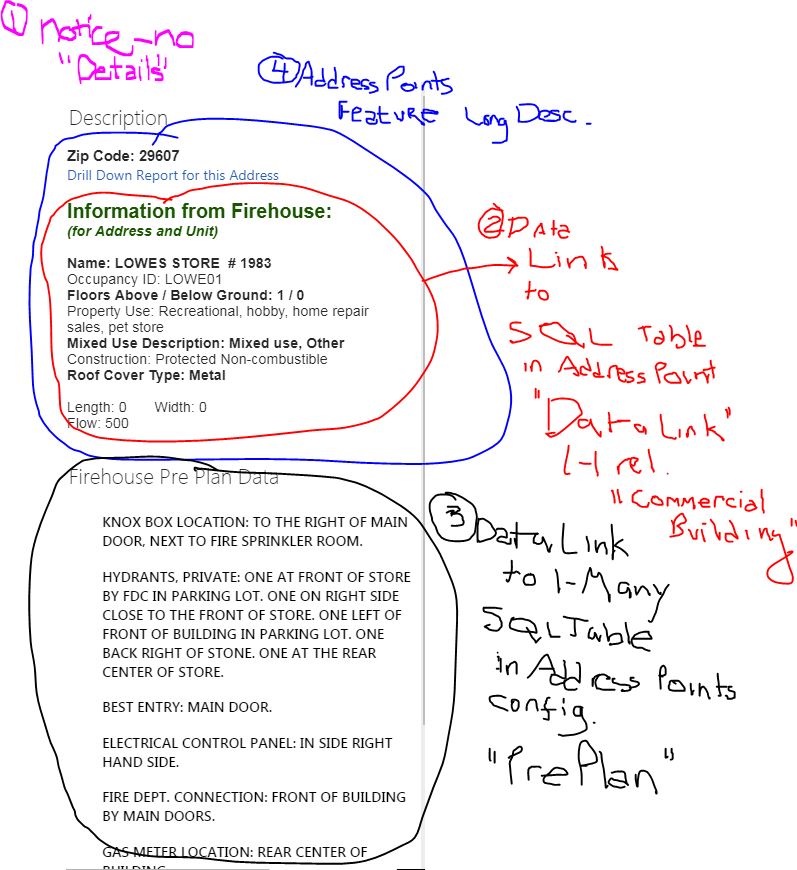
The numbers are loosely in order in which I set it up.
1) I used this to adjust the .json to NOT show the "Details" when displaying the Long Description. There may be a short way to do this now. Note: this will affect display for all layers. In my case this was desired to only ever show the long description.
https://support.geocortex.com/essentialsGSCForum?sub-nav=forum&main-nav=essentials&#!/feedtype=SINGLE_QUESTION_SEARCH_RESULT&id=90660000000XaX8AAK
1.5) Set up the connection to the SQL Server database so I could link to these tables. Set this up in Site Manager under Data Connections for the Site.
2) In configuring the layer (Address Points in my case), I created a Data Link to the CommercialBuilding table (1-1 relationship).
3) see below #4.
4) I configured the display for fields in this table via the long description for Address Points. You can do this with a 1-1 relationship.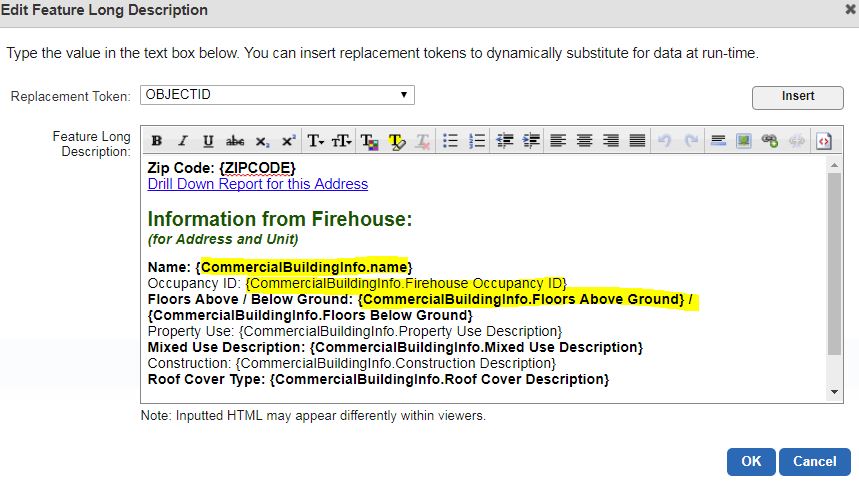
3) Set up the Data Link for the 1-many Pre Plan table. Below image might help with Data Link: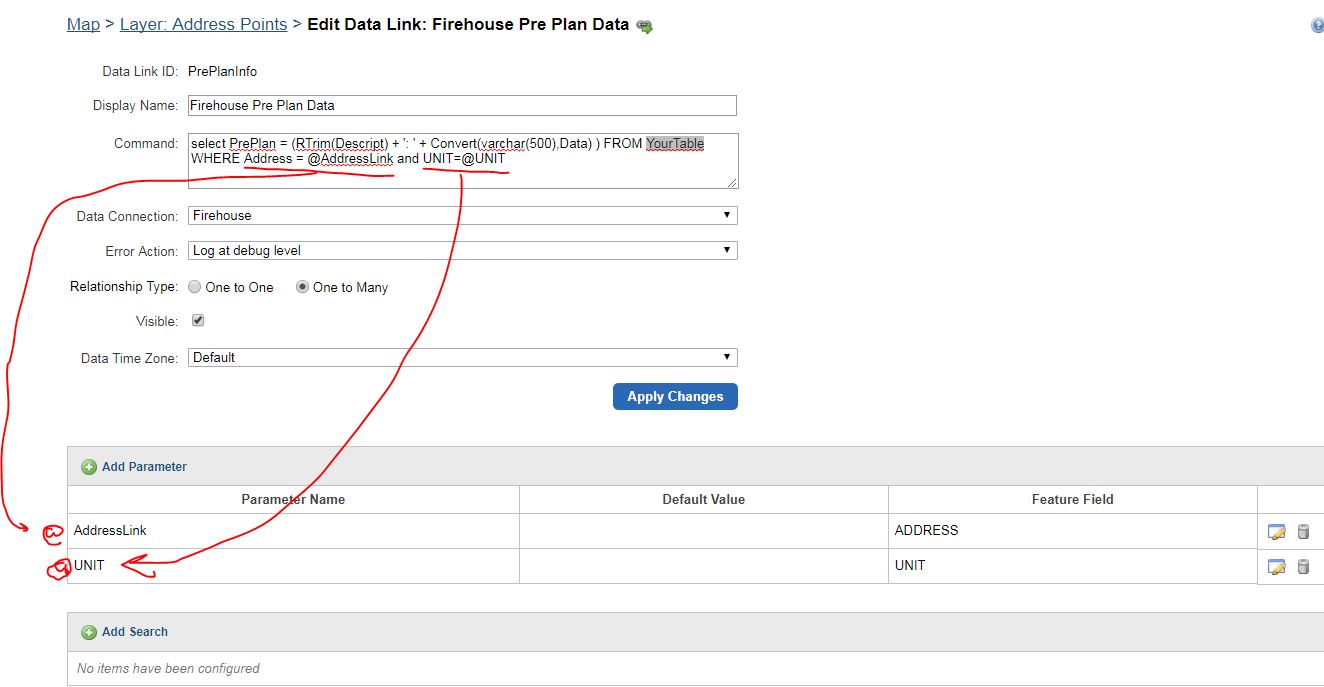
Now, it's been a while since I set this up. I believe once I set up #4, the fields would display when I displayed the long description for the address points as long as the parameters found a match.
If I forgot something, maybe someone else will respond.
Let me know if this helps.
Carmen0 -
Don,
This is the Command in the Data Link to the PrePlan Data. I realized it was a bit hard to read in the image:
select PrePlan = (RTrim(Descript) + ': ' + Convert(varchar(500),Data) ) FROM YourTable WHERE Address = @AddressLink and UNIT=@UNIT
AddressLink and UNIT are the parameters. Where AddressLink is set to the Field "ADDRESS" and Unit set to the Field "UNIT"
Example in my first image, the data being displayed is:
Descript = "KNOX BOX LOCATION"
Data = "TO THE RIGHT OF MAIN DOOR...."
Carmen
Carmen0 -
Hi Carmen thank you so much for the detailed reply! Just wanted to write a quick note to say thanks and that I may be able to implement what you have done. Just putting out some other fires at the moment and then I may have a couple of questions for you. Thanks! 0 -
Also Carmen (i know this is hijacking my own thread! but i cant find out how to ask a question directly to someone), would you mind shariing how you created the "go back in panel" functionality in your results list? Yes I snoop to see what kind of sites people have created and what cool things they might have! 0 -
Don,
No problem - I understand the "fires". If you are like us, it could end up being months before you get back to that specific item!
Would you please tell me which app you saw "go back in panel"?
Carmen0 -
Thanks carmen, im going to be able to look at this now. As per the go back in panel option i saw it on springwood cemetary map. ive opened a separate thread here (https://support.geocortex.com/essentialsGSCForum?sub-nav=forum&main-nav=essentials&#!/feedtype=SINGLE_QUESTION_DETAIL&dc=Geocortex_Viewer_for_HMTL5&criteria=OPENQUESTIONS&id=906f2000000fxmLAAQ) to keep organized 0 -
Just ran into a snag.... I have lots of features and I dont want to set up a description or long description for each, so i need to have the details left on ): 0
Du måste logga in om du vill lämna en kommentar.
Kommentarer
7 kommentarer