Extract XY of Polygon Vertices and Write to Variable

I am trying to extract the XY values of a polygon and write each unique XY pair to separate variables that can be used to create to pass a URL call to an API.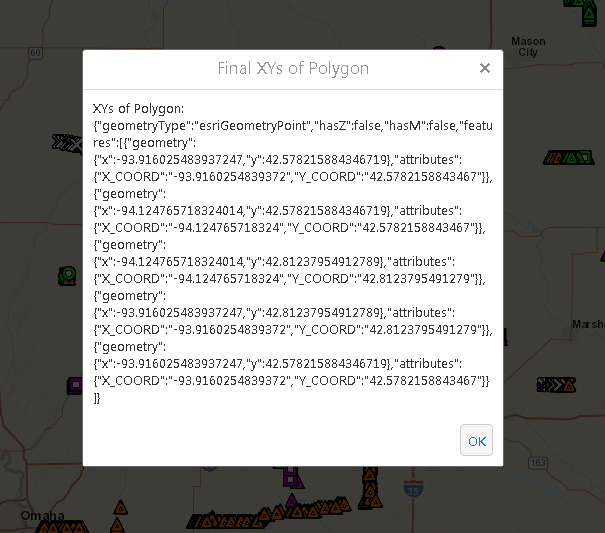
I've figured out how to capture and display the coordinates, but I am having trouble extracting each pair and writing them unique variables.
Here's where I am at:
1. Use CaptureGeometry to allow user to capture either a Rectangle, Polygon or Map Extent
2. Take geometry of polygon and create a graphic for peach point based on Point.X, Point.Y and add them to a Feature Set
3. I have an alert that shows all the XY pairs for feature set like this using FeatureSet.ToJSon():
Not really sure where to go from here to extract each XY pair as unique variable.
Thanks,
Mark
GE 4.8.1
HTML5 2.9
0
-
To take it one step further, I am trying to convert my JSON to a Dictionary, but neither "features", "attributes" or "geometry" are valid keys. Am I missing something?
Here's my JSON text I am tyring to extract:
{"geometryType":"esriGeometryPoint","hasZ":false,"hasM":false,"features":[{"geometry":{"x":-93.96546396017159,"y":42.2010316676822},"attributes":{"LONG":"-93.9654639601716","LAT":"42.2010316676822"}},{"geometry":{"x":-94.514780367067075,"y":42.2010316676822},"attributes":{"LONG":"-94.5147803670671","LAT":"42.2010316676822"}},{"geometry":{"x":-94.514780367067075,"y":42.5985635435968},"attributes":{"LONG":"-94.5147803670671","LAT":"42.5985635435968"}},{"geometry":{"x":-93.96546396017159,"y":42.5985635435968},"attributes":{"LONG":"-93.9654639601716","LAT":"42.5985635435968"}},{"geometry":{"x":-93.96546396017159,"y":42.2010316676822},"attributes":{"LONG":"-93.9654639601716","LAT":"42.2010316676822"}}]}0 -
Got it. We were making it way too difficult. I took my FeatureSet and used 'GetAttributeValues" activity and extracted each attribute into its own iList. From there, we made them their own variable using: string.Join("|",listLONG2)
To take the this:
_img_ alt="User-added image" src="https://latitudegeo--c.na53.content.force.com/servlet/rtaImage?eid=907f20000000SWb&feoid=Body&refid=0EMf2000000E46k" _/_img_
to here:
_img_ alt="User-added image" src="https://latitudegeo--c.na53.content.force.com/servlet/rtaImage?eid=907f20000000SWb&feoid=Body&refid=0EMf2000000E46p" _/_img_0 -
Another option, convert you geometry to a polygon (since that is all you are allowing your user to and iterate through the rings
Then you can do what you want with the x,y coords of each point
_img_ alt="User-added image" src="https://latitudegeo--c.na53.content.force.com/servlet/rtaImage?eid=907f20000000SXZ&feoid=Body&refid=0EMf2000000E479"_/_img_0
Du måste logga in om du vill lämna en kommentar.
Kommentarer
3 kommentarer