Display Form width and alignment - form not honoring settings inside the workflow

I am trying to set up a disclaimer form with a single image and a single button. It's a DisplayForm, width 205, Group1 width Infinity, and Image1 width 200. Theoretically this should get me a 205px width form where the image pretty much fills up the space and the button appears on the lower right corner.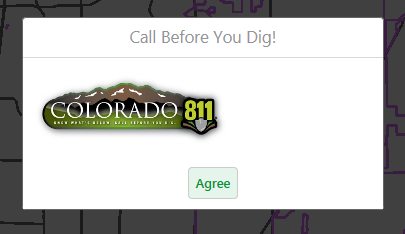
What I end up with is a form that is significantly larger than what I set in the workflow, and a bunch of white space on the right side of the form. I have no idea how to go about fixing this. I have tried leaving the image width blank (it is natively 200px wide), I have tried making the form smaller (comes out the same size no matter how small it's set).
Any thoughts here? This is incredibly sloppy looking for a public-facing application.
0
-
By accident I stumbled upon this as I was using the F12 DOM Explorer in Chrome to look at the form elements to see the size of the pieces. There is a setting in the Desktop.css for modal forms where min-width is set to 360px. No matter how small you set your form width, if it is less than 360 pixels it will not honor your width setting.
You can either change your CSS or fix the size of your image to match the minimum form width, which is what we ended up doing. Changing the CSS seemed like a bad idea in terms of future upgrades, etc.
_img_ alt="DOM Explorer" src="https://latitudegeo--c.na53.content.force.com/servlet/rtaImage?eid=907f2000000fxSp&feoid=Body&refid=0EMf2000000k9bX" _/_img_0 -

FYI there is are custom .css files for individual viewers (...[viewername]\VirtualDirectory\Resources\Styles\Custom) and the viewer template ([wwwroot]\[HTML5 Viewer]\Resources\Styles\Custom) which will take precedence over the default styling and should be preserved during upgrades. 0
Du måste logga in om du vill lämna en kommentar.
Kommentarer
2 kommentarer