How to Use ShowFeatureDetails in a Workflow (GVH 2.9)?

Hello,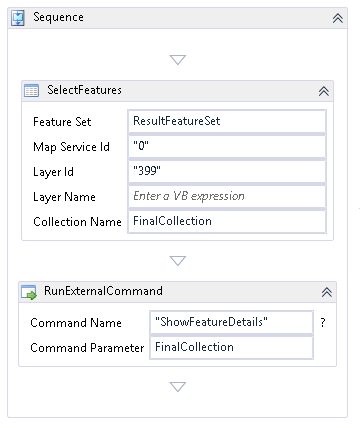
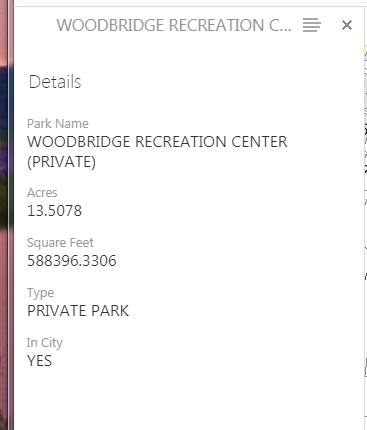
I have been trying to use ShowFeatureDetails in a selection workflow to go straight to the Feature Details when there is only one feature. There are several older threads I have looked at, but I can't get it to work for me (here (https://support.geocortex.com/essentialsGSCForum?sub-nav=forum&main-nav=essentials&#!/feedtype=SINGLE_QUESTION_DETAIL&criteria=ALLQUESTIONS&id=9066000000009q0AAA) and here (https://support.geocortex.com/essentialsGSCForum?sub-nav=forum&main-nav=essentials&#!/feedtype=SINGLE_QUESTION_DETAIL&criteria=ALLQUESTIONS&id=906600000000B79AAE) ). I have tried:
1) Using SelectFeatures to create a Collection Name and using that name as the Command Parameter. This is what the linked threads suggest.
2) Creating an argument for the command parameter, and setting the value to be {$Feature} in Essentials.
3) I've also tried using "ShowFeatureDetailsCompact".
Has anyone been able to get this to work recently? Or is this not supported anymore? This is what I mean by feature details:
0
-

You can use the external command ShowFirstFeatureFromCollection with the collection name (in your case FinalCollection) as the parameter.
https://docs.geocortex.com/essentials/gvh/2.9/commands-help/#/commands/Feature%20and%20Feature%20Set/ShowFirstFeatureFromCollectionShowFirstFeatureFromCollection Creates and displays the Feature Details dialog for the first feature in the FeatureSetCollection} specified. Parameters: argstringFeatureSetCollection A FeatureSetCollection or its ID, whose first feature's details are to be shown.0 -

Nico, that doesn't seem to work. I still have to click the arrow "Click to view feature details" to the right of the feature to expand and see the details. I can also see the details by clicking the arrow "Go back in panel" above the feature on the left. I would like to be able to see the full feature details when the output collection from SelectFeatures contains only one feature. I currently use GVH 2.8.2 0 -
I have something weird happening with this....as I watch this workflow execute in the viewer, I can see the details pane open for the selected feature, and then the details panel immediately closes and goes back to the panel where it says Selected Hydrants (1) with an arrow to go back to the details. Why are the details opening and immediately closing? I am not doing anything in the workflow past the RunExternalCommand with ShowFirstFeatureFromCollection. I don't want the user to have to click on that arrow, I want the details panel to stay open.
Any ideas?0
Du måste logga in om du vill lämna en kommentar.
Kommentarer
3 kommentarer