Layout feature details

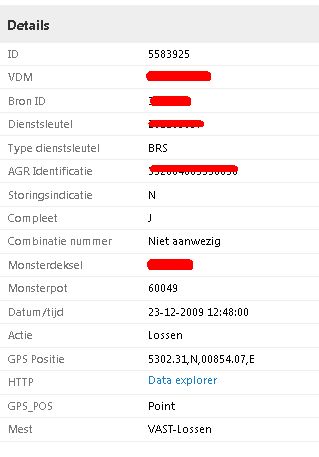
Is there a possibility to show the feature details a little bit more compact. shown in there lines. I would like to use a layout like in the lower screenshot. When showing a lot of details my users have to scroll a lot in the new situation.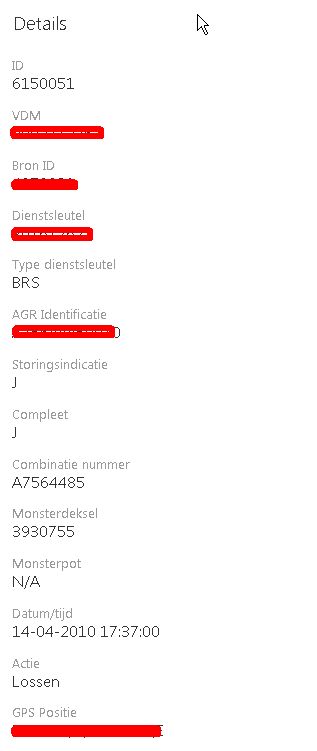
0
-

Hi Ronnie, I would also like a way to do this for all features details in my entire map.
That said are you familliar with the description and long description functionality which lets you customize layers one by one like this?0 -
You can hide/show certain fields in geocortex manager
you can also use the feature long description/description/label to customize what is viewable in the map - but this has to be done per feature.0 -
Thank you for the answers. But it is not exactly what I? looking for. I have 100+ layers and to define all the layers one by one with the long description would be a lot of work and is difficult to maintain in case of changes in de list of attributes.
I know I can hide fields, but the problem is that every field I show takes now three lines instead of one like in the previous version of Geocortex.0 -
I'va found a way of doing this with the css,
add
.attribute-label {
width: 30%
}
.attribute-label, .attribute-details {
display: inline-block;
}
li.attribute-item {
margin-top: 5px !important;
}
div.multi-column-container {
padding-top: 0px !important;
padding-bottom: 0px !important;
}
to desktop.css in yout sites folder and the detail attributes are shown as a list0 -
Glad you found a solution, I think i will implement that as well! 0 -
To make it look even more like the old version
div.attrib .attribute-label {
width: 30%;
}
div.attrib .attribute-details,.attribute-label{
display: inline-block;
font-size: 12px !important;
}
div.attrib li.attribute-item {
padding-top: 2px !important;
padding-bottom: 2px !important;
margin-top: 0px !important;
border-bottom: 1px solid #EEEEEE;
}
div.attrib li.attribute-item:hover {
background-color: rgb(222,242,255);
}
div.attrib > div.multi-column-container {
margin-top: 0px !important;
margin-bottom: 0px !important;
padding-top: 0px !important;
padding-bottom: 0px !important;
}0 -
Great I will give that a shot thanks for posting 0
Du måste logga in om du vill lämna en kommentar.
Kommentarer
7 kommentarer