Viewer loading issues

Hello all,
We are currently investigating viewer loading issues involving double forward slashes in calls to the ESRI javascript files. You will know if you are affected by this issue by 404 responses in Fiddler or the network developer tools.
We will post more details when they become available.
At this time, using Chrome or clearing your browser cache may help, but will not resolve the issue.
Regards,
Wayne Richard
Latitude Geographics Group Ltd.
Head Office: 300 – 1117 Wharf Street Victoria, BC Canada V8W 1T7
Tel: (250) 381-8130 | Fax: (250) 381-8132 | wrichard@latitudegeo.com
Developers of Geocortex web-based mapping software | www.geocortex.com
An Esri Platinum Business Partner
0
-

Good, glad to hear I'm not going crazy. FYI, here's what I've found so far....
- The problem is in IE11. Chrome is fine.
- On IE11.0.9600.18837, it fails with an error //js.arcgis.com/3.21/dojo//parser.js,[object Event]
- On IE 11.0.9600.18665, if you don't have F12 developer tools open, it fails. But the weird thing is, if you have developer tools open, it works!
Chris0 -
Hi Chris,
Thanks for the feedback!
Here is a permanent workaround that we have tested and proven to work :
From the inetpub directory, inside you viewer folder (**default viewer folder name is HTML5Viewer), edit Resources/Scripts/dojo-config.js.
change this:
{
location: esriBase,
name: "dojo"
},
to this:
{
location: esriBase + "../dojo",
name: "dojo"
}
Once this is completed, please clear your browser cache.
If you need assistance making this change or have any issues or questions with it, please feel free to ask here or submit a support case.
Regards,
Wayne Richard
Latitude Geographics Group Ltd.
Head Office: 300 – 1117 Wharf Street Victoria, BC Canada V8W 1T7
Tel: (250) 381-8130 | Fax: (250) 381-8132 | wrichard@latitudegeo.com
Developers of Geocortex web-based mapping software | www.geocortex.com
An Esri Platinum Business Partner0 -

Excellent! Thanks for posting Wayne. This has resolved our issues as well. 0 -
Chrome Version 62.0.3202.94 (Official Build) (64-bit) is not working either.
The following error error occurs on:
https://js.arcgis.com/3.21/dojo//cldr/nls/en/number.js
https://js.arcgis.com/3.21/dojo//cldr/nls/en/gregorian.js
https://js.arcgis.com/3.21/dojo//cldr/nls/en-au/number.js
https://js.arcgis.com/3.21/dojo//cldr/nls/en-au/gregorian.js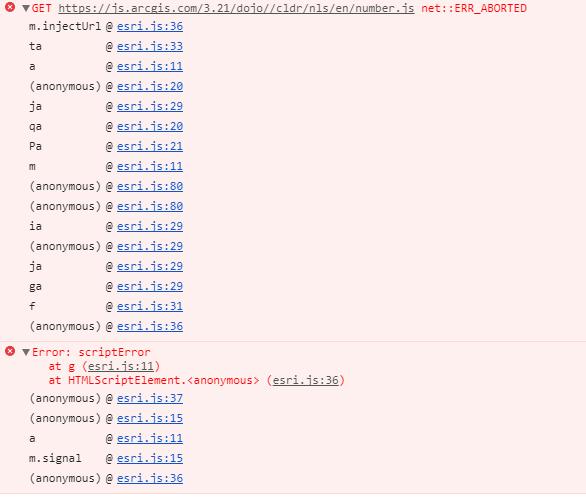
As well as the following error: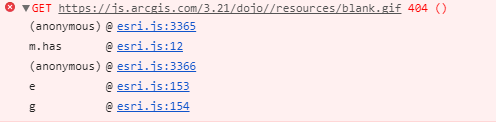 0
0 -
Hi Mel,
Can you try the fix above? I also forgot to mention to clear the cache. If you omit clearing the cache you can be using the old file and still see the same issue.
Regards,
Wayne Richard
Latitude Geographics Group Ltd.
Head Office: 300 – 1117 Wharf Street Victoria, BC Canada V8W 1T7
Tel: (250) 381-8130 | Fax: (250) 381-8132 | wrichard@latitudegeo.com
Developers of Geocortex web-based mapping software | www.geocortex.com
An Esri Platinum Business Partner0 -
Thank you, Wayne! Your solution fixed it!
Everything worked fine yesterday, but we hit this issue this morning. I had checked the forums earlier and didn't see anything posted. We've been troubleshooting this all day! This was huge for us and brought down all of our sites across the organization. I was just about to post to see if anyone else had this problem and found your post. Any chance these kind of widespread issues could be emailed out to users? Also, any idea what caused it to suddently stop working?
Thank you again!0 -
Hi folks,
For those that are not too dev savy, this is the full path to the file that needs edited:
C:\inetpub\wwwroot\Html5Viewer\Resources\Scripts\dojo-config.js0 -
Thanks, this worked for me! 0 -
Hi Wayne.
Yes, the solution fixed the js.arcgis.com errors. Shift+Ctrl+Refresh loaded the viewer with no issues (not a big fan of clearing the cache unless I have to).
The only error on loading now is the net::ERR_ABORTED error on:
https://yourserver.com/Geocortex/Essentials/REST/sites/YourSite/viewers/YourViewer/virtualdirectory/Resources/Styles/Custom/common.css
Probably because common.css doesn't exist, only desktop, handheld, and tablet. But that error doesn't stop the viewer from loading.
Cheers,
Mel0 -
I was seeing this mostly affect sites that used Active Directory. Your fix worked for me as well. My server guy says there are ofter windows updates on the first Tuesday of the month - today... 0 -
Thanks for the feedback Mike. I believe updates are the 2nd Tuesday each month but you never know, they may have changed it.
Regards,Wayne
0 -
Thank you for the feedback Stephanie. For issues like this we usually make an announcement here on the Support Center which in turn sends an email out to anyone subscribed. We didn't get to that today unfortunately. It appears that the ESRI API changed over night but we are still trying to confirm this. The same requests worked fine yesterday.
Regards,Wayne
0 -
Thank you for this fix! 0
Du måste logga in om du vill lämna en kommentar.
Kommentarer
13 kommentarer