Permissions from AD group along with Global-All Users not working

I am trying to set up permission so as to only allow users that are in a particular AD Group (called GIS_Web) to have access (editing ability) on the one Feature Service in my map. This Feature Service is called Projects (Feature Service) in the TOC for clarity.
I still want all users (Global – All Users) to be able to see the same feature’s map service (as with all Map Services, this feature is non-editable, of course). This map service is called Projects (Map Service) in the TOC.
I also want the app to automatically log users in (showing just sign-out so can check on who is logged in for now like this:).
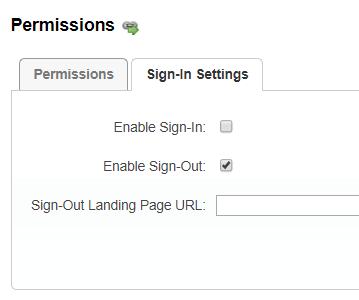
I have decided to set User Permissions to Take Precedence over Other Permissions (this made sense to me rather than the other way around) by changing the web.config file with the line:
<add key=”gcx.security.userAllowBeforeDeny” value=”true” />
See the Link below in the GTX documentation (go to the end of the Permission section) to read more about this config change:
https://docs.geocortex.com/essentials/4.9/admin-help/Default.htm#ge/admin/permissions.htm
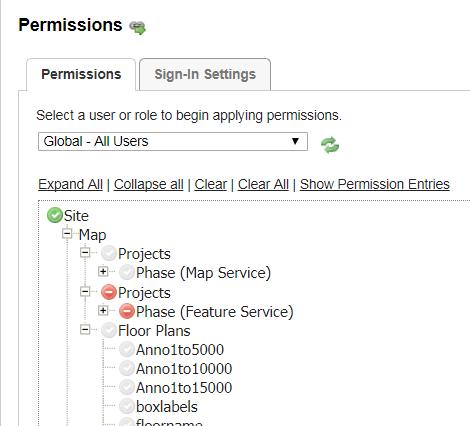
Here are my Permission settings:
For “Global – All Users”:
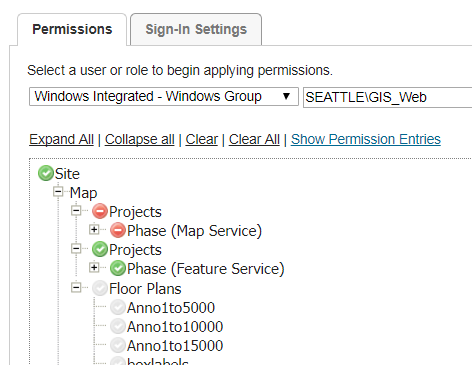
Here is the setting for the “GIS_Web” AD group:
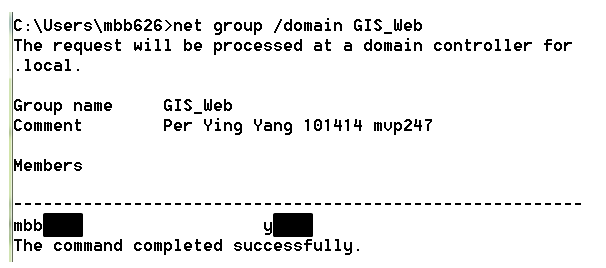
Here is the members in the GIS_Web group (I am one of them...mbb???):
This is what I see when I log into the app:
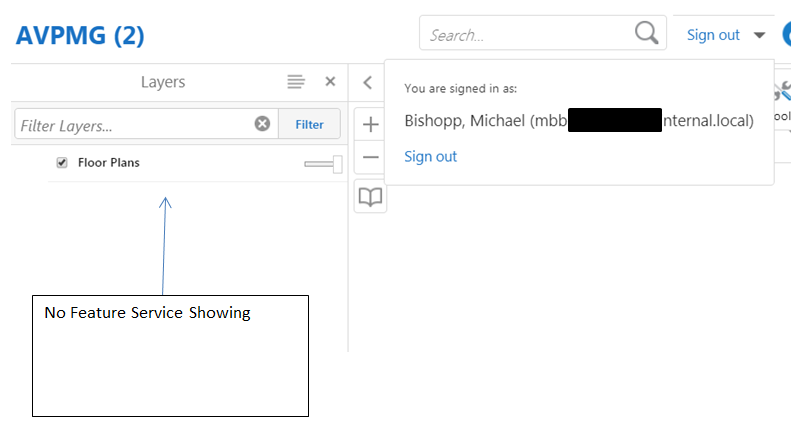
For a user that is not in the GIS_Web security group (so this would be a user only in the “Global – All Users” group), this is what they see:
When someone is logged in from the Global - All Users group, they DO see the Map Service (this is what I expect).
Still, the editing AD group (GIS_Web) cannot see the Feature Service. Why would that be?
Anyone see the flaw in my logic or setup? I’m stumped!
Michael
-

I've gotten this to work by adding this to the opening Permissions tag for each layer I want to apply Allow Before Deny to in my site.xml:
<Permissions Inherit="True" Precedence="AllowBeforeDeny">0 -
Thanks John,
That worked! Amazingly, I still had to keep the settings in the web.config file set so that User Permissions take precendence over other permissions. Then I had to apply the <Permissions Inherit="True" Precedence="AllowBeforeDeny"> to my feature service (only the FeatuerService layer! I did NOT apply this Permissions code to the MapService layer). That seemed a bit strange, but it works!
Thanks again!0 -

I appreciate the detail from Michael and John here and can see where this can come in handy for me elsewhere.
The core problem we are trying to solve as I understand it is that you have a user/subset of users that are also part of a larger group and you want to provide differing permissions for that user/subset. The problem that we are fighting here is the fact that deny is applied ahead of allow by default (and frankly I think this is the appropriate treatment).
I would like to share how we have been able to achieve this without modifying this default (deny over allow) behavior or editing the files directly. Instead you can use the GE Manager permissions UI to achieve this.
Essentially what you do is indirectly 'allow' or 'deny' permissions using the group. Then you directly apply 'allow' permissions to the layer/item/service for the user/subset. This basically says the big group (all users in this example) gets 'deny' for all items under the group unless something else specifies differently. Then the user/subset permission will directly provide 'allow' or 'deny' to the item under the group. You can also mix this, i.e. 'deny' all workflows as a group and then directly 'allow' the workflows you want all users to have for the larger user group. Then the subset user group gets a direct 'allow' on additional workflows. This is handy for admin type workflows for example.
For Michael's specific example you would have:
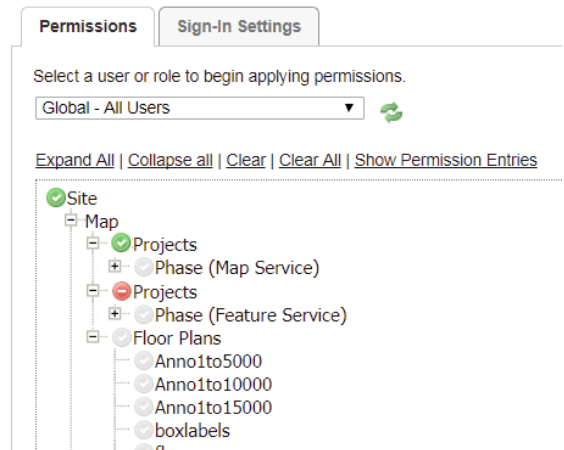
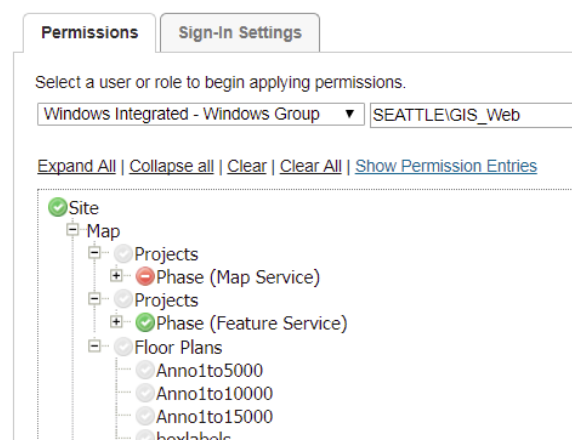 (an astute eye would catch that the indirect 'allow' on the project group is not required since it is inheriting from higher level, but the way I've illustrated here works fine as well)
Hope this helps someone!
0 -
Thank you Douglas!! Your response was EXTREMELY helpful for me. We have a situation where we have users in multiple roles and your method allows me to create permissions without changing default settings.
However, I would love to see more elaborate documentation from Latitude on how to handle this type of scenario.
It would also might be helpful to have a global "allow before deny" setting.0
Du måste logga in om du vill lämna en kommentar.
Kommentarer
4 kommentarer