Share via email in Chrome acts strange(?)

When I use the Share-->Email tool (OOB tools), something strange happens in Chrome. The email link is generated and opens in the default email program (as expected), but when this tool is used, it also sends a mailto:<viewerURL> to a new (Untitled) tab in Chrome.
I have tested this on three different machines/logins. Anyone else see this behavior in Chrome?
0
-
Hi Michael,
It looks like the link created by the Share tool will be something like this:<a href="mailto:?body=(...)" target="_blank">The target="_blank" part is key. It looks like Chrome normally handles mailto links with _blank target exactly in the way you described. If you paste the above into an html file, it'll do the same thing. I didn't have any luck finding a way to change this from Chrome settings, but you could try looking into that.
Because all of the links in the Share tool are built around the same link format, if you edit the underlying viewer js file to take out the target="_blank" part, it will affect the other links too. So if you try to use that as a workaround, it gets rid of the extra tab opened for the email link, but your Facebook, Twitter, etc, links will all navigate from the viewer page instead of opening in a new tab. I suspect too that if a user had a web email client set up as their default for mailto links (eg, Gmail), then they'd have the same problem of it opening on the same tab as the viewer instead of a new tab when they use the email link. That would likely be a big problem, since they probably aren't expecting to lose their session on the viewer, which might include things they can't get back from the share link (eg, open projects, queries, or results).
Sorry that I don't have a good solution here, but I hope that helps to explain what's happening.
-Amanda0 -
Thanks Amanda for your response.
One question: Where would I change this in the viewer js that you talk of? I have looked at the js files at the Site level--definitely not there. I have snooped around at the Viewer level, not sure I see anything there. I have found the Share.js file in the inetpub/wwwroot/Html5Viewer/Resources/Compiled/ folder...and I see this line: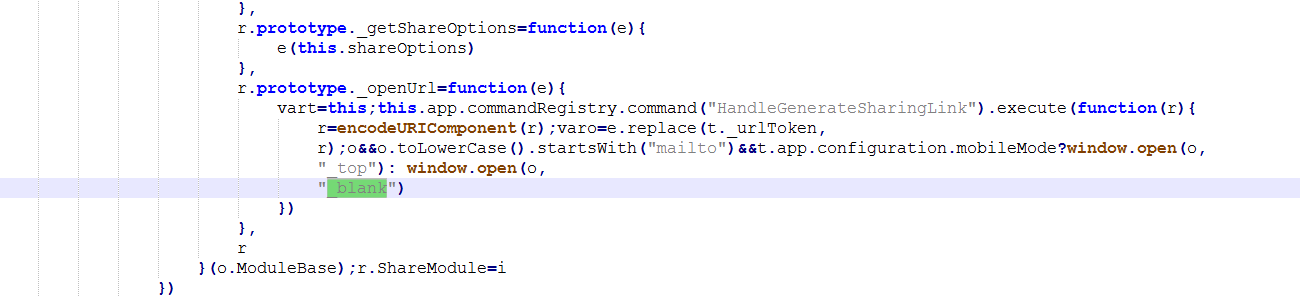
Is this where you would edit this so that a new tab would not open?
Thanks!0
Du måste logga in om du vill lämna en kommentar.
Kommentarer
2 kommentarer