Layers List Open by Default - With Home Tab Shown at Bottom

We have thus far not had the need for a home panel. I would like to add one, but still want the Layers List showing by default. If I check to "Include Home Panel" but uncheck "Open Home Panel by Default", I have to add a button to open the home panel. What I would like is for both tabs, the home and layers list, but have the layers list open by default. Does anyone know how to achieve this?
0
-

How about a startup workflow? This command will activate the layer list, which in practice means both tabs will be open but the layer list will switch the be in front of the home panel. 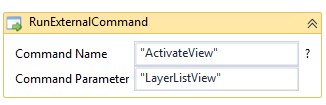 Make sure the checkboxes for Include Home Panel and Open Home Panel by Default are both checked.0
 -
Thanks John. That works. It does add a few seonds to the load time, which is unfortunate, but it does work.
Thanks!0 -
I sometimes use the Home Panel as a Help page. When I do this, I include the Home button in the Tools menu, but change it to read Help. I do not set it to open by default. While it is not on the bottom of the data pane, it is there whenever needed. 0 -
Does anyone know if this is possible without a Workflow? I have been going through the config file, but I'm not seeing anything obvious. 0 -
It's been a while, but I'm guessing the answer is still no - is there a reason a startup workflow isn't a viable option for you (e.g. load time)?
Mike's idea of using the home panel is a cool idea too - it adds a step, but you can include a link to run the open layer list workflow alongside any other startup/homescreen workflows you might want to run.0
Du måste logga in om du vill lämna en kommentar.
Kommentarer
5 kommentarer