Word wrap properties in GE4.8.2 GV2.9.1 workflow display form is wonky

In a previous version of Geocortex (v4.6.2 HTML5 Viewer v2.7.1), word wrapping in Workflow Display Forms/Group/description splits sentences after spaces. In v4.8.2 HV2.9.1, sentences are splitting in the middle of words. Does anyone know how to fix this?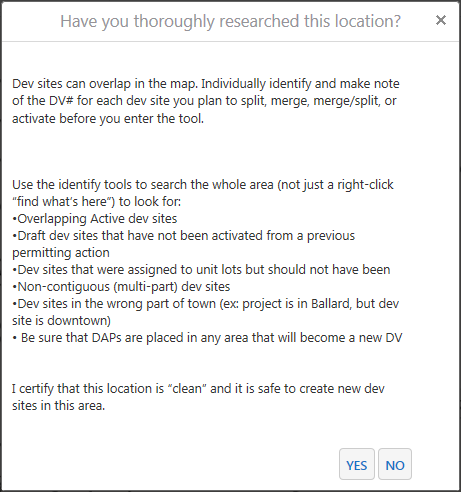
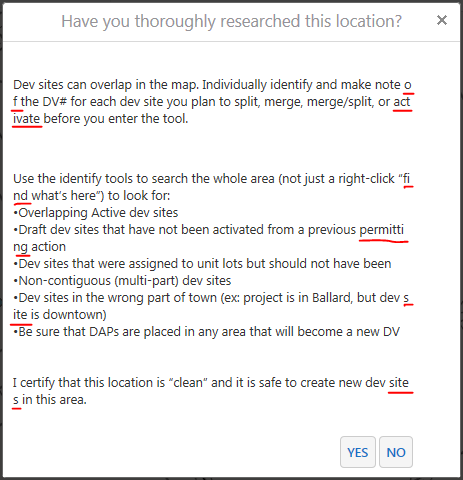
Please see attached samples from each workflow running in different GE versions.
0
-
Hi Ken,
This is a bug (GVH-16325) but it can be worked around using custom CSS. I would recommend submitting a support ticket for it and we can help you add the custom CSS to correct it. It's a bug so the time would be non-billable.
If you are handy with adding custom CSS to the viewer this should fix it -
.form-desc {
word-break: break-word;
}
but it depends on what you are displaying in the form, it may not fix everything.
Regards,
Wayne Richard
Latitude Geographics Group Ltd.
Head Office: 300 – 1117 Wharf Street Victoria, BC Canada V8W 1T7
Tel: (250) 381-8130 | Fax: (250) 381-8132 | wrichard@latitudegeo.com
Developers of Geocortex web-based mapping software | www.geocortex.com
An Esri Platinum Business Partner0 -

Thanks, this solved the issue for me. Not sure about Ken...
Carmen0 -

@Latitude, is there a fix date/release for GVH-16325? 0 -
Hi Nico,
The fix will be in 2.11, which is due to be released around the end of June. The workaround is mentioned above and I also see the following CSS mentioned as a workaround :
p.form-item { word-break: keep-all; }
Regards,
Wayne Richard
Latitude Geographics Group Ltd.
Head Office: 300 – 1117 Wharf Street Victoria, BC Canada V8W 1T7
Tel: (250) 381-8130 | Fax: (250) 381-8132 | wrichard@latitudegeo.com
Developers of Geocortex web-based mapping software | www.geocortex.com
An Esri Platinum Business Partner0 -

Thanks for this! It helped me in a pop-up workflow I have. 0
Du måste logga in om du vill lämna en kommentar.
Kommentarer
5 kommentarer