Adding Connection to HTTPS ArcServer "connection failed"

I have seen numerous posts over the years about this error and I see no answers to resolve this. I am attempting to add a public HTTPS map service to my GeoCortex. I can view the REST service, I can add it to ArcMap and play with it, but I can't connect in GeoCortex manager, why? This is a newly migrated to 10.5.1 ArcServer, I am running GE 4.8.2.24. I'll be upgrading to the latest this week.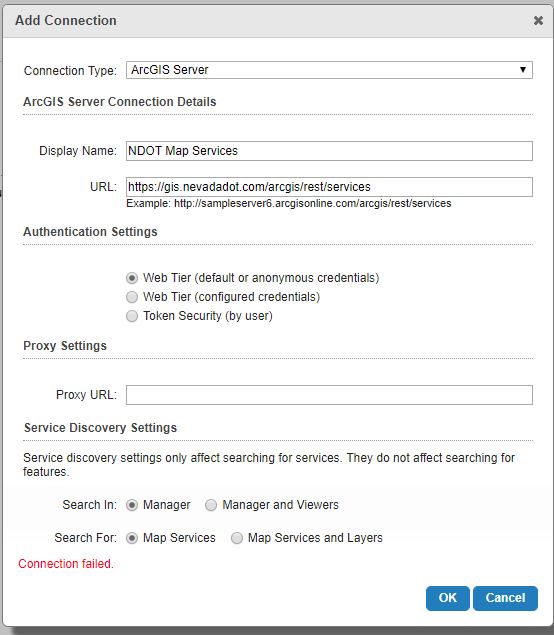 ?
?
the URL is https://gis.nevadadot.com/arcgis/rest/services
?
0
-
OK I think I know the answer. It's a firewall problem with our GeoCortex server. We had to open ports to ArcGIS Online to get it to connect so we will open a port for this one and it should answer the problem. 0 -
Did this solve your problem? We are having the same issue here. 0 -
It sure did! You can always try to telnet to that URL from the server where GC resides and see if it's even reachable. 0 -
Thanks for the response! I don't know how to telnet to the URL... May I ask which port you opened, and on which machine (Portal server or GC server)? 0 -
GeoCortex Server.
I'm not the best person to ask about telnet haha... I do know that on Windows Server 2012 it was not turned on and we had to actually go into the windows features and install it. From there you can google it on how to tenet to a web address. You might want to ask your IT too, they can probably help, mine did! It's an anciant 1970's technology feature that is still pretty awesome.
It wasn't a port exactly that we opened. All the websites are going to go through port 80 (or a different one if it's https) and that was open. Our State IT regulates how many and which websites we can access via a server behind the firewall. We tell them we want certain web address domains (up to the ".com" not the stuff after).
Or if you have internet access on your GeoCortex server, (we don't) you can just open the internet browser and go there to see if you have access.0
Du måste logga in om du vill lämna en kommentar.
Kommentarer
5 kommentarer