Get Current Position Error

I have a workflow that gets the users Current Position, creates a buffer around it, querys a feature service, and returns all of the features within the buffer. The workflow works correctly the first time it is ran and returns the users correct position. However, if the worflow is run a second time without refreshing the map, the users current position is returned as 0,0 and plops them off the coast of Africa. Does anyone know why this is happeniing and what I can do to fix it? Thank you!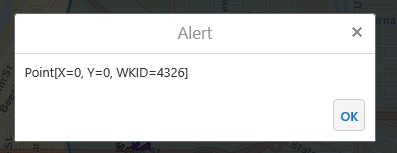
Workflow can be found here...
https://drive.google.com/file/d/120fwf3Or2fjmqXyNby-MhpVWWMTZiCmg/view?usp=sharing
0
-
Hi Lisa,
What browser are you using when you run the workflow? I can reproduce the issue in Internet Explorer, despite selecting the "always allow" option when prompted for geolocation permissions. I can also match the behaviour in IE with a stock W3 schools example here (https://www.w3schools.com/html/tryit.asp?filename=tryhtml5_geolocation_error) , so I think the underlying problem is probably very simple (whether or not that makes it easy to fix). I'll set up a bug report.
Thanks,
-Amanda0 -
Hi Amanda, we've confirmed that this workflow works perfectly in Chrome, so you are right in that IE seems to be the issue. Thank you for following up and I look forward to seeing if this gets resolved! 0 -
Hi Amanda, another issue we noticed, is that the workflow also doesn't seem to sort corrently by distance in Chrome or IE. The results will sort east to west, but not from the users current position. 0 -
Hi Lisa,
Perhaps Log or Alert the value of fsSearchFeatures.tojson both just before and just after the sorting activity. You could look at the features' attribute values and get an idea of whether the calculated distance seems wrong or if it's the sorting that seems wrong. If the sorting is wrong, you can also note if the features are 100% unsorted, or if they're sorted but following and unexpected pattern.0 -

Hi Amanda,
it is strange that GetCurrentPosition activity works for IE but not in Chrome. In Chrome, it returns 0,0 for Lat and Long. but in IE, it promops for Allow Location message first, and then returns the correct Lat and Long.
Please let me know if there are any workarounds or fix for this issue. Thanks so much!0 -
Hi Steven,
Is the URL for the viewer http or https? And if it is https, does the browser warn about any issues with the connection or SSL certificate (check next to the URL bar)? Most browsers (Chrome included) are now picky about only sending location information over secure connections, and will only allow geolocation operations on https sites that they trust. IE is the odd one out, and will still allow geolocation operations for http sites. So when getting coordinates works in IE but not Chrome, that's usually the first thing to check for.0
Du måste logga in om du vill lämna en kommentar.
Kommentarer
6 kommentarer