Remove existing panel-close.png on toolbar action button

In altering the style of some applications, I have had good luck in altering the custom CSS files. But this one has me stumped as to what to do.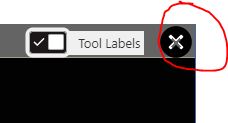


For the toolbar-action-button that will close the toolbar, I can alter the CSS for .toolbar-action-button to include a background image. The result is this:
Which is okay, but you can see the original panel-close.png (a grey X) is still displaying in the middle of the white X.
This is where it appears when I inspect with developer tools. The image is in the html code vs. the .CSS. How do I delete that element from the HTML code?
Note: I am using this new image on other "closing" actions and it appears as I want. For Example, the close panel option looks good....
Nit picky, yes, but it is driving me crazy that I can't fix it in the one location.
Thanks,
Carmen
0
-

The html markup is generated by the viewer javascript which I don't recommend toying with. You should select the img and modify that instead (or remove it with display:none;). You may find the W3 Schools CSS Combinators (https://www.w3schools.com/css/css_combinators.asp) reference useful here. 0
Du måste logga in om du vill lämna en kommentar.
Kommentarer
1 kommentar