Variable text in Report Designer

I am looking to do a couple of things with text boxes in Report Designer:
-Variable size text box based on the input data, so that when I design a line for input I don't get formatting like
"City , ST Zip", and can design to read like the normal "City, ST Zip".
-OR have the ability to input multiple DataFields into one text box (HTML/CSS or VBscript on the 'DataField' line)
Has anyone run into this issue and/or found a work-around for formatting reports?
Thanks!
0
-
Hi Benjamin,
Not sure that I understand your question but I think you could use a “calculated field” in your report that concatenates “data field” values and use “calculated field” in the report instead of “dataField” directly.
For example you could set the “formula” of a “calculated field” = CITY + ", " + CODE + " " + ZIP0 -
Hi Francesca,
This is exactly what I am trying to do! How do I set this in Report Designer?0 -
Nevermind, I got it!
Thank you0 -
Can you share how you did it in report designer? I'm trying to do something similar. 0 -
Hi Rebecca,
To achieve this, right-click on 'Calculated' to create the calculated field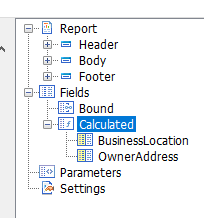
Enter a variable name for the calculated field you're creating; ex: 'OwnerAddress'.
In the Formula box, enter a scripted format for the fields you want to include; my example:
=ContactFirstName + " " + ContactLastName + "\r" + MailingAddress1 + "\r" + MailingAddress2 + "\r" + MailingCity + ", " + MailingState + " " + MailingZip
Then, for the desired text box location, input the name of your calculated field (OwnerAddress) in the DataField box instead of a singular field from your data.
It isn't entirely perfect, as it leaves a blank line if no value is in the second address field.
Hope this helps!0 -
Here's another good post on concatenating fields and dealing with NULL values or blank fields:
https://support.geocortex.com/essentialsGSCForum?sub-nav=forum&main-nav=essentials&#!/feedtype=SINGLE_QUESTION_SEARCH_RESULT&id=906600000000AfAAAU
Anybody know how to create ProperCase out of UPPERCASE text in a calculated field?0 -
Has anyone been able to get this to work in Report Designer 4.9? This seems so easy, but I keep getting a "Control Script failed for control..." I can get 1 + 1 to work but when I keep it super simple to pull a field in like =Description or just Description it bombs out. 0
Du måste logga in om du vill lämna en kommentar.
Kommentarer
7 kommentarer