query task with 404 error

Hi,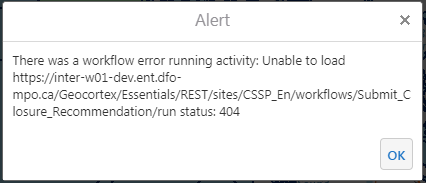
We have a workflow to query polygons one bye one from a featureclass. It works well if query for example 20 polygons. To avoid sesstion time out, after every 30 queries the workflow will popout a message to show for example 30 of 92 polygons have been processed, 60 of 92 polygons have been processed, and it also works well.
However, when query more like 200 polygons, then it will show following 404 error. Looks like the error is related to the server, not workflow itself. So any idea to fix the error will be appreciated!
0
-
Hi,
A couple of things to check or roll out:
- Is your map server secured? Could it be token expired after a number of minutes?
- Could this be consequence of a Geocortex timeout? A timeout error should be clearly states as timeout error but maybe it is “covered by” activity that displays the progress.
- Is the Geocortex log giving you any more info?
- Is the ArcGIS log giving you any more info?
- What are you trying to achieve? It sounds a laborious process: is there any way to streamline or make the process asynchronous or as Geoprocess? … this might also resolve the problem along with performance and user experience ….0 -
If you are familiar with the tool Fidder you can run Fiddler on the server and add the line to the REST web.config to tell Essentials to use Fiddler as a proxy. This will show the requests and responses and show you where the 404 is coming from. 404 is a bit deceptive, the higher 404 error numbers (404.13, 404.14 and 404.15) refer to a request that is too large and not simply missing.
Here are some instructions on using Fiddler as a proxy -
https://support.geocortex.com/essentialsGSCkba?sub-nav=kba&main-nav=essentials&#!/feedtype=SINGLE_ARTICLE_DETAIL&criteria=BESTANSWERS&id=kA360000000Cib0CAC
Feel free to submit a support case if you want assistance.
Regards,
Wayne Richard
Latitude Geographics Group Ltd.
Head Office: 300 – 1117 Wharf Street Victoria, BC Canada V8W 1T7
Tel: (250) 381-8130 | Fax: (250) 381-8132 | wrichard@latitudegeo.com
Developers of Geocortex web-based mapping software | www.geocortex.com
An Esri Platinum Business Partner0 -
Many thanks to all the help. As Wayne mentioned, the 404 error is misleading. The problem is caused by request length and content length, not URL missing, so it was fixed by changing the value of <httpRuntime maxRequestLength /> and <requestLimits maxAllowedContentLength="50971520" /> in Web.config under Latitude Geographics\Geocortex Essentials\Default\REST Elements\REST. 0
Du måste logga in om du vill lämna en kommentar.
Kommentarer
3 kommentarer