Use default value for data link token in feature description?

I've got a couple of data links set up to display fields from a related table in the feature description in a site - works great. However, I'd like to be able to use a default value of "No" when there is no value to display for the token from the data link, so it's clear to a user that there's no data to display. It seems like it should be relatively straight forward, but I'm not coming up with anything. Essentials 4.9 and HTML5 2.10.
Thanks for any input!
Kristin J.
0
-

Sounds like it could be an opportunity to use a CASE statement as part of your data link query.
SELECT
CASE
WHEN YourField IS NULL THEN 'No data available'
ELSE YourField
END AS PickAFieldName
FROM YourTable0 -
John -
Thanks for your reply, and apologies for my super late response; always something more pressing coming up! Anyway, I think I may need to be clearer regarding the issue. I'm using the data link to then populate values in a feature description from the data link. The issue is when there's no corresponding value in the table used in the data link that I want to be able to return a default value in the feature description. Any additional insights are very much appreciated. Thanks!0 -
Let's see if I understand that. So you want to have a default value in your feature description when the data link doesn't return a value, i.e., the data link returns no related records. Is that right?
For example, if you were returning a number of cases using a data link, when there are no cases returned you'd want a value like "No cases on this property/utility/thing".0 -
Correct. Currently I have my data link setup to use a table of new and old addresses pairs (addresses for the same location have been updated due to using a different address grid for addressing). In the feature description all's well for any address where there has been a change, data displays for both the new and old address values as shown below, when the user queries either.
Active Site Address
{ActiveADD.A_SiteAddress}{OLDADD.A_SiteAddress}
{ActiveADD.A_PO_City}{OLDADD.A_PO_City} {ActiveADD.A_PO_State}{OLDADD.A_PO_State} {ActiveADD.A_PO_Zip}{OLDADD.A_PO_Zip}
OLD Site Address:
{ActiveADD.O_SiteAddress}{OLDADD.O_SiteAddress}
{ActiveADD.O_PO_City}{OLDADD.O_PO_City} {ActiveADD.O_PO_State}{OLDADD.O_PO_State} {ActiveADD.O_PO_Zip}{OLDADD.O_PO_Zip}
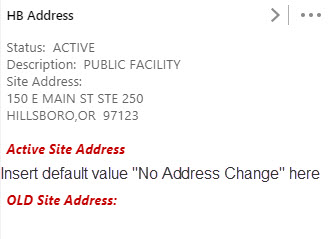
The issue is that when an address has not changed there's nothing reported back to the user in the Feature Description for "Active Site Address" or "OLD Site Address", because there's no corresponding values in the table used in the data link.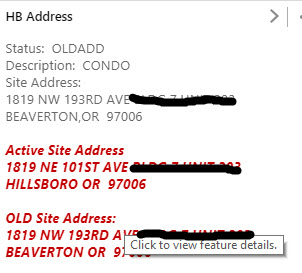
 0
0 -
Alright, I think I got it, and I think I've got an idea for a workaround. In order to do it, you'll need to include the map layer in your data link and use a LEFT OUTER JOIN. That way you'll get a result back for every record in your map layer, including ones that don't have corresponding records in the new/old address table.
Rough idea for how the data link query would look:
SELECT
CASE
WHEN AddressChangeTable.NewAddressField IS NULL THEN 'No Address Change'
ELSE AddressChangeTable.NewAddressField
END AS NewAddress
...repeat for old address...
FROM MapLayer LEFT OUTER JOIN
AddressChangeTable ON MapLayer.JoinID = AddressChangeTable.JoinID
WHERE MapLayer.UniqueID = &Id
So it'd return the new/old address when it exists in the change table, and it'd still return the hard coded text (e.g. No Address Change) when there isn't a address change record.
Let me know if any of that doesn't make sense - it's hard to peg down exactly how to make it work without knowing all of the nuances of your data tables.0 -

John, brilliant work. Do you think there is a way to change the text in the map tip based on whether or not there are results in the datalink? 0 -
Option 1 - you could use the template SQL query above, which would return a value for every feature in your map layer, either a related record or the hard coded value when there isn't a related record (in the sample that's "No Address Change").
Then you'd just use the data link in your feature description or long description as usual.
Option 2 - you'd have two data links:
1) One that return a related record
2) One for features with no related records
Then, in the feature description or long description, you put them right new two each other, something like this:
{Datalink1.YourRelatedField}{Datalink2.YourDefaultNoRelatedField}
Since only one of the data links will ever return a value (either there are related records or there aren't), only one of those values will actually populate in the map tip.0 -
Hi John,
I am trying to implement the sql template above, however I have not been able to get it to work.
When you are referencing the 'MapLayer' are you just entering the layer name as seen in the legend?
Thank you!0 -
No, you need to use the name of the dataset as it appears in your enterprise geodatabase. The data link query runs directly against the database, so it doesn't know what you named the dataset as a map layer. 0 -
Hi John,
Thanks for the response. I seem to still be having an issue when trying to deploy this to the data link, but works in the database:
SELECT r.name1, t.OBJECTID
FROM ADDRESS t left jOIN OWNER r
ON t.ROLL_NUM = r.ROLL_NUM
WHERE t.OBJECTID = :OBJECTID
(I have made the :OBJECTID a parameter)
Seems like the join works in the database, but maybe I am missing how to narrow down to the selected OBJECTID in the where clause?
Any assistance is greatly appreicated.0 -
Not sure if it matters or not, but in the query you're missing the word OUTER in LEFT OUTER JOIN.
Within the data link in GE Manager, does the where clause read:
WHERE t.OBJECTID = @OBJECTID
And do you mean you made the OBJECTED a parameter in the data link?0 -
Hi John,
I added the Outer but still not working. Yes, in the Datalink i added a parameter called OBJECTID. Then added the where clause "WHERE t.OBJECTID = :OBJECTID". Is this used to add the selected OBJECTID into the WHERE clause? I have tried using the @OBJECTID for the parameter, but still no luck. Thanks again for your help.0 -
Yes, that's how the data link inserts the OBJECTID from the selected feature into the where clause.
Hmm, the next thing I'd suggest trying is hard-coding an objectid into the data link query. It'll return the same value for every feature, but at least you could test to see if the data link works when you know the query should be returning info.0 -
Thank you John!
I got it to work by using the static value, then did some testing in the Essentials Site Directory. I figured out the issue was I had a second parameter that I had created that I was not using. When I test it in the Essentials Site Directory I realized that both parameters were needed in order to complete the query. I removed the unneeded one and everything worked correctly. I was not aware that if you create a parameter you had to use it.
?Thanks again for all your help. Greatly appreciated
-AC0 -
I didn't know that about parameters either! 0
Du måste logga in om du vill lämna en kommentar.
Kommentarer
15 kommentarer