How to calculate the sum of the values in an attribute from the FeatureSet results of a QueryTask

I am trying to find the sum of all values from an attribute (add up total acres). I have a QueryTask activity that finds a subset of values from a feature class and puts the results in a FeatureSet. How do I then get the Out Statistics value for "sum"? I created a variable for the "Group By Fields for Statistics" argument - an IList String called acres with the value ACRES. And I created an Out Statistics variable (outStats) of type iList <ESRI.ArcGIS.Client.Tasks.OutStatistic>. The original attribute is of type Double.
But now I don't know how to access any of the stats values. I have tried various assigns, conversions to DataTable, ForEach activities, etc... but I can't get the syntax right and I can't find any help or examples on the ArcGIS or Geocortex help.
Any thoughts? Or is there a better way to do this?
Thanks,
Mike
0
-

Set the Out Statistics property to something like New System.Collections.Generic.List(Of ESRI.ArcGIS.Client.Tasks.OutStatistic)({ New ESRI.ArcGIS.Client.Tasks.OutStatistic("OnField", "OutField", ESRI.ArcGIS.Client.Tasks.StatisticType.Sum) })Fill the Group By Fields for Statistics only if you want to group.0 -

Alternatively to Nico's excellent answer, you can use LINQ on your existing featureset that you've already derrived from the query. You expression would look something like:
<featureSet>.Features.Sum( Function(feat) CDbl(feat.Attributes("<StatisticFieldName>") )0 -
The workflow designer gives examples for the syntax of the Out Statistics property, if you disable the IntelliSense feature. 0 -
Thanks very much for your help! I used your code Nico in the Out Statistics field, replacing "OnField" with the field I want to compute statistics for - "ACRES". But I am not sure what to do with "OutField". Do I need to create a whole new field in the featureSet? I just put a variable there, but that gives me an unhandled exception. 0 -

Mike
I let the users get the total Appraised and Assessed values of the properties for the polygon they draw on the map and display the results in a popup.
1) Get the geometry and capture the parcels in the geometry.
2) Sum the Appraised_Total (Appraised value per parcel) using the OutStatistic, send results to new feature set.
New List( Of OutStatistic) From { New OutStatistic( "APPRAISED_TOTAL" , "SUM_APPRAISED" , StatisticType.Sum) }
3) Get the value and display the result -
item.Attributes.Item("SUM_APPRAISED").ToString
Maybe this will help.0 -
Thanks for the additional pointers, Jimmy. I am just really having trouble figuring out how to pass the value around in the Workflow Designer so I can actually access it. I can confirm I am getting features with the QueryTask. But then how to pass the output of the Out Statistics back to the user as a variable? I will be passing it along to create a report.
Here is a screenshot showing where I am confused. I am trying to pass the SUM value to the variable dTotal_Acres. But no matter what I try I am unable to get it to work. In addition I am now getting a "Unhandled exception: 'One or more errors occurred.' in activity '1.1154: QueryTask'" whereas before I could actually get through the QueryTask!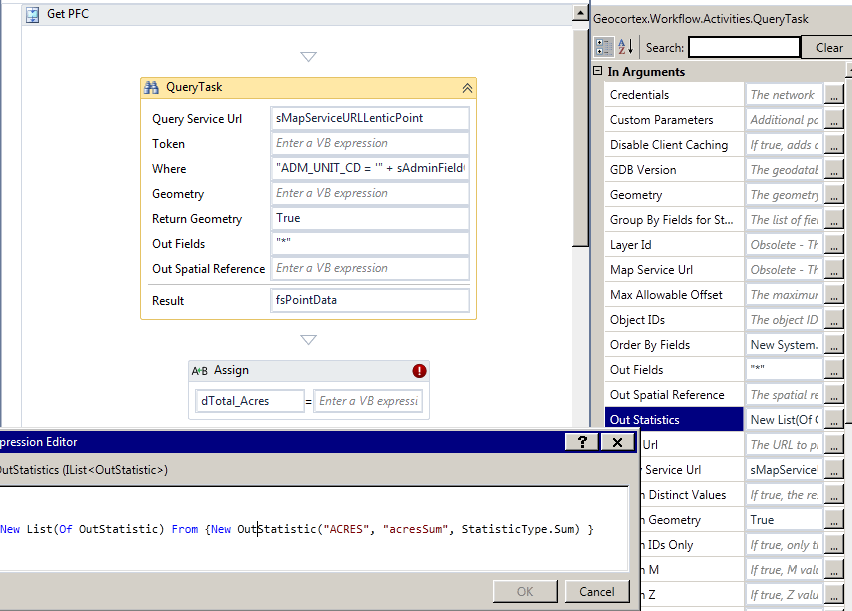 0
0 -
Mike
So, maybe there is something about trying to do OutStatistics on the SHAPE.AREA. I tried and I got the error message that you got. I copied the SHAPE.AREA field to AREA (new field) and the OutStatistics worked on it.0 -
Hey Jimmy,
Thanks for the follow up. But I am not doing OutStatistics on the SHAPE.AREA field. It is on a user inputted field called ACRES, which is of type double (this is for a point layer, so no area field at all). The outField I just made up ("acresSUM"). It does not appear anywhere else. I am not really sure how the outField works, to be honest. Do you just make up a string and then call it somewhere else? Do you have to create a variable for it?
Thanks for your help!
Mike0 -
Mike
Can you send me an email and I will send you my workflow?0 -
Thanks everyone, your suggestions and help were correct. It took me some time and help to fix because my workflow had another issue that conflicted somehow with the Out Statistics argument. I had a value in the Order By Fields argument that worked by itself. When I added the Out Statistics argument the QueryTask activity reported an error. When I then removed the Order By Fields argument the QueryTask activity and Out Statistics worked.
Thanks everyone, I appreciate the support.
Mike0
Du måste logga in om du vill lämna en kommentar.
Kommentarer
10 kommentarer