hyperlink to open local file

Hi, we used to be able to open local file via hyperlinks in feature long description like below via firefox or chrome add-ons. But just found out its not working anymore. I checked the viewer source seems that GHV5 removed the href link if it's not start with http or https?
<a href="file:///C:\temp\photo.JPG" target="_blank">CLICK HERE</a>
0
-

We ran into the same issue trying to use ftp:// links. It was reported as a bug and must have worked it's way back in again.
I don't remember who we did this for but we ended up writing a Workflow with an input parameter, passing in the ftp:// url (your file:/// url should also work). This bypassed the code checking in the feature description.0 -
To claify, it was reported as a bug, two years ago... 0 -
The file:/// protocol was stopped around the IE 6 timeframe, it's violates internet/browser standards. All browsers should disallow the protocol. We recommend hosting the files on your web server and using the http:// protocol to launch them.
Regards,
Wayne Richard
Latitude Geographics Group Ltd.
Head Office: 300 – 1117 Wharf Street Victoria, BC Canada V8W 1T7
Tel: (250) 381-8130 | Fax: (250) 381-8132 | wrichard@latitudegeo.com
Developers of Geocortex web-based mapping software | www.geocortex.com
An Esri Platinum Business Partner0 -
Wayne, where do you see the "file" URI scheme being deprecated? According to the IANA URI Schemes (https://www.iana.org/assignments/uri-schemes/uri-schemes.xhtml) it still lists the "file" URI scheme as a permanent scheme. I also checked current versions of Chrome, Firefox, and Edge and all accept file URIs.
Getting too old to keep up with all these changes... =)0 -
I'm not sure if it's deprectated or not but it's not permitted for security reasons -
https://msdn.microsoft.com/en-us/library/aa767731(v=vs.85).aspx
https://support.google.com/gsa/answer/2664790?hl=en
http://kb.mozillazine.org/Links_to_local_pages_do_not_work
because the search terms are so vague it's hard to find specific articles. Chrome starting blocking these requests since version 50 I found in one post.0 -
Wayne, fully understood the security risk that we took but we decided to allow open local file from browser by installing web browser extensions or configure the client browser (as mentioned in one of your above links). Because our Geocortex hosted externally, where we have large number of file in our local network consistently updated locally but would need be linked via GVH5 viewer, to upload the files to the external server is not practicable.
With the web browser extension / customer configuration the File URI schema still works in a standard html page, but not in GVH5 anymore from version 2.10 or 2.10.1. Something changed in the GVH5 upgrade about this but perhaps not listed in the release notes? Is it ever possible to have this function back?0 -
Wayne - Thanks for the info. We generally don't recommend using file links but what I find interesting is that I am able to use them (but I haven't modified my browsers, that I can remember...). I tested both a mapped drive and UNC path and both work in all browsers.... file://///Fileserver01/Projects/LocalGovernmentSchema.html file:///P:/LocalGovernmentSchema.htmlTested and functional in Chrome 67, Firefox Dev Ed 61, Internet Exploder 11, and MS Edge 41.
I actually have a project upcoming that is similar to Jack's issue where they store all project documentation on a shared directory, so they want to store the URI to the directory eventhough we suggested alternatives. So good to know.0 -
Tom,
We're mainly using the Silverlight Viewer ( SLV) currenlty at v 2.5.1 and HTML5 Viewer ( HTML5V) currently at v 2.11.2 and I can confirm hyperlinks to files stored on network shares are still working in IE 11.134 . We are trying to switch to HTML5V but the not all SLV features (users got used to) are available in HTML5V. Besides the search results presentation ( way better in SLV) the ability to hyperlink to asbuilt drowings or recorded documents is even a bigger issue.
When using HTML5V with IE & Firefox, the hyperlink doesn't work unless you use a right-click ( on the hyperlink text) and select open in new tab/window. In Chrome , it just won't work. So... we are not ready to "switch" to HTML5V just yet :)
You mentioned a workflow approach to this hyperlink functionality. Is that something you can share? I can only hope a hyperlink-like functionality will be a part of a next release of SLV & HTML5V, because I suspect there are many agencies currenlty using it to retrieve documents...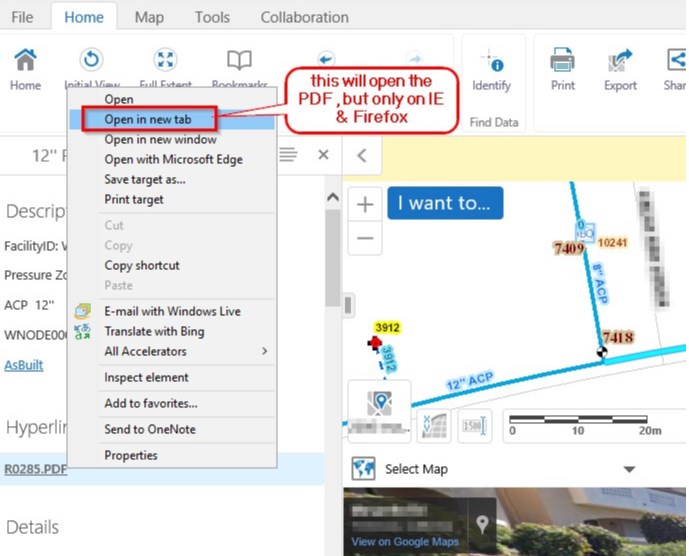
Thanks!0 -
Liviu,
Try adding target="_blank" to your href tag. That should simulate opening a new tab.
The workflow is pretty easy. We build a generic one with an input argument, which would be the URL string we want to open. I don't remember the exact Activity but I think it was Open Web Request. You create a hyperlink that calls the workflow and pass in the URL as a parameter. The browser will take over the request if it has an associated MIME type.0
Du måste logga in om du vill lämna en kommentar.
Kommentarer
9 kommentarer