Is there any way to catch when a Workflow 5 form is closed via the "x" in the upper right hand corner?

I would like to perform some clean up of a graphics layer when the workflow is closed in this way but can't figure out how to catch the event. I suppose another option would be to remove the "x" in the upper right hand corner and rely on a Cancel button if this is possible.
-
Hi Preston,
I don't believe there is any way to capture this. In Essentials Workflow (4.x), you can specify a workflow Container Name for your form like "DefaultNoCloseButton" which will remove the X button, but Workflow 5 doesn't let you choose a container name.
There is an idea post for this already; I would recommend adding a vote or some feedback there:
https://communities.geocortex.com/s/ideas#087f2000000fxWcAAI
0 -

Hi Amanda,
Are there any updates on this topic?
0 -
"Container Name" in Essentials Workflows has now been implemented as "Target" in Workflow 5. If you want to open a form with no close button, set the container name to "modal".
0 -
If I use "modal" as Target, than my form opens as a pop-up. Do I need to alter something in the desktop.json in order for this to work?
0 -
Also, setting the target to "modal" doesn't appear to get rid of the "x" in the upper right hand corner.
0 -
Ah, sorry I'd thought that I tested this yesterday... must've been looking in the sandbox and gotten confused.
Yes, you can get rid of the "x" button in the view by modifying the desktop/tablet/handheld.json, but the only way that I know of to accomplish this is pretty messy. I know that you can remove the entire header of a form by adding "headerIsVisible": false to the configuration to the view model (e.g. "ModalViewContainerViewModel").
You would probably prefer to hide the "x" with css, but you need to be careful. You can use display: none on that element, but I don't know how to differentiate between one form's "x" and the next so be sure to return "display:block" after your users click the correct button and know that all of your forms will behave the same way. Also, each css injection must be unique, so you can't keep using the same css over and over to toggle the button's visibility, but if you throw something like Date.now() into your css in a dummy style then you'll be good e.g. "blahblahblah: date.now();".
0 -
Expanding on DDS Technical Support's solution, we currently use the Inject CSS activity in Workflow 5 to hide the X button.
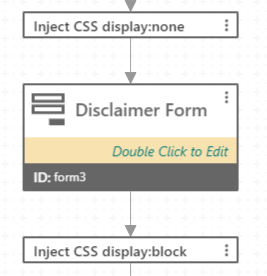
In GVH the first css inject has the following content:
="button.close-16 { display:none; overwritePreviousCSS: "+Date.now()+" }"
The second css inject has the following content:
="button.close-16 { display:block; overwritePreviousCSS: "+Date.now()+" }"
In WAB we use div.close-btn instead of button.close-16 in the above examples.
0 -

Thats great- thanks!
0
Du måste logga in om du vill lämna en kommentar.
Kommentarer
8 kommentarer