How to use the result from an activity in a Query Layer Where clause?

I am trying to do a query on a layer based upon a date range using a date picker. How do I submit the results of the selected dates in the Query Layer Where clause? I'm trying something like (PROJECT_APPLICATION_DATE > $form1.result.datePicker1) AND (PROJECT_APPLICATION_DATE < $form1.result.datePicker2), but this obviously doesn't work (hence the question). I'm just no clear how one would go about passing an ID into a where clause. Thanks in advance.
-
I just realized the formula that I'm trying to use was not posted correctly. What I am trying is "(PROJECT_APPLICATION_DATE > $form1.state.datePicker1.value.value) AND (PROJECT_APPLICATION_DATE < $form1.state.datePicker2.value.value)".
0 -
Hi Tara,
$form1.state.datePicker1.value.value will give you something like 1536087600000, but what you probably want to put in your query is probably something like
PROJECT_APPLICATION_DATE > '2018-09-04'
or
PROJECT_APPLICATION_DATE > date'2018-09-04'
(you can test a query on your ArcGIS REST endpoint and confirm which date formats work)
I would recommend that you add Format Date activities in between the form and the query so you can convert the numerical timestamp to that date format. Configure them like this
Date: =$form1.state.DatePicker1.value.value
Format: YYYY-MM-DD
Then use those activity outputs to build your query where clause. I recommend this page for learning about how to build expressions that include activity outputs: https://docs.geocortex.com/workflow/latest/help/Default.htm#wf5/help/expressions.htm#Use_String_Expressions%3FTocPath%3DExpressions%7C_____2
Using the template literal format from those docs with your example (and the addition of Format Date activities), you'd want something like this in the end:
=`(PROJECT_APPLICATION_DATE > '${$date1.formatted}') AND (PROJECT_APPLICATION_DATE < '${$date2.formatted}')`
0 -
Thank you @Amanda Frech?. This worked great. I had made it as far as to correctly format the dates, but I'm afraid my issue was that I was not including single quotes or {} around the actual formatted date. I realize this is super basic stuff, but do you know of a good resource for acceptable syntax? It seems like at least 3/4 of my issues are due to syntax problems.
0 -

Hi @Tara Preston? ,
The syntax that @Amanda Frech? used in her example is a Template literal. There's a great page on the MDN website that explains them:
https://developer.mozilla.org/en-US/docs/Web/JavaScript/Reference/Template_literals
The short version is that `abc${foo}def` is equivalent to "abd" + foo + "def". The string must use backticks and any ${ } block is treated as a script.
0 -

Similar to what was show above in the Format Date tool by @Amanda Frech? , is there a way to do the following:
I am reading from a feature layer 2 date fields and want to find out the difference between them. I get 2 timestamps:
1576107237443
1576105095299
and the absolute difference is 2142144
Is there a way to convert this number to display how many days, hours, minutes, seconds this represents within WF5? i.e. Format Date HH:MM:SS?
0 -
@Darryl Klassen? I think you could do this using the DateDiff arcade function :
https://developers.arcgis.com/arcade/function-reference/date_functions/#datediff
You choose a specified unit, then make a substraction, then choose another specified unit etc. Then, concatenation of your results...
0 -

@Amanda Frech?
I am formatting dates returned from a query task. I seem to have a database time vs browser(Chrome Version 80.0.3987.163) local time issue. Some dates returned in my display form list box are one day earlier than the database date value. If i use the "$date2.iso" output, i return the same date value that is in the database, but I would like to remove the 'T00:00:00.000Z' from the end. I tried the trim() method, but it did not remove it from the date. What is the best way to end up with date format in the list box like '2020-04-10' and is the same value as in the database?
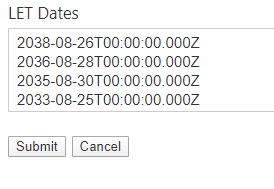
Thanks,
Chris
0 -
answered my own question. Had to use $date2.iso.substr(0,10)
0
Du måste logga in om du vill lämna en kommentar.
Kommentarer
8 kommentarer